What’s Your Story?

I think it’s imperative to follow your heart and choose a profession you’re passionate about.-Steve Kerr

What’s your story?  We all have one.  Mine is chronicled here on this blog and while it may seem like a love note to Apple and iPads most of the time, it is more about the changes in my classroom as a result of innovation.

Teachers are innovators.  We have to be.  We are often short on time, money, and resources, but we are not short on passion, creativity, and a desire to make a difference.  It is easy to walk down the hall everyday to your classroom, close the door, and go about the business of educating each day.  It is easy to start believing that what you do doesn’t matter and even easier to drift into autopilot.  It becomes easy to reject new ideas and technologies because that brings change and change brings uncertainty and uncertainty brings…well, it brings a degree of discomfort.  And who has time for that?

There is a bigger story here.  It’s your story. How do you innovate?   What if you tried one thing differently today?  What if you said no to “what we’ve always done” and said yes to something you’ve always wanted to do?

Ok, enough about you, let’s talk about me…I’ve said before iPads have been a game changer in my teaching career.  I’ve always believed in my calling to teach.  It is who I am, but that doesn’t mean I am impervious to ruts, routines, and rigor mortis.  Jumping into this project with a “what if” mindset opened more doors than I even imagined.  Stretching, embracing the change, and learning to live in the uncertain was my personal lesson plan.  It was not (and still isn’t) without setbacks, do overs, and what-in-the-world-was-I-thinking moments.  Innovation does not come without your personal investment.  Innovation doesn’t necessarily mean setting the world on fire…I’d settle for setting my students on fire for learning.

Make a promise to yourself that you will try one new thing.  Stir your creative juices and stretch.  Your skin may feel a little tight; but in the end, you will find your story.  You will re-discover what it is that brought you to this profession and you will be better for it-both personally and professionally.

I’d love for you to leave a comment, subscribe to my blog, and/or share this post with a friend.
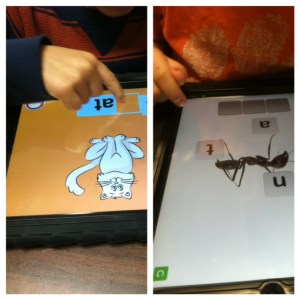
Choosing Brilliance

Don’t ask yourself what the world needs. Ask yourself what makes you come alive and then go do that. Because what the world needs is people who have come alive. – Howard Thurman

January is a good time for simplicity.  After all of the necessary messiness and decorations of the holidays, I like the simplicity of January.  January is a good time for reflection and renewal.  Beyond the usual “Get Healthy” resolutions, I find myself wanting to get to what matters.   Where does my professional passion lie? What makes me come alive in the classroom?

I will admit, getting up early this morning after 2 weeks off, I had trouble finding motivation.  Purpose.  Coffee.  But after arriving at school and having my students hug me and bubble over with excitement about being back in school, I realized they have no trouble connecting with their passion.  They said they missed their friends, they missed me, they missed their iPads.  They said they missed learning. I said it was time for Writing Workshop.  They cheered.  Their unabashed love for school, engagement, learning, possibilities, new things, and opportunities seem endless.  They show up everyday with wonder and brilliance.  When was the last time you showed up somewhere, anywhere,  with wonder and excitement at the possibilities?

As educators, our passion, our brilliance,  is easily lost amidst meetings, paperwork, lesson plans, less than supportive parents, criticism, behavioral problems, etc…I can choose to get bogged down in that or I can rise above.  I can choose to show up everyday with wonder… Wonder at what my brilliant 5 year old students can teach me about themselves and about myself.  I can choose to simplify my approach to teaching…to discard things that no longer work or bring my students alive.  I can come to work each day and be thankful for having a fully stocked classroom with supplies, an amazingly supportive administrator, and a district that believes in personalized learning and iPads.  I can connect with my own passion for literacy and learning and magnify what I am doing through this blog.  In the bleak mid-winter, I can choose to shine brightly. Let’s be brilliant together!

Where do you find yourself in this first chapter of 2013?

I’d love for you to leave a comment, subscribe to my blog, and/or share this post with a friend.

Beyond Top Ten Lists

Instead of a national curriculum for education, what is really needed is an individual curriculum for every child.-Charles Handy

It seems everywhere you turn, you find a “must have” app list or a “top ten apps for educators” list.  They list apps that are free or are the favorites of the author.  I used to look quite frequently at these lists when I first started with iPads.  I didn’t want to miss out on that one great app that might instantly transform my classroom.

Now, I rarely look at those lists.  I occasionally write about an app or two in my blog, but it is usually in the context of increasing rigor or advancing personalized learning.  I am often asked what are my “must have apps”.  I don’t mind sharing the ones I use, nor do I mind sharing my favorite ones at the time.  That list changes with what my students need.

Once I asked myself what is my goal of the iPad in the classroom, I found that I didn’t want it to be an “app machine”.  It can certainly be that, but I wanted it to be a tool for learning.  I had to define what that looked like for me first. I was in a meeting recently and someone raised a question and no one really knew the answer.  Within seconds, everyone was pulling out either their iPad or their smart phones to look up the answer.  We can memorize states and capitals, presidents, and other bits of trivia but we also need to teach our students how to solve problems and find information.  We also need to teach them how to find credible sources for that information.  We can’t do that with 2 desktop computers in the classroom, but we can do that with iPads.  By learning to think critically, analyzing information and its sources, we are doing so much more than any app can teach. As we move into personalized learning environments, we need to think beyond just apps.

Having said that, I do use apps daily and I have some apps that are very valuable in reinforcing certain skills.  There are many great apps out there and there are some that are junk.  We have to filter through them and discern the best way to incorporate them into instruction.  As we increase rigor with Common Core State Standards, we can use the iPads for so much more than just apps.  Students can create in writing, arts and music.  They can read and do research. They can explore and extend learning.  If you think your students can’t do it, then think again.  I watch my 5 year olds do it every day.

I encourage all of my iPad teacher friends out there to cut the cord that tethers them to apps.  Ask yourself what is your goal and think about what it looks like for you and for your students.  If you can’t envision it….then trust me, THEY can!

I’d love for you to leave a comment, subscribe to my blog, and/or share this post with a friend.

Personalized Learning with iPads

Today you are You, that is truer than true. There is no one alive who is Youer than You.-Dr. Seuss

How better to say it than this? One size that fits all doesn’t work for learners today. Personalized learning is the tailoring of  curriculum and learning environments to meet the needs and aspirations of individual learners, often with extensive use of technology in the process. Personalization may differ from differentiation in that it affords the learner a degree of choice about what is learned, when it is learned and how it is learned. This may not indicate unlimited choice, since learners will still have targets to be met. However, it may provide learners the opportunity to learn in ways that suit their individual learning styles and multiple intelligences.

Personalizing learning for each learner means they take ownership of their learning. Let’s take advantage of the iPad’s ability to challenge, engage and motivate different learners.  Students can often work on different levels within the same app.  As I look at what each student needs, based on assessments and observation, I am able to direct them to certain apps or certain activities within apps.  Teachers should be able to implement multiple paths to knowledge- having a variety of ways to help a diverse group of students learn rigorous standards.

Working in flexible, small groups for guided reading, I take notes as I see areas where students need practice.  One student may need help with word families and rhyming words, where another may need help with medial vowel sounds.  My top reading group may be ready to incorporate reading response journals using Pages as they read.  This would never be possible in a whole group instructional setting.  Having the technology of the iPads at our fingertips,  it is easier to differentiate instruction, find all opportunities for remediation to help struggling learners, and  provide enrichment to challenge the advanced student.

With iPads, we can create a Pandora Radio-like effect in education.  Each student can get a variety of educational experiences, engage in topics and activities of interest, and learners have the responsibility and ownership to choose how they learn, when they learn and where they learn.

I’d love for you to leave a comment, subscribe to my blog, and/or share this post with a friend.

Classroom Wikis and iPads

If you have knowledge, let others light their candles in it. -Margaret Fuller

Wikis are tools for taking student and teacher collaboration to the next level.  The most famous wiki is Wikipedia, an online encyclopedia created by users from around the globe. Wikis are also increasingly being used by the corporate world.   eBay recently added wikis to its auction site so members can coauthor articles about buying and selling. Not surprisingly, K-12 schools are also taking advantage of the opportunities for “collaborative construction” that wikis provide.

I have used Wikispaces to create a free class wiki for my students. Wikispaces is free for K-12 educators and is free of advertising.  It is also user friendly and a good place to start if you haven’t used wikis before.   I simply upload PDF documents to the wiki for my students.  They have a shortcut to the wiki on their iPads.  One touch takes them to the wiki and they are able to download the document into our DocAS app.  Any PDF annotating app can be used.  My students can complete an assignment,  math practice page, or a written assessment on the DocAS app and then I can either upload it to PaperPort for printing or emailing.  I can also save it to the camera roll and use the Simple Transfer app to retrieve their work.

Another benefit to using a wiki is I can upload PDF readers for my students.  I downloaded several word family books and sight word books at Hubbard’s Cupboard website. The children downloaded them from the wiki into their iBooks app.  Now, along with the books I have written for them in iBooks Author,  they also have PDF books on their bookshelf.  This gives them several books right at their fingertips they can read any time.

Using the wiki also reduces the amount of copies made in my classroom.  I can keep a copy of the student work from the iPad if I choose to.  Wikis are a convenient, efficient, and cost-effective way to provide learning materials to my students.  I have also created wikis for various committees on our staff.  This is an easy way for us to share meeting agendas, materials and other ideas.

I encourage you to try using wikis in your classroom.  Wikispaces makes all education pages private and can only be accessed by invitation only.  This is a secure means of encouraging collaboration and sharing knowledge.

I’d love for you to leave a comment, subscribe to my blog, and/or share this post with a friend.
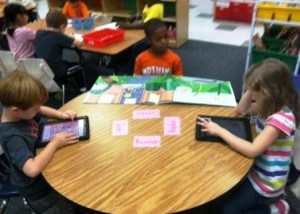
DocAS App and the SC EdTech Conference

Be a student so long as you still have something to learn, and this will mean all your life-Henry L. Doherty

I’ve just returned from presenting at the SC Ed Tech conference.  I went to share how I use iBooks Author in my classroom.  I have written about it here previously.  It was great to see a standing room only crowd and have so much positive feedback from the audience.  However, while I went to share my knowledge, I also went to learn something new.  What better place to do that than a technology conference?

One of the apps I saw is DocAS.  It was presented at the conference by a colleague of mine as “Pages on Steroids”.  It is regularly $4.99, but right now it is on sale for .99.  DocAS DocAS lets your take notes, sketch your ideas, annotate your PDF, do your presentations, read your documents, record your classes or meetings, and share your ideas on your iPad, All in one.

Here are some highlights of the app:

Access your documents from any sources: Mac/PC Desktop (Wi-Fi), Dropbox, Box, Google_Drive, Email, FTP, WebDAV, build-in browser, other Apps and more.
✔ Built-in viewer supports reading PDF, MS Office (Word, Excel and Powerpoint) and Apple iWork files (Numbers, Pages, Keynote), RTF, Text, photos…
✔ Merge, Clone, Move, Sort, Export , Rename your documents
✔ Powerful file manager with sub-folder support
✔ Password protect for your document and folder
✔ Trash bin support – double-protect your document
✔ Documents downloading indicator and new document indicator

✔ Highlight text with different colors to emphasize your important sentences
✔ Fill and Sign your PDF forms with beautiful handwriting ink
✔ Add text notes and picture in your PDF
✔ Add Bookmark
✔ Reorganize your PDF page
✔ Insert new page in your PDF
✔ Add comments on your PDF
✔ Sign your email attachment with opening your PDF from Mail App
✔ Text search in PDF
✔ Audio memo and stick note for PDF
✔ URL link in PDF

Multiple audio memo is supported
✔ Insert audio note anywhere in page
✔ Move the audio note location along with your annotation

There are many more highlights!  I am excited about having my students use this app to download documents from my class wiki and then work with the documents in DocAS.  Since Pages doesn’t currently upload to PaperPort Everywhere and DocAS does, this is particularly attractive.  I’ve used GoodNotes previously, but like DocAS better.

I will be sharing a few other conference ideas in coming posts.

I’d love for you to leave a comment, subscribe to my blog, and/or share this post with a friend.
You Can’t Handle the Awesomeness!

Nothing is so contagious as enthusiasm.- Samuel Taylor Coleridge

I love my job.  Most days.  I work in a great school and have great kids and great parents.  Don’t get me wrong, there are days I could put a knot on every head.  (The kids that is, not the parents.  Maybe. ) The best part about teaching kindergarten is the never-ending enthusiasm of my students, as witnessed by this recent exclamation:  “Whoa! There’s a new app in the ABC folder! I can’t wait to play it! Oh man! This is so awesome!  I could do this every day it’s so awesome!  I  can’t handle all the awesomeness!” I’m not sure, but I think he liked it.  One of my students missed a day of school recently and during his absence, I added a new app.  I forgot to tell him about it but as soon as he opened his iPad and opened the ABC folder (I categorize my apps into folders), he immediately saw the new app.  What’s amazing to me is that there are 20 apps in that folder and he knew instantly there was a change.  Observant and enthusiastic!

When was the last time you were so excited at school that you couldn’t handle the awesomeness? As I’m typing this, I’m trying to think of the last time I was so excited about anything that I couldn’t handle the awesomeness…and I’m still thinking…anyway, the app that created the excitement is Starfall Learn to Read.  At last, all the content from Starfall.com’s Learn to Read index in an app!

I’m still pondering the unabashed love of learning.  Children innately love learning. They are curious and want to find out the what, where, how, and why of everything around them. Where does that curiosity and enthusiasm go?  Are we drilling and testing it out of them? Are we using best practices and showing our own enthusiasm as an adult learner?  I mean, if a $2.99 app generates more awesomeness than a child can handle and he enthusiastically exclaims he could play the app every day, it’s a worthy question.  Obviously, we can’t play apps all day long, just as we can’t sit at a desk and do worksheets all day either. iPads are definitely a game changer.  My kids think they are, well… awesome and I think they are pretty awesome my very own self.  I want them to be excited about learning and I don’t want them to lose that enthusiasm.   By examining ourselves as educators and taking a long hard look at what we are teaching, hopefully we can take a cue from my young student and channel our own inner awesome!

I’d love for you to leave a comment, subscribe to my blog, and/or share this post with a friend.

Giving Students Choices in Reading

Readers without power to make their own choice are unmotivated. -Donalyn Miller-The Book Whisperer

I’ve stated before that I’m a voracious reader.  I have always loved books and the ability to be transformed by a story.  I particularly love Southern writers.  I’ve never quite understood how others aren’t “readers”. They read only when required and almost never for pleasure.  In order to create readers, we have to identify ourselves as a reader first.  We must “brand” ourselves as readers.  When I read to my class, I share what I like about that particular author. I tell about other books like that book.  I make connections with myself to the text, to others, and to the world.  My students know how much I love to read.

But what about those who struggle? Or those who don’t like it?  Getting to the root helps determine which way to help the child grow.  What don’t they like?  Are there books available that interest them?  How many informational texts are available on their reading level?  I can tell you that as much as I love reading, I would not be as enthusiastic if I were forced to sit and read instructional manuals all day, or books on mechanical things. Those are not my interest.  Taking an interest inventory helps know how to fill your book center or your iBooks shelf on your iPad.  Building an early foundation of excitement about books, whether paperback, hardback, or electronic, helps build an appreciation and love for books.

My students have a variety of genres available throughout the day.  We work to build enthusiasm for our classroom library and for our eBooks on our iPads.  By demonstrating authentic reading behaviors, doing away with worksheets, engaging kids in building stamina when they read, and giving kids choices about what they read, we can develop life-long readers.

Reading is so much more than phonics, sight words, and mechanics.  It is about building discovery, wonder, and awe around the written word.  It is power.  It is peace.

So what should students learn from us about reading?  That drill and practice worksheets aren’t making them better readers.  Reading makes them better readers.  iPads give me the opportunity to practice the mechanics of reading with individual students on their own level, but they also give them a choice of what they are reading.  There are leveled books in their iBooks libraries.  There are high interest books as part of their apps, plus all of the traditional books in our classroom.  The best part of all is that the choice is theirs!

I’d love for you to leave a comment, subscribe to my blog, and/or share this post with a friend.

Action Words Anchor Chart

Action expresses priorities. -Mahatma Gandhi

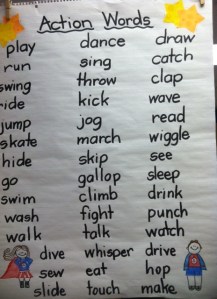
Action is something that is never lacking in a kindergarten classroom.  Something or someone is always in motion. In other action news, my students are very interested in action figures.  There was a fairly intense discussion going on at one point about who was more powerful-Spiderman or the Dark Knight. Of course, everyone had an opinion and several offered other action figures that were more awesome than the original 2 being discussed.  How does this impromptu conversation fit into the Common Core Standards?

By taking action, we can turn a random classroom discussion into a learning opportunity.  One of the kindergarten Common Core Standards is that students will participate in collaborative conversations about kindergarten topics with peers and adults. We turned their interest in that topic into an anchor chart.  Afterwards, they used their Whiteboard App to illustrate an action they could perform.  This activity involved using our sight words to construct a basic sentence and an illustration.

The following day I was reading an Eric Carle book, “Rooster’s Off to See the World” as a part of our Eric Carle author study.  As I was reading, without prompting, the children began calling out action words they heard in the story. Our discussion from the day before had carried over into a new activity.  Higher order thinking skills?  You bet.

By being alert to everyday situations, we can take action and turn them into meaningful learning activities.

I’d love for you to leave a comment, subscribe to my blog, and/or share this post with a friend.

Engaging Students in Learning with iPads

Coming together is a beginning; keeping together is progress; working together is success. -Henry Ford

One of the best parts of teaching young children is their ability to be excited about just about anything.  They still love to learn and try new things.  Their eyes light up when I say we are going to do something new.  They are not at the eye-rolling and teeth sucking stage (yet.) The other day, I said, “Ok…it’s time to get ready for Writer’s Workshop.  I have something I want you to see.”  I got fist pumps and “YESSS!” Excitement.  Enthusiasm.  Their reactions energize me and never cease to amaze me.

A key component to student achievement is without a doubt student engagement.  Using outdated techniques, while perhaps “tried and true”, can also be seen as uninteresting or even boring to our students.  Outdated tools are ineffective and inefficient.  I mean, when was the last time you used an abacus to solve a math problem?  If we want our students engaged, we have to use currency they understand.  Just switching from hand-held flashcards to an app that teaches the same skill on the iPad instantly increases engagement.  It’s fresh.  It’s interactive.  It’s engaging.  When I have 2 students working together on a skill, they learn through interaction, shared experience, trial and error, and joint success.

Over these beginning weeks of the school year, we are getting to know each other. My students are learning classmates’ names (still!) and they are learning more about themselves and what they are capable of.  In our 21st century classroom, we learn through a mixture of traditional and digital means.  Whether we are using crayons, pencils and paper or iPads, Smart Boards and laptops, we know that our success lies in working together.  iPads allow me to up the engagement factor and meet the various needs of my students.  That is definitely worth a “high five”!

I’d love for you to leave a comment, subscribe to my blog, and/or share this post with a friend.