Creating Digital Portfolios

All I really need to know… I learned in kindergarten. -Robert Fulghum

We started our digital portfolios today.  We knew by the end of last year that we really needed a systematic way of curating student work.  It was important that we be able to share it with parents but it was of utmost importance that it be simple enough for everyone…especially our kindergarten students.  I mean, let’s get real…if I have to touch every iPad to save student work, it just isn’t happening.

Showbie-238x300We went with Showbie.  Showbie allows you to set up your classroom and create assignments for students. When students submit their work, it is organized by assignment.  You can see which child has submitted work and which one hasn’t.  You can even add annotations, voice notes or written notes on the assignment and send it back.  It is very easy to use and individual student work can be emailed to share with parents.

Today, I added our first assignment.  It sends a brief alert to the individual iPad so students can see there is a new assignment.  This is great for older students. My students used Pic Collage and they were asked to choose a number between 2-9.  They added a text box and typed in their number.  Then they added the number of stickers that corresponded with their number.  After the stickers, they added another text box so they could type their names.  Lastly, they learned how to save their work to their photo roll on the iPad.

Library PhotoThey did very well with this activity.  The next step involved going into their Showbie app.  We did this together.  I used Reflector to demonstrate step-by-step on the Smart Board.  When the students opened Showbie, they simply clicked the “+” symbol, then chose their camera roll and then their Pic Collage work sample.  As easy as that, it was uploaded.  The entire activity from start to finish took 25 minutes.  I was then able to email the work samples to parents to share with the their first work sample in the digital portfolio.

The digital portfolios will certainly help us keep things organized and use a lot less paper.  Just as an aside, my school saved over $21,000 in paper, copies, and ink cartridges last school year.  By using digital portfolios, student work is preserved over longer periods of time.

I’m excited about the creation of these digital portfolios.  It will be a great way to organize, view and share student progress.  As we progress through the year, it will also be a great way for students to use their own voice and choice to showcase their work.  I will provide the stimulus.  They will choose the means in which they demonstrate their learning.

Today we will do exciting new things.  Let’s get to it!

End of the Year Wrap Up

Waiting makes me restless. When I’m ready, I’m ready.-Reba McEntire

monster“Mrs. Meeuwse, my brain and my butt feel all jiggly.”…  And can’t we all relate to that? We have 7 days of school remaining and these kids are ready.  In fact, I’m not sure if the dinosaur drawing to the left is really a dinosaur or a portrait of me the last few days.  I may or may not be a little cranky…

To be sure, we are continuing our daily routine as much as possible for as long as possible.  We are busy readin’ writin’ and ‘rithmaticin’ daily.  The problem is these brilliant kindergartners are-Caps Lock- DONE,  ready to move on, needin’ to bounce, DONE.

So, in order to preserve my sanity, I came up with the idea that we needed to work on a project.  An end-of-the-year-what-have-I-learned project.  The idea was well received and they quickly wenthope and ella to work sketching out their plan.  They still like to make their plans on paper.  They have the choice of how to present their project.  Some are choosing Explain Everything, some, iMovie, some Book Creator and some Pic Collage.  I needed to intervene only once…a loud chorus of “None of your business!” rang out from a group of girls working together when a rogue boy intruder came by to see what they were doing.

Waiting makes me restless.  It definitely makes 5 and 6 year olds restless. When they are ready, they are ready. What better way to wrap up the year, than to have students share what they have learned?  Some are still working on their projects and it may go on through the week.  Here is one group that made an iMovie. They planned out their script and did it all themselves.  They are already talking about what they want to add to it. They said this is their “rough draft”.

We will have a sharing time so that all groups can show their work.  Some chose to work by themselves on the project and that’s ok too. Sometimes you feel like a nut, sometimes you don’t.  What matters, is that even up to the end, we are working together and students have the ability to choose. When teachers find ways to nurture these inner motivational resources, they adopt an autonomy-supportive motivating style.

All of that to say…the count down is on.  The natives are restless and we need to stay busy.  An end of the year project is just what we need to get us through the crazy.

Today we will do exciting new things. Let’s get to it!

Reaching Different Learning Styles With The iPad

We learn to do something by doing it.-John Holt

I’ve been teaching myself Spanish.  I’ve used a variety of methods, including Rosetta Stone.  All have taught me some good basic Spanish; however, nothing has helped me more than having actual conversation in Spanish.  Well, conversation may be a bit overstated…I’m ok as long as the other person speaks very slowly and we only use the present tense.  It’s definitely a process.

How do you learn best?  For me, it depends on what I am learning.  Sometimes I need to take notes, other times I need to think out loud.  Some things are easier to learn with another person while with other things, I need to be alone.  My guess is most of us have different styles for learning depending on what it is we are working on.

Our students are no different.  They all learn different things in different ways and at different rates.  Kids today learn from a variety of sources.  They learn from television, peers, computers, video games, and social media.  Technology in our classrooms allow our students to explore different approaches to learning.

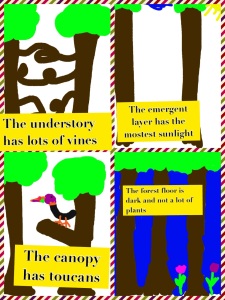
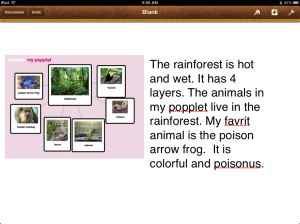
We have spent some time learning about the rainforest.  I recently blogged about how my students use planning sheets to map out their day and their learning experiences.  To share some of their knowledge gained about the rainforest, my kids chose which creation app to use and then demonstrated their knowledge through the iPad. Below are ways 2 different children chose to share with me what they have learned.

rainforest pic collage

popplet rainforest

One child chose to use Doodle Buddy and Pic Collage and the other chose to make a Popplet and import it into a Pages document. Other students in my class chose different ways.  A few chose Explain Everything, a few chose Book Creator and some chose to use drawing paper, crayons and pencils.  When students have choices they see themselves as participants and contributors to their own education.

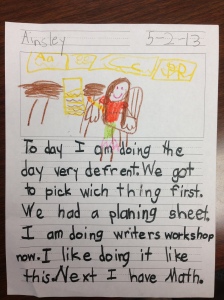
My students, even in kindergarten, like the ability and the responsibility of making these choices about their school day.  Some of the choices given to them are “must-do’s” and some are “may-do’s”.  One child wrote about planning her day in Writer’s Workshop.

PL writingMotivating students to achieve can be difficult in this hyper-paced world.  Giving students choices to work and learn in the manner that best suits them makes them stake holders in their own education.  One of the best ways to learn something is by doing it.  Let’s go for it!

Today we will do exciting new things. Let’s get to it!
Directions At Their Fingertips

Read the directions and directly you will be directed in the right direction. -Lewis Carroll

I know there are a million jokes about a certain gender  *ahem* not wanting to stop and ask directions.  I am one of those people who don’t like to read the directions.  I tend to jump right in and when all else fails, I read the directions….and if Dr. Phil were asking, I would have to answer that hasn’t always worked out so well for me.

Our students need directions all day and they look to us for them.  Sometimes they need those directions repeated once and sometimes multiple times.  It can be difficult to fulfill that need when there are others who also need your time and attention.  Part of personalized learning, however, is giving them what they need, when they need it.

I’ve started recording directions with my iPad for each of my literacy centers and putting them in a book in the Book Creator app. This week we have been learning about the Rainforest.  I created a video for my vocabulary center, journal center, reading center and word work center.  These are then put in Book Creator.  I named it Rainforest Centers and saved it to the Box App.  My kids go into Box and save it to their iBooks.  The directions are there for them whenever they need them.  They can put their ear buds in and listen as many times as they need.  The best part for me is twofold: 1. They don’t have to interrupt me to ask for directions and 2. Once the book is created, I can reuse it next year if I want.

Ultimately, my plan is to create 2 or 3 sets of directions for each center to benefit students working on different levels, high, medium and low.  Each group would have different directions depending on their abilities.  These direction books could also be created for math as well.

I chose Box because this required the fewest steps for my kindergarten students to complete to access the videos on their own. After all, it is meant to be done without my help.  Another ADE friend of mine in Maine uploads her videos to You Tube and creates QR Codes.  However you choose to do it, simplicity for younger students is a must.

So, while I am working on trying to be better about reading directions before doing something, my students can benefit from having directions at their fingertips whenever they need them.

Today we will do exciting new things.  Let’s get to it!
In Their Own Words with Book Creator

Storytelling is the most powerful way to put ideas into the world today.-Robert McKee

Lessons from PeteChildren love to listen to stories.  They are also pretty adept at retelling them.  Often, the re-telling is far more interesting than the original.

One of our Common Core standards in kindergarten is that the child will retell a familiar story, including key details.  This week in our shared reading, we read Pete the Cat by Eric Litwin. There are many lessons to be learned from Pete and the children have enjoyed reading and re-reading this story.  They’ve loved singing his song along with him. We made the Lessons From Pete anchor chart yesterday.

Today, the children decided to make a book about Pete the Cat and creating pic collagehis new white shoes as a retelling.  They used a planning grid to map out their stories.  In Book Creator, they designed the cover and wrote their re-telling.  They illustrated their book by drawing in Doodle Buddy.  Once they finished their entire book, they went back and recorded themselves reading the story (and singing Pete’s song.) Here is a link to Eva’s Pete the Cat retelling.  I love her use of expression as she reads.

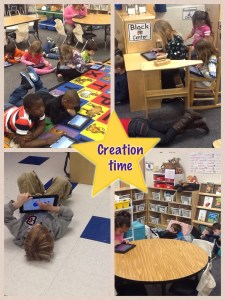
This activity was initiated by the kids and planned out by them.  They spent most of the day, off and on working on this project.  They were delighted with the fact that they came up with “the lesson” and were in charge of carrying it out.  The Pic Collage above shows them in their creative process.  They were spread out and deep in thought. From the collaborative work and rich conversations during their time working on the planning sheets, to the creation of their book and recording their own voice to retell the story, it was an amazing activity and not a bad way to end our week with Pete.

I could have had the children sit and retell me a story easily enough.  But it was so much more meaningful by having them do this in their own way.  Voice and Choice…the school work of champions…and as Pete says, “It’s all good.”

Today, we will do exciting new things.  Let’s get to it!
Raising the Bar with iPads

If you’re the band leader you ask more of yourself than anyone else, so they tend to raise the bar for me.-Kristin Hersh

If you look up the definition of the idiom “raising the bar” you will find it means to set a higher standard for people to follow.  Leaders in education are looking for innovative ways to improve student achievement by raising the bar.

H and A under tableA growing number of state and local leaders are working to redefine education in the 21st century, embracing technology and implementing creative reforms that help students customize their education. Initiatives such as blended learning, online classes, and virtual schools allow parents and educators to move away from outdated, ‘one-size-fits-all’ coursework and instead personalize curriculum to meet students’ unique needs. This is a hard shift for many who have difficulty with change or who see no reason to change.

iPads have changed the landscape of teaching and learning.  The ability to research, create, read, write and expand using these tools looks different for each child if done correctly.  I recently read an article that explored the effect of iPads on student achievement.  There was no disagreement on the engagement of students, but there were mixed thoughts on the achievement.  One teacher said the iPads take up too much of her time and she only uses them in her high school classes a few times a month.  (Wait, What?)

Whatever technology you incorporate must be a part of your curriculum.  It’s not about the apps.  It’s not about having iPad time. When adults in the workplace work on a project or assignment, they have the “what”.  They then must decide the “how”.  You look at the job and decide what tools are necessary for completing the job.  Back in the dark ages when I was in college, we hand-wrote every paper that was turned in.  Now, a handwritten essay won’t even be considered and it is turned in electronically.  Our students today will be entering the work force in the future.  They have to learn how to look at a problem and decide the best tool for solving it.

If we wait until iPads in classrooms raise every test score then they will never be purchased.  This is not a magic bullet.  We still need quality teaching and best practices.  The iPads enable us to raise the bar by meeting individual student needs…but only if the teacher empowers his/ her students to take charge of their own learning.

My grade level team works together to reflect and change. We have high expectations for our students.  They help me raise the bar in my own teaching.  How are you raising the bar?

Today, we will do exciting new things.  Let’s get to it!

Personalized Learning with iPads

Today you are You, that is truer than true. There is no one alive who is Youer than You.-Dr. Seuss

How better to say it than this? One size that fits all doesn’t work for learners today. Personalized learning is the tailoring of  curriculum and learning environments to meet the needs and aspirations of individual learners, often with extensive use of technology in the process. Personalization may differ from differentiation in that it affords the learner a degree of choice about what is learned, when it is learned and how it is learned. This may not indicate unlimited choice, since learners will still have targets to be met. However, it may provide learners the opportunity to learn in ways that suit their individual learning styles and multiple intelligences.

Personalizing learning for each learner means they take ownership of their learning. Let’s take advantage of the iPad’s ability to challenge, engage and motivate different learners.  Students can often work on different levels within the same app.  As I look at what each student needs, based on assessments and observation, I am able to direct them to certain apps or certain activities within apps.  Teachers should be able to implement multiple paths to knowledge- having a variety of ways to help a diverse group of students learn rigorous standards.

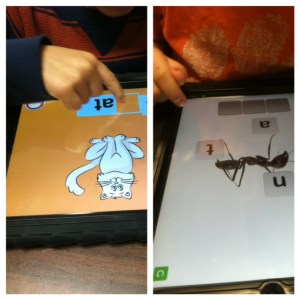
Working in flexible, small groups for guided reading, I take notes as I see areas where students need practice.  One student may need help with word families and rhyming words, where another may need help with medial vowel sounds.  My top reading group may be ready to incorporate reading response journals using Pages as they read.  This would never be possible in a whole group instructional setting.  Having the technology of the iPads at our fingertips,  it is easier to differentiate instruction, find all opportunities for remediation to help struggling learners, and  provide enrichment to challenge the advanced student.

With iPads, we can create a Pandora Radio-like effect in education.  Each student can get a variety of educational experiences, engage in topics and activities of interest, and learners have the responsibility and ownership to choose how they learn, when they learn and where they learn.

I’d love for you to leave a comment, subscribe to my blog, and/or share this post with a friend.