Giving Students Choices in Reading

Readers without power to make their own choice are unmotivated. -Donalyn Miller-The Book Whisperer
I’ve stated before that I’m a voracious reader.  I have always loved books and the ability to be transformed by a story.  I particularly love Southern writers.  I’ve never quite understood how others aren’t “readers”. They read only when required and almost never for pleasure.  In order to create readers, we have to identify ourselves as a reader first.  We must “brand” ourselves as readers.  When I read to my class, I share what I like about that particular author. I tell about other books like that book.  I make connections with myself to the text, to others, and to the world.  My students know how much I love to read.

But what about those who struggle? Or those who don’t like it?  Getting to the root helps determine which way to help the child grow.  What don’t they like?  Are there books available that interest them?  How many informational texts are available on their reading level?  I can tell you that as much as I love reading, I would not be as enthusiastic if I were forced to sit and read instructional manuals all day, or books on mechanical things. Those are not my interest.  Taking an interest inventory helps know how to fill your book center or your iBooks shelf on your iPad.  Building an early foundation of excitement about books, whether paperback, hardback, or electronic, helps build an appreciation and love for books.

My students have a variety of genres available throughout the day.  We work to build enthusiasm for our classroom library and for our eBooks on our iPads.  By demonstrating authentic reading behaviors, doing away with worksheets, engaging kids in building stamina when they read, and giving kids choices about what they read, we can develop life-long readers.

Reading is so much more than phonics, sight words, and mechanics.  It is about building discovery, wonder, and awe around the written word.  It is power.  It is peace.

So what should students learn from us about reading?  That drill and practice worksheets aren’t making them better readers.  Reading makes them better readers.  iPads give me the opportunity to practice the mechanics of reading with individual students on their own level, but they also give them a choice of what they are reading.  There are leveled books in their iBooks libraries.  There are high interest books as part of their apps, plus all of the traditional books in our classroom.  The best part of all is that the choice is theirs!

I’d love for you to leave a comment, subscribe to my blog, and/or share this post with a friend.

Exploring Science

Men love to wonder, and that is the seed of science. -Ralph Waldo Emerson

Young children are curious about the world around them and eager to explore it. This curiosity is reflected in the numerous questions that children pose in everyday conversations at home and in school. However, at the beginning of school, young children are afforded few opportunities to engage systematically and thoughtfully in learning science. On average, less than 10% of instructional time is spent on teaching science in the early grades.  Time is a precious commodity in the classroom…so how do we fit it all in?

One of the ways we incorporate science is through our thematic units.  We also explore science themes through informational texts.  One of my reading groups was reading a leveled book on weather.  The informational text was written on this group’s reading level.  After reading the book and discussing different kinds of weather, we used our iPads as both a reading response/science journal.  Using our Whiteboard App, the children wrote about weather.  Kaylee wrote about a sunny day.  This was their first experience using the iPad keyboard.  They were excited about creating this assignment on their iPads.  There was a lot of good discussion among the children about which type of weather they would choose and how they would represent that on the iPad. One of the best ways to incorporate scientific skills in young children is to help them verbalize what they have observed.  Doing this activity in the small guided reading group made it very manageable.  The children already knew how to use Whiteboard in its basic form, how to change their colors, draw, erase, and save…but had not used the keyboard function before.  We had to discuss a few keyboard basics-space bar, backspace to erase, and how to hide the keyboard when finished.

Carl Sagan, the famous astronomer and writer, said that all children start out as scientists, full of curiosity and questions about the world around them.  We can tap into that natural potential by engaging students in hands-on activities, and in class discussions that help students discover simple but amazing facts about the world around them. The iPads serve as a tool to facilitate and extend the learning.

I’d love for you to leave a comment, subscribe to my blog, and/or share this post with a friend.

As Easy as ABC…Magnetic ABC App

To succeed, you will soon learn, as I did, the importance of a solid foundation in the basics of education – literacy, both verbal and numerical, and communication skills -Alan Greenspan

One of the most challenging aspects of teaching is trying to meet all of your students’ needs.  In a room of 25 children, I have students who are reading and those who have just started learning letters of the alphabet, plus all other levels in between.  The iPads facilitate my ability to differentiate learning for all of my students.

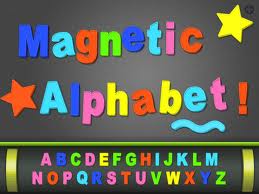
With my children that are still struggling with naming letters and sounds, we have been working with our Magnetic ABC appThis $1.99 app has upper and lower case letters and numbers.  It also has themes and objects available for use.  As an ABC practice activity, I call out an upper case letter and they choose it and put it on their board.  We scroll to the lower case letters and have them find the matching partner letter.  Sometimes I call out a letter sound and they have to find the letter that makes that sound.  Students who know their letter sounds practice with this app also. They can choose one of the objects and then match it’s beginning sound.   I can give them a CVC word and we stretch it out.  As they hear those sounds, they choose the corresponding letter. We can create word family words also.  The ability to use letters more than one time is a bonus.   More advanced students can make sentences dictated to them by either me or a partner.

The app also has numbers and objects.  Students can practice their numeracy skills, 1:1 correspondence, addition and subtraction, making sets less than, greater than or equal to, and patterning.  My students seem to enjoy the iPad version of this so much more than the real magnet letters on the cookie sheet that I put out in centers.  It’s also a lot easier to clean up!

Having a multipurpose app that meets a variety of student needs help me build a strong foundation in all students.  We can’t assume that students know these most basic of skills or short change their practice.  Apps that grow with students are efficient and effective.  Students are engaged and learning is underway. While these activities seem so…well, so basic, they are.   It just goes to show you that it doesn’t have to be fancy to be functional and fun!

I’d love for you to leave a comment, subscribe to my blog, and/or share this post with a friend.
Press the Reset Button

Definition of Reset: 1:to set again or anew  2: to change the reading of, often to zero- Miriam-Webster Dictionary

Starting a new school year with young children requires starting anew with our kindergarten curriculum.  It means ending the previous year with children reading and writing and taking charge of their own learning then starting completely over again with children who not only don’t know classmates’ names but some still don’t know MY name.

After 23 days of school, it is easy to think we are in a groove.  Most know routines and procedures and most are figuring this whole school-thing out.  But the key word here is most. It is key because by definition, most is not all.  Yes, I still have some who are still trying to make sense of our day.  I still have some who don’t know where some things go or where to find other things.  As an adult, it is easy to think that after 23 days of school, these children should have it all together.  They should know how to turn the volume down on their iPads, how to find the math folder on the iPad, how to put it to sleep and put it away quickly.  Right?

Ah…time to hit the Reset Button.  They really don’t know how to do those things yet.  It can take up to 70 repetitions for young children to fully make a concept permanent.  It is difficult, at times, for me to reset.  Ending the previous year on such an instructional “roll” and then starting back over from zero is part of the kindergarten teacher territory, but that doesn’t mean it’s easy. It helps that those children in the class who do know how to do many things are more than willing to help their friends who can’t.

As we start a new week, it is important to remember it is only our 5th full week of school.  We are 5 years old and while we learn most things very quickly, most is not all. By slowing down and making sure all are ready with these basic skills in all areas, we can then speed up with minimal disruption.  Am I preaching to myself?  Most definitely.  But I’m pretty sure there are others out there who, like me, need to push the reset button and start today, Monday, with a fresh set of expectations.

I’d love for you to leave a comment, subscribe to my blog, and/or share this post with a friend.

Let’s Play!

“Play is the highest form of research.” ~ Albert Einstein

When you ask my students what they did at school on any given day, they will answer, “I played.”  For those unfamiliar with how young children learn, that answer can be unsettling.  Play gives children a chance to practice what they are learning. Play, by its very nature, is educational. It saddens me to see kindergarten classrooms doing away with centers. Fortunately, my principal sees the value of play in young learners.

My students have a variety of centers to “play” in each day.  These centers are carefully planned to enhance learning.  We have a reading center, a poetry center, a writing center, a math center, a science center, and an ABC center.  We have centers for blocks, legos, housekeeping, and art.  We use a rotation system in the morning while I teach guided reading groups and in the afternoon while small group guided writing occurs.  While students are at the ABC or at the math center, they may also choose iPads.  I have 2 iPad cards (or passes) in each of those centers.  2 students may work on iPads while at ABC and 2 at Math.  My apps are in folders and students at ABC may only work in the ABC folder while those at math may only work on apps in the math folder.  They must have the “pass” in order to use the iPads during that time.

I don’t start the “pass system” until a few weeks into school. I print them on card stock and laminate them. (See photo at left and click here to print your own.)

I need to make sure the children know where the folders are on the iPad and that they know how to properly use the iPads on their own.  They also know that if they are not in the appropriate folder, they will lose their iPads for the afternoon.  While I do monitor the students, my monitoring is nothing compared to the eagerness of my students to monitor (tattle on) each other.  By giving them these “controlled” opportunities to use iPads on their own, I am building up to having them use iPads in the reading center and other times as they deem they are needed in their learning.

Children need the freedom and the time to play.  When the fun goes out of play, most often so does the learning.  My students are engaged in a variety of structured play activities throughout the day. We include iPads as a part of those activities.  In play, children learn how to learn.  iPads give us the opportunity to extend and differentiate learning.

I’d love for you to leave a comment, subscribe to my blog, and/or share this post with a friend.

More on Anchor Charts

Tell me and I forget. Teach me and I remember. Involve me and I learn. -Benjamin Franklin

One of the first things we do in kindergarten (besides learning where the bathroom is) is to create an anchor chart together.  Anchor charts are charts that are created with the students to help them “anchor” their learning.  We make one for every letter of the alphabet, we make one with our classmates names, we make one for how to listen, we make one for colors, one for numbers, and any other skill I would like them to use on a regular basis.  We use them daily in our Reading and Writing Workshop activities.

My students love them and refer to them all throughout the day. They are engaged in the process of creating them so they take ownership in them.  After a while, they know more of what is on the charts than I do.  Space is a concern…and do I really need to leave a chart on Halloween words up all school year? Those questions are answered with the iPads.  I find that I leave the alphabet charts up all year; however, seasonal charts, or special charts made for a specific activity do not have to stay up and take up valuable wall space.  By photographing all of the anchor charts and syncing them out to the children’s iPads, they have the charts with them all year long regardless of whether they are on the wall or not.

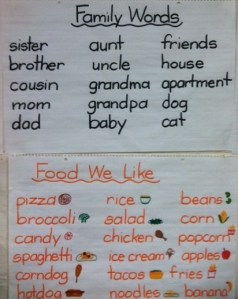
A recent writing activity included writing about our families.  After making the Family Words chart, they were able to refer to it all week as we discussed our families.  We also wrote about foods we liked.  By having the anchor chart, students were able to write about these foods.  In a week or so, I can add these to their iPads and they will have access to these words even if I take these charts down.

Another advantage of having these charts on the iPads is that students don’t have to walk across the room to see them if they are writing something and need a word.  The charts are also available if students are reading on their iPads and would like to read the charts.  It is like Read the Room, only it is done in their seats.

If you aren’t using anchor charts, I highly recommend them.  They are quick and easy but they pack a powerful punch.  Parents can even make them at home and post on the refrigerator or in the child’s room.

By involving the child in the learning, they create connections that are critical for mastery of skills.

I’d love for you to leave a comment, subscribe to my blog, and/or share this post with a friend.
Teamwork

A single leaf working alone provides no shade. -Chuck Page

Even with a full time teaching assistant in my classroom, there are times when I could use a few extra hands.  25 kindergarten students often makes me feel like an octopus with arms going in all different directions at once.  We are 14 days into the school year, nearly 3 weeks.  I have some students who immediately fell into our class routines and procedures.  By now, most know what to do…however, there are a small handful who still need guidance. They are easily confused and have that deer-in-the-headlights look when I give directions. This is not uncommon and in time, all falls into place.  Fortunately, I have a few “Mother Hens” in my classroom who know just what to do and they assist those who need a little extra help.

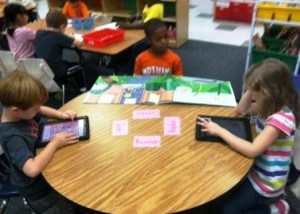
Using the iPads is no different.  I have many students who are already pretty iPad savvy and a few who are still working on it.  Without me asking, the students are quick to help each other and show them how to find something or do something.  As one student helps another, the peer coaching aspect strengthens both students. Students are already learning to ask a friend before asking me.

One app we have used in partner activities is ABC Magnetic Board.  It is $4.99, but with the Apple Volume Purchase Program you can get it for almost half.  The app has upper and lower case letters in 4 languages, numbers, shapes, diacritics, signs and symbols, 5 sets of toys: summer, party, night, snowy winter and Christmas, and more than 15 backgrounds.  The pictures created can be saved to the camera roll also.  We have students partner up and spell names, sight words, match upper and lower case letters, and beginning sounds using the pictures in the app.  There is a free version, but it is pretty limited.  At this point in the year with a wide range of abilities in my room, this app allows differentiation for students on different skill levels.  It also allows cooperative learning.  This app is better than the classic version of refrigerator magnets because each letter can be used multiple times (and pieces don’t get lost!)

As my students work to become “experts” on a variety of tasks and skills, knowing there is a helping hand nearby encourages children to try new things and step out of their comfort zone.  It is part of our classroom culture to work together as a family.  Family members help each other.  Watching my students work together this early in the school year, I know there will be many great things to come.

I’d love for you to leave a comment, subscribe to my blog, and/or share this post with a friend.

Learning Phonics with iPad Apps

Practice is the best of all instructors. -Publilius Syrus

The beginning of every school year brings a variety of ability levels to kindergarten.  I have children who are already reading and some who struggle with just naming upper and lower case letters and sounds.  I’ve stated that the best part of having 1:1 iPads in the classroom is the ability to differentiate for student need.  There are a series of apps by Good Neighbor Press we use a lot in the beginning of the year.

The first app I use is the Upper and Lower Case Letter Matching Pocket Chart.  This has students matching upper and lower case letters.  It takes about 3-5 minutes to complete the cycle.  This is particularly good for my young learners who are still working with this skill.  It is easy to use and engaging as the students are earning stars for correct answers.  It also helps with the ever-confusing lower case b and d identification.  This app is .99

Beyond matching, another app in the series is Matching Beginning Sounds.  Again, this is a 3-5 minutes cycle that is highly engaging and keeps students moving through the app.
Other apps in the series include matching rhyming words, ending sounds, consonant blends and digraphs, word families, compound words, and long and short vowels.

Math apps are also available from this publisher.  There are apps for shape matching, position words, counting 1-20, number and number words matching, fractions and single digit addition and subtraction.  Each of these apps can be purchased individually, or for $4.99, you can purchase Pocket Charts Pro and receive all 20 games in one app!

One of the reasons I like this app is because pocket charts are common in many classrooms.  These apps are recognizable activities that don’t require a lot of front loading to use.  It also give you a quick sense of an individual child’s abilities.  While I may have 1 or 2 pocket charts available during centers for students to interact with, having a variety of pocket charts apps in their iPads means no one has to wait their turn.  Instant access!  Because there is a variety of skill levels within the app series, there is virtually something for everyone.  When you can deliver just-in-time-practice to each individual student, you are increasing engagement as well as allowing the child to move at his/her own pace.  Students who are ready to move on aren’t held back by those needing extra practice.  Those needing extra practice aren’t being rushed on by those who are ready to move on.

As I’m finishing the 10th day of school today and finishing up all of my initial assessments, I see I have a wide variety of student abilities.  By using apps such as those in the Pocket Chart series, I know my students are getting practice right where they need it!

I’d love for you to leave a comment, subscribe to my blog, and/or share this post with a friend.

Introducing iPads to Kindergartners

From small beginnings come great things. -Proverb

Today was the day. After a nice restful weekend and a bottle of Extra Strength Excedrin tucked away in my school bag, I was ready to seize the day.  I was ready to take the big step.  Today was the day to introduce iPads.  It was our 4th day of school and my students were itching to get their hands on them.  I had been asked repeatedly over the first 3 days, “When can we use the iPads?”   I kept telling them, “soon”.  As a child I hated that response from an adult.  Soon was never soon enough.  It wasn’t that I didn’t want them to use the iPads, I just wanted to skip over the “here’s how to use them” part.  You know, the boring stuff.  The oh-so-important-do-not-pass-go-do-not-collect-$200-do-not-rip-off-this-tag-under-penalty-of-law important kind of boring stuff.  5 year olds have a casual relationship with the “fine print”.

As soon as I said iPads today, there was instant silence, then instant cheers.  Uncontainable excitement.  I rolled them out in small groups.  5 at a time, keeping the basics short and sweet.  I took each child’s picture on his/her individual iPad and made it the home screen and the wallpaper.  This makes it instantly recognizable when opened by all.  We went over turning it on, navigating screens, choosing an app, closing the app, and putting the iPad to sleep.  We went over how to hold it, how to carry it and where to put it when finished.  Wide eyed and smiling, their joy was apparent. Their engagement was instant. Then, oh so quickly, their time with the iPads was finished and we had to put them away.  One by one, they returned them to the charging cart so I could lock them away for the day.  One child leaned over and said softly to his iPad, “Goodnight iPad. We can play again tomorrow.”

As for the rules and procedures, we get to do it all over again tomorrow and the next day and the next.  Modeling and reinforcing the “fine print” ensures that our  small beginnings will soon produce great things!

I’d love for you to leave a comment, subscribe to my blog, and/or share this post with a friend.

Going for Gold

Be firm on principle but flexible on method. -Zig Ziglar

Watching the Olympics the past 2 weeks, I’ve marveled at the flexibility of the athletes, particularly the gymnasts.  They can put their bodies into positions that seem almost super-human to me.  I can’t even bend over and touch my toes.  Their abilities come from intentional practice, training and coaching.

Flexibility isn’t restricted to range of movement with our joints and muscles.  It is also about being willing or disposed to yield.  I’ve been teaching for, well, forever it seems.  It is super easy for me to reach into my file cabinet, pull out a unit of study and go on autopilot…teaching the same lessons, using the same examples, smoothing out the same, wrinkled and faded artifacts and expecting the same answers from my students.  It is literally, a no-brainer.

The longer we teach, the easier it is to develop tunnel vision.  A few years ago, I found myself going through the motions of teaching.  I wasn’t happy but couldn’t figure out why.  My rigidity was more like rigor mortis. When I started using the iPads, I found a new spark of excitement that energized my teaching.  I found the joy of student-led learning and being open to the moment.  When I became present, I discovered how my students became more engaged.  I realized that being on autopilot is a death knell to the classroom.

To be sure, iPads required a new flexibility for me.  I still had an overarching goal but I learned to be not just accepting of student-led learning, I became expectant of it.  The beauty of this shift in my teaching was that my students exceeded even my usually high expectations.  My mantra to teachers in other grades who seem reluctant to incorporate iPads is “If my 5 year old kindergartners can do it, surely your students can also.” Just like those Olympic athletes, our own teaching flexibility requires intentional practice, training and coaching.  It starts from the top in administration.  When administrators create a culture of flexibility, team-work, and open-mindedness, then teachers feel empowered to try new things, reach beyond what they think is possible, and “Go for Gold!”

Are there parts of your life/career that are on autopilot?  Try to find one thing that you can change and allow yourself to feel energized by it.  Your enthusiasm will be contagious!

I’d love for you to leave a comment, subscribe to my blog, and/or share this post with a friend.