Cultivating a Love for Reading

My mother was my world and she brought reading into it. -Donalyn Miller, The Book Whisperer

I was fortunate that I came from a family of readers.  Everyone read and the love of it was instilled in me very early.  I wish the same could be said for all of my students, and because it isn’t a priority in every home, I make sure to make it is a priority for the 7 hours they are with me Monday through Friday.

We talk about books and immerse ourselves in literacy building activities all day long.  We compare books and authors.  We compare writing styles and illustrations.  We do author studies and we use mentor texts in our Writer’s Workshop time.  I create books for my students in iBooks Author and in Book Creator.  I put them on their iPads and they have “just right” books at their fingertips all the time.  So, it isn’t surprising to me that my students are eager to make their own books.

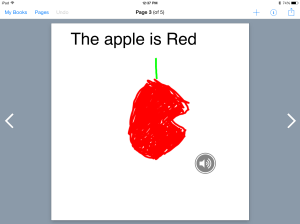
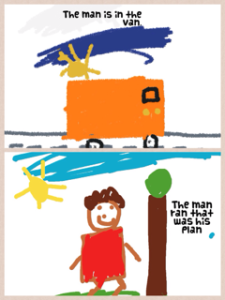
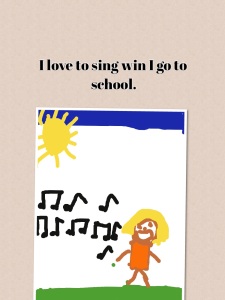
Our favorite app for student-created books is Book Creator.  I’ve written about my ongoing love affair with the Book Creator app many times,  and now, you have the ability to draw within the app itself.  After introducing my students to this versatile app, I was immediately asked if they could make a book.  Many work on them during their free choice time.  At this point, they are fairly short books.  Here are a few screen shots from one of the first books a student created.

IMG_0860

IMG_0861Because he recorded his voice reading the book, I can’t upload the file.  This book was 5 pages, including the ever popular “The End” page.  He worked every free chance he had over a couple of days to complete it.  Because we use Showbie, I can upload his book to the shared folder and all of the other students can download his book and have it on their bookshelves.  This is a great way for students to share their work with their peers.

Another student started a Space book in Pic Collage.  It is not finished but her intention is to create several pages, save to her camera roll and upload into Book Creator.  Here is one of the first pages of her book:

IMG_0859I love the enthusiasm and creativity of these children.  I love how their excitement over creating a book is so genuine.  I love how their eyes widened and they bubbled over with excitement when they saw the Book Creator app and what it could do.

Giving children choice in how they demonstrate their learning is a mainstay in our classroom.  My students take charge of their learning through the use of these creation apps.  They think nothing of using  multiple apps to create a final product.  They create and combine on their own with confidence.  They are able to upload their final work to Showbie independently.  They are proud of their work and are eager to share.

As a parent and as a teacher, I want my children and my students to feel the joy of being a reader.  By bringing my own love of reading to the classroom, my students are discovering they are able to create their own books, make their own art, and share the joy with others as well.

Today we will do exciting new things. Let’s get to it!
 

Educating Each Child

Grown-ups love figures… When you tell them you’ve made a new friend they never ask you any questions about essential matters. They never say to you “What does his voice sound like? What games does he love best? Does he collect butterflies? ” Instead they demand “How old is he? How much does he weigh? How much money does his father make? ” Only from these figures do they think they have learned anything about him.” -Antoine de Saint-Exupéry, The Little Prince

IMG_0102(1)Grown ups do love their figures…it’s all about data.  We have to quantify something, measure it, analyze it and dissect it down to its very bones before we decide if something has meaning or value.  A recent article in our local newspaper ran in giant bold type the front page headline that the use of iPads in our district is not resulting in significant gains in scores.  If you are looking to sensationalize a hot-button topic, then the more negative the headline, the better.

The funny thing about data is that it doesn’t take into account many important factors.  Factors that can’t always be measured.  We have had our iPads for 3 years.  Some would say that’s enough time to show some major growth.  This would be true if iPads manufactured intelligence and poured it into the mouths of our students.  iPads are not a magic bullet or get smart quick scheme.  They are not integrated equally into every classroom, nor are they used in a cookie-cutter way in every lesson for every student.  Some teachers use them extensively for in-depth learning, and others…well, not so much.  Meaningful staff development is critical and my district has done a good job of working with teachers in best practices.

But what about each individual child?  Since the iPad is merely a tool, it must be used in a way that enhances individual student learning. Information is an essential key to learning.  Accessing information is a logical need.  How does a class of 30 plus students access information equitably in a classroom with 2 desktop computers (if that)? We don’t use card catalogs, hard bound encyclopedias, or phone books any more.  We rarely use paper maps (which is just as well, I can’t ever fold them correctly).  With the fading away of these sources of information, where are we to get information?

Wholesale dismissal of the use of iPads after 3 short years of implementation is short-sighted.  They provide necessary accommodations for disabled students, that have never before been available.  Vision impaired, speech impaired and autistic children have an open avenue of accessibility that is not just necessary, it’s their right.  Students who have learning disabilities or have learning delays can have learning experiences that are “just in time” for them.  Similarly, students who excel and are more advanced than their peers have the ability to work at that higher level with the iPad.  It is because of these abilities to personalize learning for my students that 100% of my students have gone to first grade reading above grade level for the past 3 years, that my school has earned the Apple Distinguished School award 2 years in a row, and earned an overall rating of excellent, scoring 99.3% on the Federal Report Card.  Our school rating went up to 5th in the school district from 8th in the 2011-12 school year.

Where is that headline?  That never made the newspaper.

My students learning experiences are richer, more in-depth and more rigorous because each of them have access to a powerful learning tool.  I can’t imagine teaching without them now.  Think of the many ways you access information today.  My guess is, you do it automatically without thinking of the technology necessary.  How inconvenient would it be if you lost access to that technology? How backward would it be to say, “I’m sorry, you aren’t making statistically significant progress in your work life so we are going to remove your access to information.” ?  Heck, if my SmartBoard goes down for a day or I don’t have internet access at school for a few hours I feel handicapped.

This is the world we live in and it will only become more wrapped up in the need for technological access.  Dissect that data all you want…but behind every number is a child.  Are you going to look at that child and say, “Sorry, but you aren’t worth the expense to adequately educate you for the future.”?  I know I can’t say it.  I’m grateful I work in a place that can’t say it either .

Today we will do exciting new things.  Let’s get to it.

Teaching and Leading

A leader is best when people barely know he exists, when his work is done, his aim fulfilled, they will say: we did it ourselves. -Lao Tzu

medium_6550520What do you need today?  A moment of peace and quiet? A push to get moving on a project you’ve been neglecting? Better yet, when was the last time you were even asked what you need?  As educators, we often are so focused on others, we don’t take the time to nurture ourselves either personally or professionally.  Today, I got something I needed. I had the ability to reunite with a cohort of teachers; ones with whom I had the privilege of spending one day a month in intensive Literacy Leadership training two years ago.   Our trainers brought us all back to share our stories and how we’ve changed since our training.  We also had great discussions on being educational leaders, why leadership is important and how teacher leaders extend their reach to touch others.

In preparing for this reunion workshop, we had to reflect on how our teaching has changed, how we’ve changed, over the last 2 years and be ready to share with the group.  Wow…my last 2 years have been just a little busy.  You can say it was the perfect storm of events.  The original literacy cohort began the year I received iPads.  The merging of the professional development highlighting student literacy with the versatility of the iPads completely transformed my teaching. I was encouraged to start this blog by a visionary friend who saw the magnitude of this story long before I did.  Then, I was chosen to be an Apple Distinguished Educator which gives me the amazing opportunity to speak to educators and leaders globally about my work.  (I used italics there because this still blows me away!)

Today, after writing out our transformation into teacher leaders, we were then asked to set a goal about where we go in the future.  I. Had. No. Idea…Really.  If you had told me 2 years ago I would be doing what I’m doing today, I would have never believed it.  So, there’s no way I can predict the future.  What I can say, is that by being open to the process all this time, doors open.  That’s it.  Show up everyday, be true to what you believe about how children learn, and doors open.  I do have to give MAJOR praise to my principal who supports me at every turn.  He truly exemplifies an educational leader.  He understands that the collective wisdom in the room far exceeds his own as an individual and he nurtures teacher leaders.

As for the iPads, what I need to say is this:  No one ever picked up a pencil and said, “THIS is truly a transformational tool needed for learning.  Let’s build an entire lesson around this!” The iPad can be a transformation tool as long as it is not the focus of the lesson. It can transform your teaching as well, if you are open to the process.

So, to all of you out there I say be open to the process.  Refresh yourself with a class or workshop. Collaborate!  In the words of my cohort leader, “Teachers can’t afford to be in private practice.  We have to collaborate to be effective.”  True story.

Thanks to all of you who show up here on a regular basis…I’m grateful to have you as readers.  You too, bring something to my table.

Today we will do exciting new things…let’s get to it!

Photo credit:  Creative Commons

Augmented Reality with Aurasma

When you think of any aspect of life or work, augmented reality is completely going to change how we do it. -Ori Inbar

I’ve been reading a lot about augmented reality.  It is a technology that superimposes a computer-generated image on a user’s view of the real world, thus providing a composite view. Wait, what? My inability to wrap my brain around that has kept me from exploring it until just recently… Think about the yellow first down line you see on TV when watching a football game. That’s augmented reality.  Why do I need that in my classroom and how does it work?  Enter Aurasma.

imagesAurasma is a free app that allows you to create auras.  The auras allow you to embed content, video, weblinks, or even 3D animation.  All you need are pictures to serve as the trigger and a device to read the aura such as an iPad.

So, I’m pretty sure I’m not the only teacher who gets repeatedly interrupted during small group instruction by students asking for directions (that you’ve already given) for an activity.  I’ve been looking for a way to use QR Codes to post directions for different activities, but haven’t been able to use them because You Tube is blocked.  So now, I just create an aura using an image as a trigger.  I record myself giving directions for the activity.  This is the overlay.  I save the aura to a channel and print out the trigger image.  My students open their Aurasma app, hold the iPad over the trigger image, and my video plays automatically.  This allows them to get the directions as often as they need.

Other uses could include student-created auras demonstrating learning, sharing stories, solving math problems, or scavenger hunts. Individual students could have instruction tailored to their needs by simply scanning an aura.  I talked with my PE teacher today about having students in PE create auras for a circuit training activity.  The uses are truly endless.

So, as you are reading this and thinking you aren’t sure you get it, just as I did, don’t despair.  I created a PDF giving you step by step directions on how to create an aura as well as how to set up student iPads so they can read the auras in the classroom. Click here for those directions:  Aurasma Directions

I’m excited about exploring different uses for this great app.  My kindergarten students were excited to use it and have already asked if they can make their own! That will be our next step.  This takes personalizing learning to a whole new level.

Give it a try! I’d love to hear how you use it in your classroom!

Today we will do exciting new things.  Let’s get to it!

Using iPads to Work and Learn Together

Coming together is a beginning; keeping together is progress; working together is success. -Henry Ford

Ah yes….working together….I can’t help but be reminded of the the preschool song “the more we get together the happier we’ll be”.  Working together, planning together, and achieving goals together is a beautiful thing.  It is not, however, something that is always done easily and it does require planning and effort.

We have been diligently working and planning together in our class.  Besides working on instructional goals, we are also working on our soft skills.  It is never too soon to work with children on their “EQ”…emotional intelligence quotient.  These are the cluster of personality traits, social graces, communication, language, personal habits, friendliness, and optimism that characterize relationships with other people.  They complement hard skills.  Learning these skills now help transition them into adolescence and adulthood. In today’s world,  soft skills relate to a person’s ability to interact effectively with coworkers and customers and are broadly applicable both in and outside the workplace.

That being said, it takes time and planning to build community in a classroom full of egocentric 5 year olds.  We have been working on planning our day, working together on activities and projects as well as sharing with each other our completed work and work in progress.  This involves listening to each other, offering praise and helpful suggestions (helpful being the operative word).  This takes modeling and practice!

This week, we shifted from writing the plan for our day on a PDF on our iPads to actually typing it in the Notes app.  This has been very efficient and the kids feel “grown up” making a real list by typing.  They have their 5 “must do’s” listed on the Smart Board and they choose the order in which they want to complete them.  Currently, I am assigning the apps, but soon they will be choosing which apps to use to complete the assignment.  smartboard captureThe picture cues to the right assist them if they forget as they move through the day.  Kids are working individually, in pairs, or small groups by their own choice all throughout the day.

Here is a sample of the word work created on this particular day in the Magnetic Alphabet app.  The kids take a screen shot when finished and upload to Showbie for me to check later.

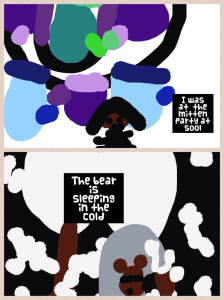
magetic abc workHere are 2 Pic Collage examples from a different day using the vocabulary words “mitten” and “cold”.

cold pic collage

Mitten pic collageOnce the students draw their pictures in Drawing Pad app, they save to their camera roll and upload into Pic Collage.  They then type the sentence using the vocabulary words for each picture.  They save it and upload to Showbie.

This schedule allows for a lot of collaborative time with each other and with me.  I am able to conference with children, assess, work with small groups and facilitate all throughout the day.  Because students have many opportunities to work collaboratively and interact with each other, we can practice modeling those soft skills we are learning about each day.

By setting up the classroom environment to reflect the values of learning through choice and collaboration, students are able to learn valuable skills that will carry them into the future.

Today we will do exciting new things.  Let’s get to it!

What’s the Plan?

A goal without a plan is just a wish. ― Antoine de Saint-Exupéry

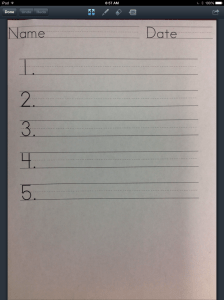
In my last post, I mentioned we are in transition.  We are continuing to shift from our choice board system into a more student-controlled system.  One of the first things needed is a way for them to record their daily plan.  I’m sure there are many ways to do this, but we are using a planning sheet that I scanned into Showbie.  The students will download and write their day in Good Notes, which is a PDF annotator.  This saves me from having to use paper to copy every day.  The planning sheet is very simple.  planning sheet

The students have 5 things they must do today.  These are listed on the Smart Board and students have the choice as to which order they wish to complete them.  Here are the choices from yesterday:

1.  Pic Collage with 2 bear facts

2. Read 3 “Just Right Books”

3. Math center

4. Writing Workshop

5.  Poetry notebook

Students choose the order they want to complete these activities and write them on their planning sheet.  They then have either me or my assistant approve their plan and they get started.  While students are working independently, my assistant and I pull small reading groups.  We are able to see all 5 reading groups between the two of us in the hour and a half block of time.   Students also have some activities to choose from if they finish early.  We call these “May Do’s”  The 5 items above are “Must Do’s”.

In the afternoon after recess, we have another hour block of time before Special Area.  This time is spent with students either continuing to finish their “must do” list or if they finish, they have “choice” center time.  All of the centers in the room become available for this choice time.  This block allows me and my assistant to conference and work with individual students in any area that needs focused attention.  We did this schedule last school year for the first time and it worked great! Their content creation was amazing and it allowed all students to learn time management, work individually or in small groups, and it allowed them to work on their own levels.

Here are a couple of samples of their Bear Facts.  Illustrations drawn in Drawing Pad app and uploaded into Pic Collage where they wrote their sentences:

bears2

bears1

The kids are excited about having the ability to make their own schedules and plans.  We will continue to work on this schedule over the coming few weeks.  The must-do’s change daily.

By incorporating student voice into daily learning, we are planning for success!

Today we will do exciting new things.  Let’s get to it!

Building Vocabulary with iPads

Vocabulary is a matter of word-building as well as word-using. -David Crystal

We are in transition…in the process of moving from our choice board centers to more content creation centers.  This will take us a couple of weeks to migrate over to that system.  I will write more about this as we go, but for now, we are  adding various components daily that will be a part of our day.

How do you know when it’s time to change?  Every class is different and some can handle this change sooner than others.  I have a few signs I look for.  I look to see if the students are able to work more independently on iPad activities involving creation apps (such as Pic Collage and Explain Everything).  I also look to see if they are mostly able to upload their work to our digital portfolio app, Showbie independently.  But the real indication that really spurs me to move to the next phase in centers is they are driving me freaking crazy in the ones we currently have.  Even with frequent changing of manipulatives, activities and games, they suddenly stop using them purposefully.  Unifix cubes are no longer being used to pattern.  They are becoming light sabres and swords, or guns that attack others. And I am on the verge of yelling, “C’Mon Man!”  When you begin to feel the crazy creeping up and you want to retreat into the bathroom for an hour of sanity, it’s definitely time…and  I’m apparently the grown up and something has to give.   🙂

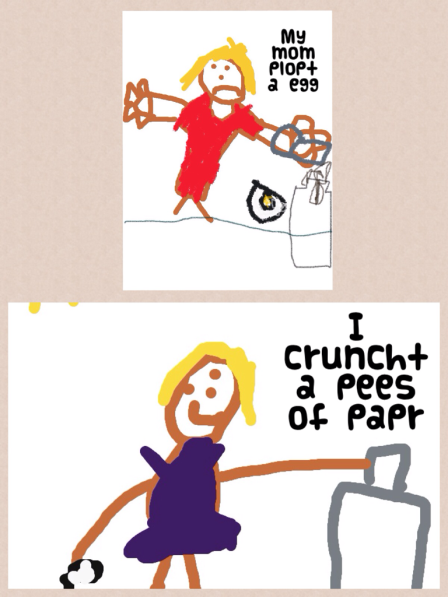
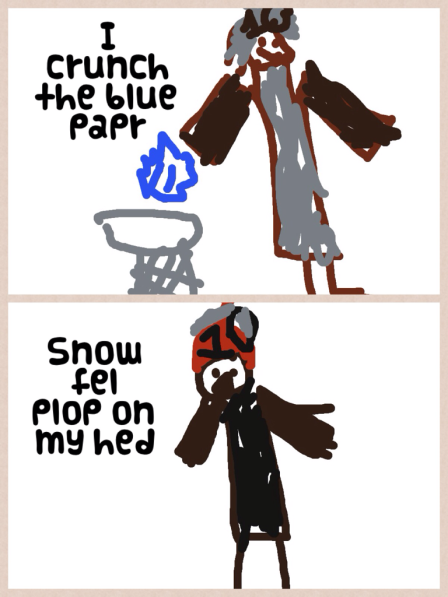
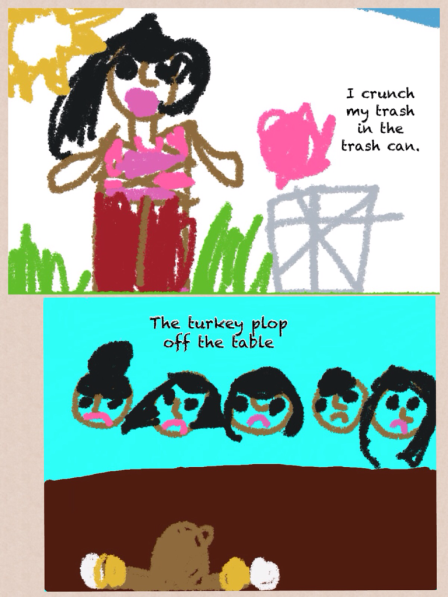
So to get ready to transition, we start working on vocabulary.  This will be one center the students will have once we move away from the choice board.   This week we are reading The Snowy Day (appropriate and all polar vortex-y).  This is our mentor text while we talk about onomatopoeia.  We talked a lot about the words “crunch” and “plop”.  These words in the story relate to snow, but we don’t get snow here.  We thought of other things that can crunch and plop.  The next few days we will work on just 2 words but we will eventually move to 4 vocabulary words each week. These words are usually unit related.

The students took these 2 words, crunch and plop, and drew a picture for each.  It was saved to the camera roll, then uploaded into Pic Collage.  The students then wrote a sentence to go with their pictures using the vocabulary word in the sentence.  The finished Pic Collage was saved to the camera roll and uploaded to Showbie.

Here are a few examples:

Vocab Pic Collage 1

Vocab Pic Collage 4Vocab Pic Collage 2

Working with onomatopoeia is fun and a good way to start introducing vocabulary to young students.  As students become more proficient in their learning and in their ability to handle more responsibility, moving into more robust content creation is a logical next step.  And don’t we all have those really bright students for whom we just can’t dig deep enough for their requirements?  This type of activity allows them the freedom to move and groove on their own.

The best part of student-centered classrooms is giving them the ability to soar when they are ready.  We are always moving toward more student voice and choice.  I mean, no one wants to listen to my big talky head all day.

Stay tuned.  We are on the move!

Today we will do exciting new things.  Let’s get to it!

New Year Resolutions

Write it on your heart that every day is the best day in the year. -Ralph Waldo Emerson

It’s been said that what you do on the first day of the new year will influence what you do the rest of the year.  Hmm…I will make sure I am not cooking or cleaning on January 1 if that’s the case!

IMG_0703Since most of us are still enjoying a few more days of vacation, it is a good time to look ahead to 2014.  It has always been difficult for me to think of a “year” as anything  other than a school year-which for me, runs August to June, then summer vacation, and then a new year begins.  I’ve never done anything other than be a student or a teacher.  January to January is tricky for me.  That being said, we have been in school nearly 4 months and the winter break gives us time to refresh, restore, and refocus.

Someone asked me a while back what I like to do.  It seemed like a simple question but I found I had a little trouble answering it.  Of course, spending time with my family and friends made the list, but when pressed further, “What lights you up?” I fell silent.  This troubled me.  Why couldn’t I name anything? It occurred to me that I liked the idea of writing but never pursued it because I didn’t see myself as a writer.  A friend gently encouraged me and this blog was born.  I found I could quickly tap passion when it involved my students and their learning with the iPads.

I recently bought a “big girl” camera and have started pursuing a long hidden interest in photography.  I’m a true beginner in this endeavor, but am loving going on photo walks and discovering life behind the lens of a camera.  (I started a new photo blog here.)  What I am learning is you don’t have to be a professional to make art.

What does all of this mean for you?  I encourage you to explore some unexplored interests.  Step out and try something new.  Incorporating iPads in to my classroom has completely transformed the way I teach.  I don’t just think outside the box, I live there! Sometimes the people around you won’t understand your journey.  They don’t need to, it’s not for them.

Let 2014 be the year you step out, take some risks.  Resolve to hone your craft.  Create a classroom where you would want to be a student. Ditch old teaching methods, PowerPoints, and worksheets.  Examine who you are and what you like. Pursue some of your interests and you will be a more passionate teacher because of it.

What lights you up?

Today we will do exciting new things.  Let’s get to it!
Kodable in Kindergarten

When people think about computer sciece, they imagine  people with pocket protectors and thick glasses who code all night.-Marissa Mayer

This week is the “Hour of Code” week.  Students from kindergarten through 12th grade are learning computer code through online tutorials.  This campaign is a push by President Obama, Mark Zuckerberg, and Bill Gates in an effort to create interest in computer science in students in the U.S.

Not one to miss out on all the fun, we found a great app for coding in kindergarten called Kodable.  Kodable is designed for children ages 5-7, but I will say that I know a few grown-ups who have spent an hour or three on it. There is a free version of the app and the Pro version is .99 in the App Store.  Here is a screenshot of Kodable Pro:

KodableappThe object is to program the fuzzy ball to move through the maze to eat the coins by putting the arrows in the correct sequence.  My students were immediately engaged.  Their conversations were analytical and full of strategy.  They worked on this app for 45 minutes and were upset when they had to stop.  What surprised me was how quickly some gave up and how others persevered.  Actually, I should say I was surprised at who gave up and who persevered.  It was not at all as I thought it would be.

Why code?  Well, why not?  It’s always been widely accepted that it is easier for children to learn a foreign language when they are young.   Using these devices is as natural as speaking to our students. Why not let them learn a computer language?

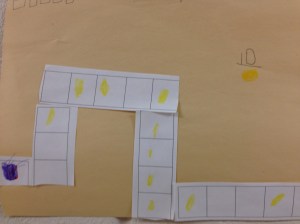
After my students worked diligently on Kodable yesterday, today we took it a step further.  They created a code that needed to be solved by a friend.  They drew the track for the fuzzy ball and had a friend sequence the arrows to correctly move the ball.  First they designed the track, then they added the coins to be obtained, and finally, they drew the number of boxes at the top for each arrow to be placed in sequence.  This means the student had to go back and count for themselves how many turns were needed in order to know how many boxes to draw.  Here are a couple of samples:

coding1

coding2Once it was created, they passed it to a friend who then drew the arrows in the boxes provided to show the correct order.  The friend also had to count the number of coins earned and write the number on the sheet.  They loved this!  Seeing their enthusiasm, I printed out some pre-made track and put it in the math center.  This way they could cut and build their own if they wanted without having to draw.  Here is one a student made at the math center:

coding3

The track was the length of a sheet of paper.  They could cut and edit how ever they chose.  This one had 10 gold coins.

Kodable was a great find.  I am sure we will be working on coding for much longer than this week dedicated for it.  My young inquiring minds are eager to continue and there’s not a pocket protector anywhere to be seen!

Today we will do exciting new things.  Let’s get to it!

Word Work and iPads

Teaching reading IS rocket science! -Louisa Moats

I’ve probably used this quote before…but it certainly bears repeating.  We are immersed in literacy activities all day long in our classroom and it is starting to bear some fruit.  Nearly all students are reading and we are 75 days into our school year.

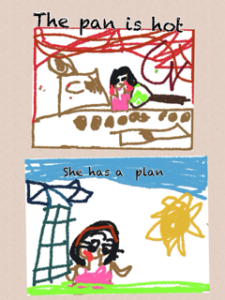
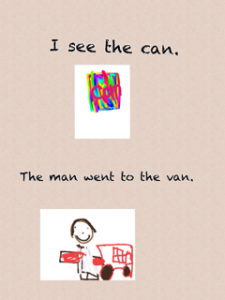
Since we follow the Reading and Writing Workshop Models daily, we spend a lot of time doing word work activities.  We have been working diligently on word families and rhyming words.  We have used our iPads quite a bit to do this word work. The Magnetic ABC app has worked well in making words together in small groups.  We have also done a little app smashing with Drawing Pad and Pic Collage.  Here are a few samples from that:

photo 3photo 2-2

photo

At the risk of being Captain Obvious, we were working on the -an word family.  They were able to choose 2 words in that family to illustrate in Drawing Pad.  They saved those drawings to the camera roll then uploaded them into Pic Collage where they typed a sentence with each word.  After saving the Pic Collage, they uploaded it to Showbie for their portfolio.

This relatively quick activity ( 30 minutes start to finish) will be a building block for when the children move into planning their own day and they have vocabulary words for their word work.  These 2 frames will eventually become 4 in Pic Collage.

What are the challenging parts right now?  We are still working on using the space bar between words when typing.  Back spacing and starting again provides an almost miraculous cure to that!  A few still need guidance in saving their Pic Collages to their camera roll.  Other than that, they are rock stars!

Word work is an important part of early skill building in literacy.  We play many quick games daily both on the iPad and in small skill groups.  Word Work helps them become better readers and writers.  If you are unfamiliar with the components of the workshop approach, I encourage you to read Lucy Calkins’ books.  These are easily found online and are great resources for the Reading and Writing Workshop models.

The difficulty of teaching reading has been greatly underestimated.  It is a complex process and requires a repertoire of strategies.  The iPads are providing me with another tool in my toolbox to reach all of my young readers!

Today we will do exciting new things.  Let’s get to it!