Hope Explains More

hom·o·phone : a word pronounced the same as another but differing in meaning, whether spelled the same way or not, as heir  and air.

If you want a sure-fire way to make a class of kindergarten students laugh you need only say “underwear”, “poop” or “naked”.  This will result in uncontrolled, hysterical whooping and laughing.  We recently added the sight word “but” to our list and that immediately created some wide eyes and giggling.  I had added a “bad word” to our list.  What was I thinking?

We immediately launched into a lesson on homophones. This is a complicated concept for my students because they don’t realize words can sound the same but be spelled differently and mean different things.  We came up with a few together on an anchor chart to help them visualize this.  We will add to this as we come across other words, hopefully not as scandalous as “but” and “butt”.

These class conversations combined with the anchor charts help them make concrete connections to otherwise nebulous concepts.  My students are not experts on homophones now, but they have been exposed to the concept and hopefully, with the creation of the anchor chart, it will cause them to stop and think when confronted with another word that is confusing.

In a recent post, I extolled the virtues of our Explain Everything app. One of my students, Hope, was very articulate in her explanation of her annotated illustration.  Hope was vexed by the whole “but” “butt” issue and wanted to Explain Everything about these words that was creating such consternation in our classroom.  Please allow Hope to explain more:

I’d love for you to leave a comment, subscribe to my blog, and/or share this post with a friend.

For the Love of Words…

The limits of my language are the limits of my universe-Goethe

Kaylee vocabWe are at the point in the school year where my students are able to read most of their sight words and are able to decode many others.  As we flex our thinking muscles, we are working on increasing vocabulary words.

Students learn vocabulary words informally when they are immersed in a word rich environment. Anchor charts with rich words and lists of synonyms can be used to create a word rich environment. Students learn new words through rich conversations, personal reading and daily experiences with read aloud texts.

We are working to increase our Tier 2 and Tier 3 vocabulary during literacy centers.  Students are given 4 vocabulary words that go along with our thematic unit.  In the example above, the words were love, heart, friend and valentine.  The children had to write a sentence in Pic Collage to show they understood the word and then they illustrated their sentence in Doodle Buddy and imported it into the Pic Collage.  They will also be allowed to look for pictures on Safari to demonstrate words soon.  (I was a little hesitant to have them look up images for valentines words…) After they created their Pic Collage, they shared it with their team and read the sentences of the other children.  A colleague of mine uses Strip Designer with her first graders to demonstrate their vocabulary words.  Either of these apps work great.  You can save the work to the photo library or upload to PaperPort to demonstrate workflow.

To teach vocabulary, we must use rich and robust instruction through multiple exposures. Children who acquire a substantial vocabulary are often able to think more deeply, express themselves better, and learn new things more quickly. They are also very likely to be successful not only learning to read, but also in reading at or above grade level throughout their school years.

I’d love for you to leave a comment, subscribe to my blog, and/or share this post with a friend.

Hope Explains Everything on iPad

Grown-ups never understand anything for themselves, and it is tiresome for children to be always and forever explaining things to them. -Antoine de Saint-Exupery

Have you ever listened to a 5 year old tell about their work? Try listening to 25 of them.  Daily.  They have so much they want to tell and explain that I don’t have enough ears to listen to it all.  Their work is so detailed and there are like 40 bajillion things they absolutely must tell, and if you interrupt them even once, they must.  start.  over.

Hope

Hope

Thank goodness I have Explain Everything.  It is the perfect app for my kids to demonstrate their workflow, show me what they have learned and talk, talk, talk to their hearts content.  If they mess up, they just erase and start over.  My kids are learning about labeling and annotating their work.  Scientists label and good readers annotate for meaning.  When I showed them the app, someone said, “You mean I can just tell my iPad everything I want it to know?”  Yes…within 13.8 GB of reason.  So with full permission to illustrate, write, label, annotate AND talk, this lesson was a home run. There is an example from Hope, one of my students at the end of this post.

Ok…so a small caveat.  I have a slight obsession with neat and orderly and it’s hard for me to do messy.  (Yes, I realize I teach kindergarten.  Somehow it all works.)  This activity can get messy.  I had to get over my urge to tidy it up and put it all in a bento box and say that’s, that. You can’t have kids recording all over the classroom while other kids are talking and recording at the same time.  So, as kids finished their illustrations, labeling and annotations, I allowed 4 at a time to go out in the hall, spread themselves out, and tell their story.  I actually had to tell them it was ok to speak up so they could be heard by the recorder.

We will be using this approach with demonstrating mastery of math standards as well in the coming weeks.  Explain Everything is not free…There are other apps, like Show Me that does similar things that is free.

As my kids are working on many different kinds of fluencies, stretching their cognitive wings and needing to share what they’ve learned, having the iPad allows my kids to create, produce, redefine and transform all in one place.

Please allow Hope to Explain Everything:

I’d love for you to leave a comment, subscribe to my blog, and/or share this post with a friend.

Cooperative Learning and iPads

The things that make me different are the things that make me.- A. A. Milne

collaboration 3When it comes to tattling, I have the “blood, fire, vomit” rule.  You know, don’t come tell me unless there is blood, fire or vomit.  This generally works very well.  They’ve learned what is important to tell me and what is small stuff.  Cooperative learning isn’t always smooth sailing.  5 year olds have a casual relationship with sharing and taking turns.  There are many times group activities have the potential to turn into a major disruption unless the activity is set up just right.

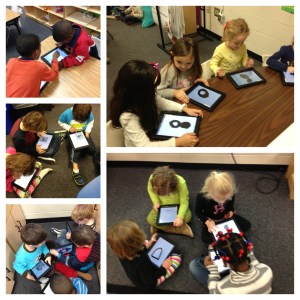
With iPads, cooperative learning is a breeze.  My kids look forward to working with others.  They love sharing, watching what their friends are doing and they love being “an expert” and showing others how to do things.  Each child has something unique to bring to the group. Because they feel confident, they all participate.  Today, we paired with another kindergarten class and my students worked with those students to teach them how to make books.  This is the second time in 2 weeks 50 kids have come together in one classroom to learn from each other.  There was plenty of conversation but there was no whining, tattling, or complaining.  One hour of no tattling in a class of 50 kindergarten students is nothing short of a miracle.  collaboration 2

As we begin to personalize learning and students are excited about what they are learning, it seems natural that many negative behaviors will go by the wayside.  As learners actively participate in the design of their learning and have a voice in what they learn, they take ownership.  They build a network of peers, teachers, and others to guide and support their learning.  Think back to the last professional development training you had that really engaged you and spoke to you…you were focused and energized, and hopefully excited about the possibilities of what you learned.  In contrast, think back to the last training you had that was not so engaging.  Did you stay focused or were you more inclined to check Facebook on your phone or talk to those around you?  Our students are no different.

As we here in the US move through our winter doldrums, let’s find ways to connect with the passions of our students.  It all starts with them.  The more we give them a choice and voice in their own learning, the less we have to use the “blood, fire and vomit” rule.  I, for one, am ALL for that!

group collaborationI’d love for you to leave a comment, subscribe to my blog, and/or share this post with a friend.

Flash Mob Writing Groups?

No matter how many plans you make or how much in control you are, life is always winging it.-Carroll Bryant

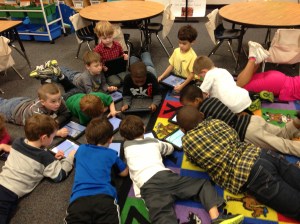
book writingMy lesson plans said something completely different.  It was unscheduled, unplanned, and… undeniably better than anything I had on today’s agenda.  You’ve heard of a Flash Mob?  A Flash Mob is a group of people who assemble suddenly in a public place, perform an unusual and seemingly pointless act for a brief time, then quickly disperse, often for the purposes of entertainment or artistic expression.  Well, That.  Just.  Happened.  No dancing or singing…this was definitely in the realm of artistic expression.  My students were working on their iPads when a group suddenly gathered in the middle of the room and started writing books.  This group (pictured above) was fully engrossed in their work.  They were discussing book topic, titles, text placement, and content. They stopped briefly, only to ask me to put on some “creative music”.   Once they started, they didn’t stop until they were finished.  Most had written a 4 page book.  Once they finished, they dispersed and went back to what they were doing before.

Flexibility is critical in a student centered classroom.  Kids need to feel comfortable making decisions about their learning…even at age 5.  Shutting down that activity because it wasn’t what I had planned for today, would have killed the creativity and spontaneity of that moment.  (Ok, that hour.)  If we are about the business of creating readers and writers, we have to give them time to read and to write.  I can’t always write on command; however, there are times when an idea strikes me and I can hardly wait to write.  It’s hard to stifle that feeling when you are inspired.

Setting up your classroom so that children can move in and out of small groups and make choices about their learning environment, helps foster a real sense of ownership. Allowing them the freedom to grab that iPad and jot down ideas, research a topic, read a book, or create their own book is what 21st century learning is all about. I will welcome a flash mob like that any day!

Here is Kaylee’s book commemorating the 100th day of school:

I Love 100! by Kaylee

I’d love for you to leave a comment, subscribe to my blog, and/or share this post with a friend.

Kids Teaching Kids with Book Creator

collageKnowledge exists to be imparted.-Ralph Waldo Emerson

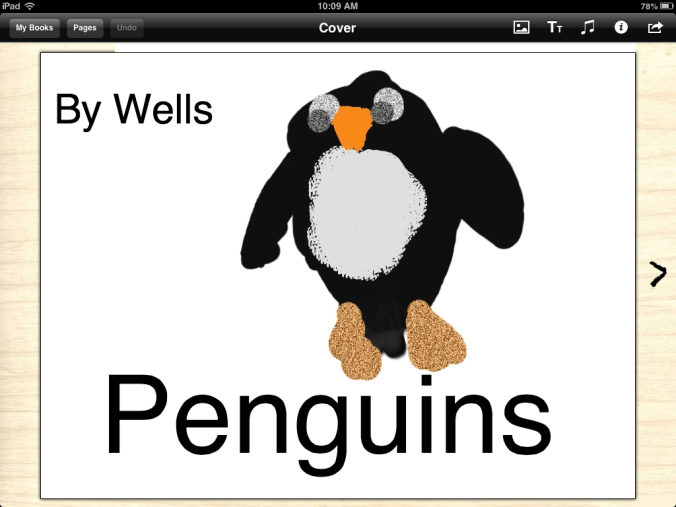
For a short time, I considered that it was highly possible I had lost my mind.  I was going to teach my kids how to use Book Creator on a Friday. Not only that, they were going to teach another kindergarten class how to use it later in the day.  Simmer down…my sanity is still intact.  I worried needlessly.  My iPad proficient five year olds created a 4 page book on Penguins in less than an hour.  They illustrated their pictures in Doodle Buddy, saved them to the camera roll, imported them into Book Creator, typed their text and exported the book to their iBooks app in the morning.  I demonstrated how to do this on the SmartBoard prior to their starting on their own.

In the afternoon, we hosted another kindergarten class to come learn from us.  At one penguin bookspoint, there were 50 kids in my classroom.  They were in groups of 2 or 4, working together.  By the end of our session, the other class had at least the book cover completed and some had their first page finished.  My children loved, loved, loved teaching them.  The engagement was instant.  Their conversations were instructive, relevant, and meaningful.  There were conversations about word choice and details in illustrations.  We even discussed getting back together and sharing our finished books with each other.

My students, in the end, wanted to know if they could show another class how to create their own books.  What a great way for all of my students to have an opportunity to be a leader.  Even the quiet and reserved students, who may otherwise be reluctant to share in front of the group, took a leadership role in the small groups.  While the finished products are going to look great, the process in getting there was priceless.  Not to be forgotten, the science facts they acquired as they wrote about penguins, their life cycle, and their habitats.  Combine that with the literacy aspect and the cooperative learning on the iPads, and I’d say today was a complete success.

Here is a screen shot of one of the book covers:

book cover

I’d love for you to leave a comment, subscribe to my blog, and/or share this post with a friend.

Creating Writers

In creating, the only hard thing is to begin; a grass-blade’s no easier to make than an oak. -James Russell Lowell

As a writer, sitting in front of a blank screen with a blinking cursor mocking the emptiness of the page, Lowell’s quote hits home.  I often have no idea where my writing is going until I begin.  Often, it goes in directions surprising even to me.  That “aha” moment…the one when you have clarity, direction, and purpose is utterly inspiring.

My students are working on making a book using the Scribble Press App.  This is our first attempt at book making with this app.  They love all of the choices of tools this app provides.  Even though it is January, my students need me to model the process.  I model the think-aloud process of deciding what to write about and I even model being stuck.  I sit in front of the blank iPad screen and think….and think some more.  I model starting out with writing about one topic and then deciding to discard that idea and go in a different direction.  I model not finishing in one sitting.  They need to see this process and learn how to work through the “not knowing”.  We are all about instant gratification…we have to learn to process, think, and wait.

Their books are a work in progress.  I am hoping they will finish by the end of this week.  The end product, however, is not the important part.  It is what is learned in the getting there.  They are fussing over fonts, color and illustrations.  They are grappling with word choice, sounding out those words, and very emergent keyboarding skills on their iPads.  The Common Core standards emphasize three anchor standards for writing:  argument, informational, and narrative.  Human beings grow up on narratives, on stories.  We live our lives hearing stories and telling them.  We plan and daydream and work and worry in narrative.  How important then, is it to spend valuable time in this genre?

As tempting as it is at times, to rush through to get something done, allowing our students to sit and stew, think, plan, erase and start again is critical to growth in writing.  We have to set the stage, model and allow time-protected time-for genius to develop.

I’d love for you to leave a comment, subscribe to my blog, and/or share this post with a friend.

Digital Letters to Santa

Maybe Christmas, the Grinch thought, doesn’t come from a store.-Dr Seuss, from How The Grinch Stole Christmas

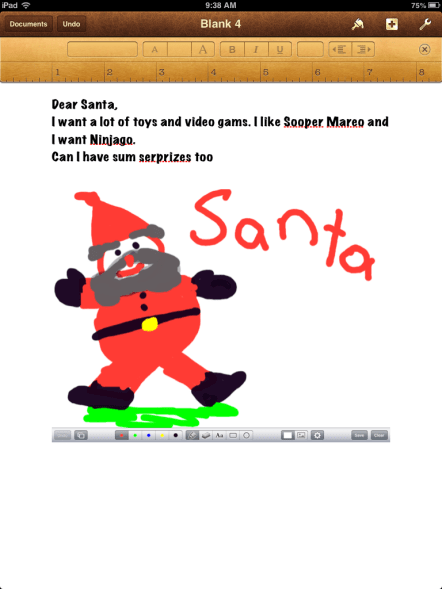
Pages SantaAh…try telling that to a class of 5 year olds.  Ever since the calendar turned to December, my students have been in Christmas mode.  In Grinch-like fashion,  I have been trying to ignore Christmas in the classroom…trying to hold out until next week which is our last week of school before winter break.  My efforts have been met with stubborn resistance.  They want to talk about, read about, sing about and write to Santa.  My steely resolve was usurped…and with apologies to Dr. Seuss, every 5 year old in my class, the tall and the small, was singing and writing without any permission at all!   Mrs. Meeuwse HADN’T stopped Christmas from coming! IT CAME!  Somehow or other, it came just the same!

So, taking advantage of the teachable moment, I turned their desire to write to Santa into a lesson using Pages.  We worked on our writing and then incorporated a drawing from our Whiteboard App.  This activity was easier in small writing groups.  I was able to work with each child on the mechanics of using Pages and how to import their artwork from their photo roll.

Sometimes we have to be willing to give into the frenzy and go with the flow.  Their general excitement was channeled into a meaningful activity that kept them engaged. They were busily writing and talking with their partners about their writing.  I have to admit, even my grinchy self enjoyed the activity. Knowing the fickleness of the 5 year old list for Santa, I imagine we will have several more opportunities to revise, refine, and edit these lists.  This will provide me a few more opportunities to incorporate the writing process.  Having the iPads, we were able to take an age-old activity of writing to Santa and move it into the digital age.

We have 7 more days until winter break.  After all of the excitement, I will definitely be ready for “a long winter’s nap” or at the very least, some Who-pudding and some Who- roast beast.

I’d love for you to leave a comment, subscribe to my blog, and/or share this post with a friend.
Building Reading Stamina with the iPad

Believe me, my children have more stamina than a power station.-Robbie Coltrane

Building stamina in young readers is definitely a challenge.  Their attention spans are short and their energy level is high.  It is important to know children well enough to link each of them to the texts that will sustain their interest, and won’t be so challenging they get discouraged.  Every good English language arts teacher knows that immersing students in reading is far more important than teaching test-taking strategies. Many are also familiar with some of the techniques for helping their students monitor their reading throughout a reading task. Some use specific lessons and strategies for helping students maintain focus and gain stamina as they read, but finding the best lessons and other resources for teaching such skills is often time-consuming and difficult, requiring more hours than teachers have for seeking out new material.

Using iPads has helped increase my students’ stamina even during the short 57 days we’ve been in school.  As students build confidence in reading short, leveled texts, they are more likely to venture into more difficult texts.  I use LAZ leveled reader apps and my own texts that I’ve created in iBooks Author to supplement the reading materials in class.  As students have a few minutes of free time, or they are in the book center, they have high interest texts to choose from on their iPads.  Having these books at their fingertips makes it easy for anytime reading.  Re-reading familiar texts also increases their fluency.

Another way to use iPads in building stamina is to celebrate progress. Without getting too caught up on the number of minutes spent reading, celebrate the time that is spent reading. Share your favorite parts of books read by reading out loud with a partner on the iPad.  Illustrate your favorite parts in the Pages app and share with your writing group.

Spending longer periods of time reading means fewer interruptions and more time reading what you love. iPads provide resources beyond your regular classroom materials to facilitate this.  As your students move into higher grades, having reading stamina will help them navigate the longer texts and assignments.

I’d love for you to leave a comment, subscribe to my blog, and/or share this post with a friend.

Doodle Buddy and Science Drawings

Touch a scientist and you touch a child.-Ray Bradbury

October and November are great months in the South.  Fall and cooler weather are a nice respite from the stifling hot Charleston summers.  It is also a great opportunity to explore fall and harvest in science.  There are many ways to create science journals on the iPad.  You can use Pages, whiteboard apps, or any number of drawing apps.  We’ve been using Doodle Buddy.  It is a free drawing app.  My students can create a drawing and save to their photo roll.  Once created, they can then import the drawing into their writing.  We like to import into Pages as well as Book Creator.

Here is an example of one child’s science journal.  We were discussing pumpkin life cycles.  After reading a book, From Seed to Pumpkin, many students wanted to draw the life cycle in their Doodle Buddy app.  From this, the child can type directly on the drawing with the keyboard or he can import it into Pages or Book Creator.  Each stage of the life cycle could be broken down into one page each, with this image above being used as the culminating page.  This is a great sequencing activity as well.

When I introduced Doodle Buddy, I connected my iPad to the SmartBoard and demonstrated how to use the app and how to save the drawing.  It is very simple to use and my students caught on immediately.  It always amazes me how engaged they are when they are creating on the iPad.  Their language was rich with inquiry and science vocabulary.  After creating, they love to share.  When they create, they are more likely to internalize important concepts.  Critical thinking is occurring.  There was no doubt in my mind after looking at their diagrams that they understood this plant life cycle concept.

By having these drawings on their iPads, they are also able to re-visit their work and add to it if interested.  Learning is extended and interest is maintained.  Even though it is still early in the school year for these young scientists, their enthusiasm for science is evident.

I’d love for you to leave a comment, subscribe to my blog, and/or share this post with a friend.