Increasing Rigor with iPads

It is no longer OK to provide the vast majority of America’s children with a fill-in-the-blank, answer-the-questions, read-the-paragraph curriculum that equips them to take their place on the assembly line.-Lucy Calkins, Pathways to the Common Core

I was recently asked to observe in a 4th grade classroom at my school.  She was implementing some new literacy strategies and wanted some feedback.  It was affirming to see the rigor and engagement of her students. It was also a good reminder of the vertical articulation that needs to occur between grade levels.  As a kindergarten teacher, I seldom get to see my students in action after they leave my classroom.

Our literacy activities involve small group work.  In my class, students read and write for a variety of purposes on their level.  These activities include reading on the iPad as well as word work in various apps and some writing on the iPad.  In the class I observed, students were using iPads to research information for a news article.  They were seeking credible sources and the author of the article.  They were jotting down important facts and comparing information.  Later in the school year, my kindergarten students will be using iPads to research information on various topics.  They will be finding facts to incorporate into their writing. I am building up to that now with iPad activities of increasing complexity with my students.

As we work diligently in our own classroom worlds to prepare our students to move up, it is important to keep a broader view.  We lay a foundation in each grade level that is built upon by the next.  It was good for me to step out of my kindergarten world into the world of “big kids”.  What I do each day is important and relevant.  I think we all need a reminder of that from time to time.

Our students face a different world of challenges than we did.  They will approach problem solving differently.  The implementation of the Common Core State Standards emphasize much higher-level comprehension skills than previous standards.  Readers of today are asked to integrate information from several texts, to explain the relationships between ideas and author’s craft.  Previous literacy efforts defined literacy in terms of basal reading programs with emphasis on seatwork.  The Common Core standards convey that “intellectual growth occurs through time, across years, and across disciplines.” While iPads alone can’t meet these standards, having a powerful, technological tool combined with strong teaching, we can meet and exceed these standards.

I’d love for you to leave a comment, subscribe to my blog, and/or share this post with a friend.
Personalized Learning with iPads

Today you are You, that is truer than true. There is no one alive who is Youer than You.-Dr. Seuss

How better to say it than this? One size that fits all doesn’t work for learners today. Personalized learning is the tailoring of  curriculum and learning environments to meet the needs and aspirations of individual learners, often with extensive use of technology in the process. Personalization may differ from differentiation in that it affords the learner a degree of choice about what is learned, when it is learned and how it is learned. This may not indicate unlimited choice, since learners will still have targets to be met. However, it may provide learners the opportunity to learn in ways that suit their individual learning styles and multiple intelligences.

Personalizing learning for each learner means they take ownership of their learning. Let’s take advantage of the iPad’s ability to challenge, engage and motivate different learners.  Students can often work on different levels within the same app.  As I look at what each student needs, based on assessments and observation, I am able to direct them to certain apps or certain activities within apps.  Teachers should be able to implement multiple paths to knowledge- having a variety of ways to help a diverse group of students learn rigorous standards.

Working in flexible, small groups for guided reading, I take notes as I see areas where students need practice.  One student may need help with word families and rhyming words, where another may need help with medial vowel sounds.  My top reading group may be ready to incorporate reading response journals using Pages as they read.  This would never be possible in a whole group instructional setting.  Having the technology of the iPads at our fingertips,  it is easier to differentiate instruction, find all opportunities for remediation to help struggling learners, and  provide enrichment to challenge the advanced student.

With iPads, we can create a Pandora Radio-like effect in education.  Each student can get a variety of educational experiences, engage in topics and activities of interest, and learners have the responsibility and ownership to choose how they learn, when they learn and where they learn.

I’d love for you to leave a comment, subscribe to my blog, and/or share this post with a friend.

Building Reading Stamina with the iPad

Believe me, my children have more stamina than a power station.-Robbie Coltrane

Building stamina in young readers is definitely a challenge.  Their attention spans are short and their energy level is high.  It is important to know children well enough to link each of them to the texts that will sustain their interest, and won’t be so challenging they get discouraged.  Every good English language arts teacher knows that immersing students in reading is far more important than teaching test-taking strategies. Many are also familiar with some of the techniques for helping their students monitor their reading throughout a reading task. Some use specific lessons and strategies for helping students maintain focus and gain stamina as they read, but finding the best lessons and other resources for teaching such skills is often time-consuming and difficult, requiring more hours than teachers have for seeking out new material.

Using iPads has helped increase my students’ stamina even during the short 57 days we’ve been in school.  As students build confidence in reading short, leveled texts, they are more likely to venture into more difficult texts.  I use LAZ leveled reader apps and my own texts that I’ve created in iBooks Author to supplement the reading materials in class.  As students have a few minutes of free time, or they are in the book center, they have high interest texts to choose from on their iPads.  Having these books at their fingertips makes it easy for anytime reading.  Re-reading familiar texts also increases their fluency.

Another way to use iPads in building stamina is to celebrate progress. Without getting too caught up on the number of minutes spent reading, celebrate the time that is spent reading. Share your favorite parts of books read by reading out loud with a partner on the iPad.  Illustrate your favorite parts in the Pages app and share with your writing group.

Spending longer periods of time reading means fewer interruptions and more time reading what you love. iPads provide resources beyond your regular classroom materials to facilitate this.  As your students move into higher grades, having reading stamina will help them navigate the longer texts and assignments.

I’d love for you to leave a comment, subscribe to my blog, and/or share this post with a friend.

FAQ’s about iPads in the Classroom

An investment in knowledge pays the best interest. -Benjamin Franklin

We have had several visi
tors from other school districts over the past few months, interested in seeing iPads at work in the classroom.  From those visits and other questions posed on this blog, I am posting today some frequently asked questions. Hopefully it will help many of you as you navigate the early waters of incorporating iPads into your classroom.

  • How did you get the money to pay for the iPads?

My school district re-purposed funds that were originally designated for replacing computers in our classrooms.  These funds were for technology modernization and rather than purchase 2 computers per class, we piloted iPads.

  • iPads vs other hand-held tablets

Clearly, iPads is my answer.  They are game-changers. They are versatile, easy to use, backed by Apple and there are tons of educational apps available for use.  Having access to the internet is critical…these are more than just e-readers.

  • How often do you use the iPads each day?

All throughout the day for a variety of activities, small group, whole group, and individual. My main focus of use is to increase achievement in literacy.

  • What if the kids get tired of them or bored with them?

OK, seriously?  They are not toys.  They are learning tools that are essential to 21st century learning skills.  If teachers teach using best practices, kids will never be bored with them.

  • How do you get the work off of the iPads?

Legit question here…it’s not always been easy.  We are still unable to email from the iPads.  The best work around at this point for me is Simple Transfer app.  Anything that can be saved to the camera roll can be transferred off of the iPad.  My other option is PaperPort Anywhere.  My kids can save work to their folders on the PaperPort app.  I can access it, print, save or email work.  I’m excited that Pages now uploads to PaperPort!

  • How often do you have breakage or damage?

In 14 months of iPad usage with 3 different kindergarten classes: ZERO. They are very careful with them and I make sure we model and teach iPad procedures regularly.

  • What are your must-have apps?

Ah….these change as I come into new apps.  Currently, I love Montessori Crosswords (ELA), Park Math (Math), Pages, Book Creator, Simple Transfer, and Whiteboard. Oh…and Starfall.  Ok, making myself stop right there.

  • How often do you sync?

In the first few months of using them, A LOT.  I was constantly finding new apps and was a syncing mad woman.  Currently, not so much.  I will sync books or photos if I want them all to have them.  I use my class wiki to get work to student iPads and they then upload to PaperPort to get them back to me.

  • What do you like most about iPads in the classroom?

What’s not to love? I can’t imagine ever teaching without them.  They take learning to a whole new level with personalized instruction.  Being able to meet each student where they are instructionally is priceless.  With 25-30 students each year, I need all of the instructional support I can get.  iPads make it possible to differentiate instruction every day.

  • Are there any drawbacks?

As to the use of the iPads: absolutely none.  The only thing that could be a drawback is the cost of apps when you multiply it out over an entire class or school.  Get your PTA involved.  Hold fundraisers, donate blood (kidding, sort of) whatever it takes to bring in some extra money for those apps.

So there you are…hopefully this provided some insight into using iPads in a 1:1 classroom.  It can seem overwhelming, but it really is manageable.  My students, even at age 5, are quite capable with these devices.  The investment is worth the cost to reach every learner every day.

I’d love for you to leave a comment, subscribe to my blog, and/or share this post with a friend.

The Joys of Children and Technology

The few wonders of the world only exist while there are those with the sight to see them.-Charles de Lint

This post isn’t technical or about favorite apps.  It’s Friday, and it’s been a tough week for me.  My sister has terminal cancer and the family has been called in.  Even amidst the sadness, my 2 year old great-niece has provided us all with some relief and smiles.

Children have a way of doing that.  They have a way of seeing things that the rest of us don’t.  Earlier this week, one of my students asked, out of the blue, “Mrs. Meeuwse, does Jesus use FaceTime on his iPad?”  *crickets*  Well, um…you see…I looked at a room of 25 inquisitive, dead serious little faces.  And then, deliverance…another child piped up with, “Jesus is a superhero.  He can do anything.” And so, there it is.  Wisdom, innocence and simplicity all in one package.

Teaching has so many golden moments.  Some are amusing, some are profound.  I love my job.

I’d love for you to leave a comment, subscribe to my blog, and/or share this post with a friend.

Press the Reset Button

Definition of Reset: 1:to set again or anew  2: to change the reading of, often to zero- Miriam-Webster Dictionary

Starting a new school year with young children requires starting anew with our kindergarten curriculum.  It means ending the previous year with children reading and writing and taking charge of their own learning then starting completely over again with children who not only don’t know classmates’ names but some still don’t know MY name.

After 23 days of school, it is easy to think we are in a groove.  Most know routines and procedures and most are figuring this whole school-thing out.  But the key word here is most. It is key because by definition, most is not all.  Yes, I still have some who are still trying to make sense of our day.  I still have some who don’t know where some things go or where to find other things.  As an adult, it is easy to think that after 23 days of school, these children should have it all together.  They should know how to turn the volume down on their iPads, how to find the math folder on the iPad, how to put it to sleep and put it away quickly.  Right?

Ah…time to hit the Reset Button.  They really don’t know how to do those things yet.  It can take up to 70 repetitions for young children to fully make a concept permanent.  It is difficult, at times, for me to reset.  Ending the previous year on such an instructional “roll” and then starting back over from zero is part of the kindergarten teacher territory, but that doesn’t mean it’s easy. It helps that those children in the class who do know how to do many things are more than willing to help their friends who can’t.

As we start a new week, it is important to remember it is only our 5th full week of school.  We are 5 years old and while we learn most things very quickly, most is not all. By slowing down and making sure all are ready with these basic skills in all areas, we can then speed up with minimal disruption.  Am I preaching to myself?  Most definitely.  But I’m pretty sure there are others out there who, like me, need to push the reset button and start today, Monday, with a fresh set of expectations.

I’d love for you to leave a comment, subscribe to my blog, and/or share this post with a friend.

Teamwork

A single leaf working alone provides no shade. -Chuck Page

Even with a full time teaching assistant in my classroom, there are times when I could use a few extra hands.  25 kindergarten students often makes me feel like an octopus with arms going in all different directions at once.  We are 14 days into the school year, nearly 3 weeks.  I have some students who immediately fell into our class routines and procedures.  By now, most know what to do…however, there are a small handful who still need guidance. They are easily confused and have that deer-in-the-headlights look when I give directions. This is not uncommon and in time, all falls into place.  Fortunately, I have a few “Mother Hens” in my classroom who know just what to do and they assist those who need a little extra help.

Using the iPads is no different.  I have many students who are already pretty iPad savvy and a few who are still working on it.  Without me asking, the students are quick to help each other and show them how to find something or do something.  As one student helps another, the peer coaching aspect strengthens both students. Students are already learning to ask a friend before asking me.

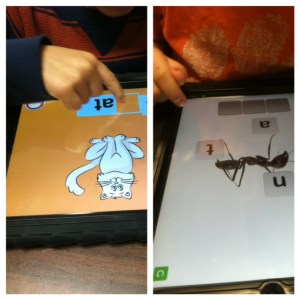
One app we have used in partner activities is ABC Magnetic Board.  It is $4.99, but with the Apple Volume Purchase Program you can get it for almost half.  The app has upper and lower case letters in 4 languages, numbers, shapes, diacritics, signs and symbols, 5 sets of toys: summer, party, night, snowy winter and Christmas, and more than 15 backgrounds.  The pictures created can be saved to the camera roll also.  We have students partner up and spell names, sight words, match upper and lower case letters, and beginning sounds using the pictures in the app.  There is a free version, but it is pretty limited.  At this point in the year with a wide range of abilities in my room, this app allows differentiation for students on different skill levels.  It also allows cooperative learning.  This app is better than the classic version of refrigerator magnets because each letter can be used multiple times (and pieces don’t get lost!)

As my students work to become “experts” on a variety of tasks and skills, knowing there is a helping hand nearby encourages children to try new things and step out of their comfort zone.  It is part of our classroom culture to work together as a family.  Family members help each other.  Watching my students work together this early in the school year, I know there will be many great things to come.

I’d love for you to leave a comment, subscribe to my blog, and/or share this post with a friend.

Going for Gold

Be firm on principle but flexible on method. -Zig Ziglar

Watching the Olympics the past 2 weeks, I’ve marveled at the flexibility of the athletes, particularly the gymnasts.  They can put their bodies into positions that seem almost super-human to me.  I can’t even bend over and touch my toes.  Their abilities come from intentional practice, training and coaching.

Flexibility isn’t restricted to range of movement with our joints and muscles.  It is also about being willing or disposed to yield.  I’ve been teaching for, well, forever it seems.  It is super easy for me to reach into my file cabinet, pull out a unit of study and go on autopilot…teaching the same lessons, using the same examples, smoothing out the same, wrinkled and faded artifacts and expecting the same answers from my students.  It is literally, a no-brainer.

The longer we teach, the easier it is to develop tunnel vision.  A few years ago, I found myself going through the motions of teaching.  I wasn’t happy but couldn’t figure out why.  My rigidity was more like rigor mortis. When I started using the iPads, I found a new spark of excitement that energized my teaching.  I found the joy of student-led learning and being open to the moment.  When I became present, I discovered how my students became more engaged.  I realized that being on autopilot is a death knell to the classroom.

To be sure, iPads required a new flexibility for me.  I still had an overarching goal but I learned to be not just accepting of student-led learning, I became expectant of it.  The beauty of this shift in my teaching was that my students exceeded even my usually high expectations.  My mantra to teachers in other grades who seem reluctant to incorporate iPads is “If my 5 year old kindergartners can do it, surely your students can also.” Just like those Olympic athletes, our own teaching flexibility requires intentional practice, training and coaching.  It starts from the top in administration.  When administrators create a culture of flexibility, team-work, and open-mindedness, then teachers feel empowered to try new things, reach beyond what they think is possible, and “Go for Gold!”

Are there parts of your life/career that are on autopilot?  Try to find one thing that you can change and allow yourself to feel energized by it.  Your enthusiasm will be contagious!

I’d love for you to leave a comment, subscribe to my blog, and/or share this post with a friend.

Comfort Zone-Exit Stage Right

I’m continually trying to make choices that put me against my own comfort zone. As long as you’re uncomfortable, it means you’re growing. -Ashton Kutcher

I return to school in 7 days.  Recently, I was asked to mentor a new teacher hired on my grade level.  My plan was to meet her at school and go over the important things she would need to know to get started.  I went to school the day before our meeting and moved my furniture and set up my classroom.  There was no way I was going to be able to sit in the chaos of jumbled furniture and plan with her.  I guess you can say I have high organizational needs.  My brain functions better when my environment is in order.

While we have different ways we approach things, whether it’s our classrooms, our homes, a new task, we all have a comfort zone in which we operate.  Our students are no different.  As I prepare for a new class of spunky 5 year olds, I am looking forward to watching them learn and grow.  As educators, we have to stretch ourselves and step outside of our comfort zones in order to innovate. In order to make a little magic.   There is tremendous enthusiasm for iPads and other technologies in education and it’s definitely part of learning’s future.  The opportunity to share information, collaborate around the world, to consume endless amounts of content and get access to information anywhere, anytime, anyplace, is a game changer that fundamentally will have a huge role in the future of the way learning takes place.

Ironically, using iPads is not out of the comfort zone of our students.  They come in ready and excited to get started.  Part of good teaching is staying a little ahead of the game.  Having a plan for implementation, and yet, allowing students to have the freedom to stretch and create is necessary for true success.  Teachers are good at planning….but not all are comfortable letting go and giving kids time to figure things out themselves.  For some, it’s threatening when students know more than they do.  The new Common Core State Standards stress the importance of student engagement in the whole brain activity of creative problem solving.

As we prepare for a brand new year, I’m thinking about how I can stretch myself and step out of my comfort zone a little. I’m looking to make a little magic.  With the iPads, the possibilities are endless.  Are you willing to stretch with me?

I’d love for you to leave a comment, subscribe to my blog, and/or share this post with a friend.

Collaboration

As you navigate through the rest of your life, be open to collaboration. Other people and other people’s ideas are often better than your own. Find a group of people who challenge and inspire you, spend a lot of time with them, and it will change your life. -Amy Poehler

What do educators talk about?  Even when not in the classroom, getting a bunch of educators together means “school talk”.  At a recent social gathering, I found myself huddling up with my teacher friends and commiserating with them about the ending of summer and the beginning of another year.  It is ironic that in a profession so centered around human interaction, teachers often find themselves feeling very isolated.

Spending time with other educators, engaging in meaningful conversations and talking through ideas is critical for effective teaching.  With the addition of new and ever-changing technologies, that collaboration is more necessary than ever.  Some teachers push through new ground effortlessly and others may need a little more guidance.  When experiencing difficulty, some teachers may feel reluctant to ask for help.  Others may feel they are the only one having difficulty.  We are quick to encourage collaboration with our own students and less likely to engage in it ourselves.

At the school district level and at my school level, we believe firmly in the “Train the Trainer” model.  Empowering teachers at their own schools builds a cadre of knowledge.  With the implementation of the iPads, the 3 of us who participated in the original pilot worked with our staff to train them.  We created a vanguard of sorts by also working closely with our school technology committee.  This committee consists of one teacher from each grade level.  This way, each grade level team had a point-person to check with first if questions or problems arose.  Our technology committee meets monthly to go over what is working and what needs attention.  Grade level teams meet weekly. During these meetings, we have a “Ten Minute Tech Time”.  We share what we are doing in our classrooms with the iPads and discuss any questions or issues that we may be having.  This built in time ensures that teachers are voicing their ideas, questions, and/or problems.  Our school district’s Ed Tech team are frequent visitors in our school and in our meetings.  They are quick to offer support, suggestions and solutions.

Teaching today is hard enough.  Collaborating with your colleagues and other educators can broaden ideas, provide support within the system and sustain teachers as we all navigate through the Technology Turnpike.

I’d love for you to leave a comment, subscribe to my blog, and/or share this post with a friend.