Raising the Bar with iPads

If you’re the band leader you ask more of yourself than anyone else, so they tend to raise the bar for me.-Kristin Hersh

If you look up the definition of the idiom “raising the bar” you will find it means to set a higher standard for people to follow.  Leaders in education are looking for innovative ways to improve student achievement by raising the bar.

H and A under tableA growing number of state and local leaders are working to redefine education in the 21st century, embracing technology and implementing creative reforms that help students customize their education. Initiatives such as blended learning, online classes, and virtual schools allow parents and educators to move away from outdated, ‘one-size-fits-all’ coursework and instead personalize curriculum to meet students’ unique needs. This is a hard shift for many who have difficulty with change or who see no reason to change.

iPads have changed the landscape of teaching and learning.  The ability to research, create, read, write and expand using these tools looks different for each child if done correctly.  I recently read an article that explored the effect of iPads on student achievement.  There was no disagreement on the engagement of students, but there were mixed thoughts on the achievement.  One teacher said the iPads take up too much of her time and she only uses them in her high school classes a few times a month.  (Wait, What?)

Whatever technology you incorporate must be a part of your curriculum.  It’s not about the apps.  It’s not about having iPad time. When adults in the workplace work on a project or assignment, they have the “what”.  They then must decide the “how”.  You look at the job and decide what tools are necessary for completing the job.  Back in the dark ages when I was in college, we hand-wrote every paper that was turned in.  Now, a handwritten essay won’t even be considered and it is turned in electronically.  Our students today will be entering the work force in the future.  They have to learn how to look at a problem and decide the best tool for solving it.

If we wait until iPads in classrooms raise every test score then they will never be purchased.  This is not a magic bullet.  We still need quality teaching and best practices.  The iPads enable us to raise the bar by meeting individual student needs…but only if the teacher empowers his/ her students to take charge of their own learning.

My grade level team works together to reflect and change. We have high expectations for our students.  They help me raise the bar in my own teaching.  How are you raising the bar?

Today, we will do exciting new things.  Let’s get to it!
Reaching Each One with iPads

boys workingBelief in oneself is one of the most important bricks in building any successful venture.-Lydia Child

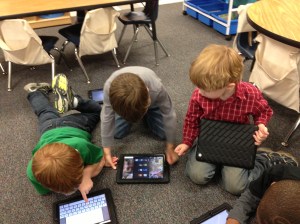
I was observing my students working independently the other day and was feeling pretty good about how far they have come this year.  During this observation, I noticed one of my students sitting quietly.  His facial expressions indicated there were problems.  I walked over to see if I could help and noticed he had done nothing.  He hadn’t even started.  As I talked quietly with him, I discovered he had no idea how to get started.

Have you ever been that one?  The one who “didn’t get it”?  I vividly remember being the one in 3rd grade who didn’t get 2 digit multiplication.  Everyone else around me got it and I felt stupid.  My teacher at the time, bless her heart, did what she thought was the right thing to do and that was call me up to the board to stand there, in front of everyone, until I understood.  I am 47 years old and have never forgotten that moment of shame and embarrassment.  Remembering that feeling, meant that how I handled the next few moments with the young man who hadn’t started his work, was critical.

One of the reasons I love having iPads in the classroom is the ability to give my kids what they need.  That means that “the one” who needs extra support can get it without the embarrassment of everyone knowing.  It also means that those who are ready to move on are able to do so without having to wait on others to catch up.  When we personalize learning for students, we are giving them what they need, when they need it, for as long as they need it.  Engagement comes when we give students voice and choice. It is hard to hear the student’s voice when we are the ones doing all of the talking.

I think it’s important for us all to remember those times when we were “the one”.  How we handle situations when students struggle can make the difference in how that student sees himself/herself as a learner for many years to come.  Utilizing technology with personalized learning helps engage learners on their own terms.  No longer do our students have to feel like they are standing alone while everyone else moves on.

Today, we will do exciting new things.  Let’s get to it!

Some Days are Like That

The greatest sign of success for a teacher is to be able to say, “The children are now working as if I did not exist.” -Maria Montessori

For the record:  Heloise does not have a helpful hint for the best way to remove vomit from an iPad.  Being faced with this very dilemma recently, I realized I had no lifestyle guru to turn to for help.  I just had to push up my sleeves and get to cleaning it.  Into every kindergarten teacher’s life, a little vomit (or other body fluid) must fall.

Some days are like that…a lesson bombs on the same day your principal comes to observe, whining and tattling rules the day, no one seems to be listening, and someone vomits on an iPad.  The best part of those days is when they are over.  A recent visitor to my classroom marveled at how well behaved my students were and how they were so independent.  She noticed they do not interrupt me when I am teaching small groups.  She asked if they were like this all the time or just because there are visitors in the room.  I replied that most days they are independent and well behaved.  I work diligently in the beginning to make them as independent as possible.  Personalizing their learning and giving them the voice and choice to make their own decisions about their learning is a big part of creating that independence.  However, we all have days that are not stellar.

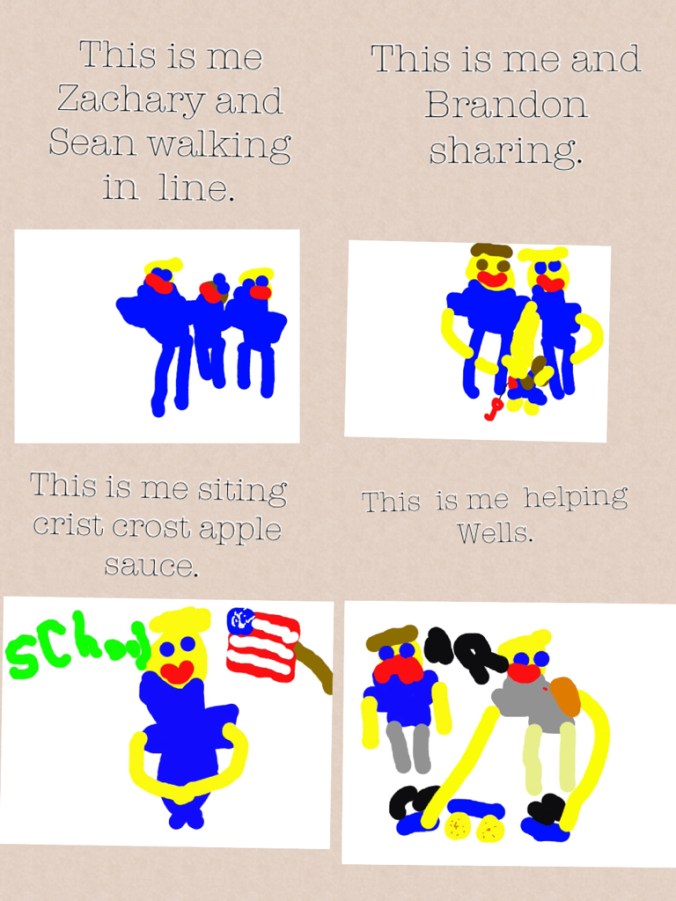
IMG_0366Recently, we were having so many problems with kids not getting along we re-visited our Code of Cooperation.  We discussed where we were falling short and what we could do to correct the situation.  We talked about what each of our agreements would look like.  What does it look like when we listen to others?  What does it look like to be nice?  After our discussion, the children made a Pic Collage to demonstrate their understanding of what our Code of Cooperation should look like.  Here is an example:

HREF

While this won’t solve all of the world’s problems, it helps from time to time, to re-visit expectations and reconnect with what we are about.  It helps us as teachers to return to our fabulous selves and remember that, while “vomit” happens, tomorrow can be a better day.

Here is a great video for when you have one of those days:

Today, we will do exciting new things.  Let’s get to it!
It’s a New Day…I’m Still Me

Every new day is a once in a lifetime event. How much more exciting would our lives be if we embraced this truth and lived accordingly?-Steve Maraboli

Tuesday, February 19th was an ordinary day.  School, cook dinner, answer emails and play my new game obsession Candy Crush.  (I can NOT get beyond level 30!) I had checked my email obsessively the last 3 weeks waiting to hear some news, and another day looked as if it would pass without hearing anything.

The email notification on my phone reluctantly pulled me away from attempting to crush those candies.  The subject line was: ADE Class of 2013-United States.  Holy cow…here it was.  The long awaited email.  I was home alone when I opened it and saw the first line: Congratulations and welcome to the Apple Distinguished Educator (ADE) Program.  I stopped reading and started yelling.  My poor dog was certain I had lost my mind.  This application had been turned in since November and the waiting was excruciating.

So what does all this mean? ” Apple Distinguished Educators (ADEs) are part of a global community of education leaders recognized for doing amazing things with Apple technology in and out of the classroom. They explore new ideas, seek new paths, and embrace new opportunities. That includes working with each other — and with Apple — to bring the freshest, most innovative ideas to students everywhere.”-Apple

I’m thrilled beyond words to be a part of this community and can’t wait to learn from the best of the best.  The honor is incredible, but more importantly, the ability to work with some of the most amazing educators in the world is priceless. ADE

Wednesday, February 20 was back to reality.  Still wearing my huge smile and excitement from the night before, it was apparent my children didn’t know the awesomeness of this distinction. They had no idea anything was different from the day before.  Because it wasn’t.  I’m still me.  I’m excited at the new role I will be wearing as an ADE and the possibilities of what new things I can bring into my classroom, but we are back to business.

My kids ask me each day “What will we learn today?”  My answer is always “Today, we will do exciting new things.  Let’s get to it!”

Thanks to all of you for all of the blog and Twitter love!  We have exciting new things to do…let’s get to it!

I’d love for you to leave a comment, subscribe to my blog, and/or share this post with a friend.

We’ve Only Just Begun

“The way to get started is to quit talking and begin doing.” -Walt Disney

One of the best gifts I received this holiday season was the notification from Apple that my school, Drayton Hall Elementary,  met all of the criteria for Apple Distinguished School.  The application was rigorous as was the competition.  We were thrilled to be awarded the distinction.  While many see awards like this as the culmination of hard work, I see it as just the beginning.

I’m pretty good at pushing boundaries.  When I was given the iPads back in January, 2011 as one of 3 pilot teachers for the entire school district, I really had no rules or expectations.  My only limitations were those created by my very own self.  Since I was given a class set of iPads, (thank goodness the district’s Ed Tech staff believed in kindergarten having 30 iPads!) I took full advantage of the opportunity and  looked beyond the “broadcast nature” of the iPad.  More than a presentation tool, my students fully interacted with the iPads.  In small groups, we found individual support opportunities that bolstered those students who were in the bottom tier.  As student engagement was instant, I looked for ways to incorporate the iPad into every aspect of our instructional day.  As the pilot moved beyond the 3 original classes, the staff at my school embraced the technology and zeroed in on the potential these devices hold.

While I know many schools are just getting iPads and perhaps aren’t able to fund them 1:1 at this time, I hope the teachers will continue to voice their desire for them.  The iPad is designed to be a one-user device.  The true power comes when each student holds his/her own iPad and is able to interact with it, work with materials on the child’s own level, and create and save on it.  Sharing, while perhaps necessary for a time, isn’t  ideal.  You can’t expect to see the results we are seeing at my school without a 1:1 implementation.  If you are unable to fund a whole school, find your early adopters on staff and let them have at it.  These people make things happen!

While my holidays are coming to a close next week, I’m excited about what the remaining 5 months of school hold.  With a new year beginning, let’s follow Walt Disney’s advice:  Quit talking and begin doing!  I’m proud of my school for earning the Apple Distinguished School honor.  This isn’t the end,  we’ve only just begun!

I’d love for you to leave a comment, subscribe to my blog, and/or share this post with a friend.

Does Santa have a GPS?

“To the top of the porch, to the top of the wall, now dash away! Dash away! Dash away, all!”  – Santa Claus in Clement C. Moore’s Twas the Night Before Christmas.

Today, our class went to see The Polar Express with approximately 4,683 other children.  (I exaggerate, but not by much.)  My kids were very excited and after the movie, I overheard these conversational tidbits:

Child 1: Did Santa’s sleigh have GPS?  I didn’t see one in the movie.

Child 2: Maybe Santa uses his iPad.

Child 1: Mrs. Meeuwse, does Santa have an iPad?

Me: Um, hmmm….Well, I guess he does.  I don’t really know for sure.

Child 2:  Can’t you Google it? (I did Google it and they were pleased to see the photo inserted above as it has a place for his iPod in the sleigh.  Even Santa can’t be without his iTunes.)

Child 1: If he does have one, he can just use the map app to find my house, right? That’s probably where he keeps his Christmas list.

Christmas 2.0 is very different from my experiences growing up.  Technology has infiltrated even our most magical of life’s experiences.  While I love my technology, my iPhone, my iPad, my MacBook, I find myself torn at what appears to be the loss of some holiday magic.  I remember tiptoeing into my living room as a 5 year old child and seeing that Santa had come.  The tinsel on the tree sparkling with the lights…I just accepted that Santa had come and didn’t question his ability to fly around the world and deliver presents.  I loved hearing my dad read Twas the Night Before Christmas and being allowed to open one present on Christmas Eve. (Which was usually pajamas.)  My southern upbringing left me thinking that Santa said, “Dash away! Dash away! Dash away, y’all.”

While I am grateful for all of the wonderful advantages of technology in our classroom, I would like to keep Christmas old school…unless Santa would like to bring me one of those robot vacuum cleaners…I mean, I have been very good this year. Ho, Ho, Ho!

I’d love for you to leave a comment, subscribe to my blog, and/or share this post with a friend.

Building Reading Stamina with the iPad

Believe me, my children have more stamina than a power station.-Robbie Coltrane

Building stamina in young readers is definitely a challenge.  Their attention spans are short and their energy level is high.  It is important to know children well enough to link each of them to the texts that will sustain their interest, and won’t be so challenging they get discouraged.  Every good English language arts teacher knows that immersing students in reading is far more important than teaching test-taking strategies. Many are also familiar with some of the techniques for helping their students monitor their reading throughout a reading task. Some use specific lessons and strategies for helping students maintain focus and gain stamina as they read, but finding the best lessons and other resources for teaching such skills is often time-consuming and difficult, requiring more hours than teachers have for seeking out new material.

Using iPads has helped increase my students’ stamina even during the short 57 days we’ve been in school.  As students build confidence in reading short, leveled texts, they are more likely to venture into more difficult texts.  I use LAZ leveled reader apps and my own texts that I’ve created in iBooks Author to supplement the reading materials in class.  As students have a few minutes of free time, or they are in the book center, they have high interest texts to choose from on their iPads.  Having these books at their fingertips makes it easy for anytime reading.  Re-reading familiar texts also increases their fluency.

Another way to use iPads in building stamina is to celebrate progress. Without getting too caught up on the number of minutes spent reading, celebrate the time that is spent reading. Share your favorite parts of books read by reading out loud with a partner on the iPad.  Illustrate your favorite parts in the Pages app and share with your writing group.

Spending longer periods of time reading means fewer interruptions and more time reading what you love. iPads provide resources beyond your regular classroom materials to facilitate this.  As your students move into higher grades, having reading stamina will help them navigate the longer texts and assignments.

I’d love for you to leave a comment, subscribe to my blog, and/or share this post with a friend.

FAQ’s about iPads in the Classroom

An investment in knowledge pays the best interest. -Benjamin Franklin

We have had several visi
tors from other school districts over the past few months, interested in seeing iPads at work in the classroom.  From those visits and other questions posed on this blog, I am posting today some frequently asked questions. Hopefully it will help many of you as you navigate the early waters of incorporating iPads into your classroom.

  • How did you get the money to pay for the iPads?

My school district re-purposed funds that were originally designated for replacing computers in our classrooms.  These funds were for technology modernization and rather than purchase 2 computers per class, we piloted iPads.

  • iPads vs other hand-held tablets

Clearly, iPads is my answer.  They are game-changers. They are versatile, easy to use, backed by Apple and there are tons of educational apps available for use.  Having access to the internet is critical…these are more than just e-readers.

  • How often do you use the iPads each day?

All throughout the day for a variety of activities, small group, whole group, and individual. My main focus of use is to increase achievement in literacy.

  • What if the kids get tired of them or bored with them?

OK, seriously?  They are not toys.  They are learning tools that are essential to 21st century learning skills.  If teachers teach using best practices, kids will never be bored with them.

  • How do you get the work off of the iPads?

Legit question here…it’s not always been easy.  We are still unable to email from the iPads.  The best work around at this point for me is Simple Transfer app.  Anything that can be saved to the camera roll can be transferred off of the iPad.  My other option is PaperPort Anywhere.  My kids can save work to their folders on the PaperPort app.  I can access it, print, save or email work.  I’m excited that Pages now uploads to PaperPort!

  • How often do you have breakage or damage?

In 14 months of iPad usage with 3 different kindergarten classes: ZERO. They are very careful with them and I make sure we model and teach iPad procedures regularly.

  • What are your must-have apps?

Ah….these change as I come into new apps.  Currently, I love Montessori Crosswords (ELA), Park Math (Math), Pages, Book Creator, Simple Transfer, and Whiteboard. Oh…and Starfall.  Ok, making myself stop right there.

  • How often do you sync?

In the first few months of using them, A LOT.  I was constantly finding new apps and was a syncing mad woman.  Currently, not so much.  I will sync books or photos if I want them all to have them.  I use my class wiki to get work to student iPads and they then upload to PaperPort to get them back to me.

  • What do you like most about iPads in the classroom?

What’s not to love? I can’t imagine ever teaching without them.  They take learning to a whole new level with personalized instruction.  Being able to meet each student where they are instructionally is priceless.  With 25-30 students each year, I need all of the instructional support I can get.  iPads make it possible to differentiate instruction every day.

  • Are there any drawbacks?

As to the use of the iPads: absolutely none.  The only thing that could be a drawback is the cost of apps when you multiply it out over an entire class or school.  Get your PTA involved.  Hold fundraisers, donate blood (kidding, sort of) whatever it takes to bring in some extra money for those apps.

So there you are…hopefully this provided some insight into using iPads in a 1:1 classroom.  It can seem overwhelming, but it really is manageable.  My students, even at age 5, are quite capable with these devices.  The investment is worth the cost to reach every learner every day.

I’d love for you to leave a comment, subscribe to my blog, and/or share this post with a friend.

Classroom Wikis and iPads

If you have knowledge, let others light their candles in it. -Margaret Fuller

Wikis are tools for taking student and teacher collaboration to the next level.  The most famous wiki is Wikipedia, an online encyclopedia created by users from around the globe. Wikis are also increasingly being used by the corporate world.   eBay recently added wikis to its auction site so members can coauthor articles about buying and selling. Not surprisingly, K-12 schools are also taking advantage of the opportunities for “collaborative construction” that wikis provide.

I have used Wikispaces to create a free class wiki for my students. Wikispaces is free for K-12 educators and is free of advertising.  It is also user friendly and a good place to start if you haven’t used wikis before.   I simply upload PDF documents to the wiki for my students.  They have a shortcut to the wiki on their iPads.  One touch takes them to the wiki and they are able to download the document into our DocAS app.  Any PDF annotating app can be used.  My students can complete an assignment,  math practice page, or a written assessment on the DocAS app and then I can either upload it to PaperPort for printing or emailing.  I can also save it to the camera roll and use the Simple Transfer app to retrieve their work.

Another benefit to using a wiki is I can upload PDF readers for my students.  I downloaded several word family books and sight word books at Hubbard’s Cupboard website. The children downloaded them from the wiki into their iBooks app.  Now, along with the books I have written for them in iBooks Author,  they also have PDF books on their bookshelf.  This gives them several books right at their fingertips they can read any time.

Using the wiki also reduces the amount of copies made in my classroom.  I can keep a copy of the student work from the iPad if I choose to.  Wikis are a convenient, efficient, and cost-effective way to provide learning materials to my students.  I have also created wikis for various committees on our staff.  This is an easy way for us to share meeting agendas, materials and other ideas.

I encourage you to try using wikis in your classroom.  Wikispaces makes all education pages private and can only be accessed by invitation only.  This is a secure means of encouraging collaboration and sharing knowledge.

I’d love for you to leave a comment, subscribe to my blog, and/or share this post with a friend.

A Simple Way to Get Work Off of iPads

Our life is frittered away by detail. Simplify, simplify-Henry David Thoreau

One of my biggest challenges with the iPads is getting student work off of the iPad.  Our emailing ability has not come to fruition as I had hoped and many apps just don’t work with Paper Port.  I keep thinking it just shouldn’t be this difficult to get the work off of the iPad!

Enter my new favorite app…Simple Transfer. This $1.99 app is the easiest way of transferring your Photos and Videos to computer and other iOS devices via WiFi. No need for cable, iTunes or extra software.  Yesterday, I transferred a student video from the iPad to my laptop.  It took mere minutes.  Here are the highlights:

View all your photo albums and videos on your computer and download them as zip file via WiFi

★ Send multiple photos and videos from your computer to your device

★ Transfer any number of photos and videos between iOS devices (iPhone, iPad and iPod Touch), select an album and tap on “Select All” to transfer all your photos/videos

★ Ability to create new albums and transfer to photos/videos to other albums

★ Photos are transferred with full resolution including metadata and videos transferred with the highest quality

★ No limit on the number or size of the photos/videos you transfer between devices or computers

★ Slideshow photo albums on your computer’s browser

★ Pay only once to install the app on all your iOS devices (iPhone, iPad and iPod Touch)

Ahh…for a Monday morning, I could use a little simplicity.  Couldn’t you?

I’d love for you to leave a comment, subscribe to my blog, and/or share this post with a friend.