Using iMovie in the Classroom

When you make a film you usually make a film about an idea. -Sydney Pollack

I think almost everyone enjoys a good movie.  The cost of going to the theater, however, is becoming terribly cost prohibitive.  The last movie I saw in the theater was Lincoln.  It was a great film and it renewed my interest in the history of the Lincoln era and the Civil War.  Living in Charleston where the Civil War began, I am able to walk on the very cobblestone streets that Union and Confederate soldiers trod.

iMovieBringing topics alive to our students is difficult…especially historical topics that are far removed from our students day to day reality.  Looking at a Social Studies text with illustrations and images of historical figures isn’t always very engaging. iMovie is an app that can be used across all grade levels.   A 4th grade teacher in my school has her students use iMovie to demonstrate their learning.  A project on Abolitionists involved students using Book Creator to create a book on their chosen Abolitionist and many chose to create an additional project in iMovie.  Here is one student’s iMovie on Harriet Tubman:

Wow…this blew me away.  A nine year old created that.

Teachers can also use iMovie as a tool for introducing content in a meaningful way.  Students are far more likely to be interested in topics when introduced like this:

The fairy tale clips were downloaded from You Tube and inserted into iMovie.  The clips were trimmed and text frames were added.  In this movie, the clips are from familiar movies on which students can anchor their learning.  This 4th grade teacher uses this iMovie to introduce her thematic unit.  What a great way to grab students’ attention and engage them from the beginning.

While I have had my students create iMovies to demonstrate learning, it hadn’t occurred to me to use them for instruction and content delivery.  After these are created, students can access them and re-play them if needed for instruction.

I encourage you to explore iMovie from the instructional side. It will definitely be on my To-Do List for the fall!

Today we will do exciting new things. Let’s get to it!

End of the Year Wrap Up

Waiting makes me restless. When I’m ready, I’m ready.-Reba McEntire

monster“Mrs. Meeuwse, my brain and my butt feel all jiggly.”…  And can’t we all relate to that? We have 7 days of school remaining and these kids are ready.  In fact, I’m not sure if the dinosaur drawing to the left is really a dinosaur or a portrait of me the last few days.  I may or may not be a little cranky…

To be sure, we are continuing our daily routine as much as possible for as long as possible.  We are busy readin’ writin’ and ‘rithmaticin’ daily.  The problem is these brilliant kindergartners are-Caps Lock- DONE,  ready to move on, needin’ to bounce, DONE.

So, in order to preserve my sanity, I came up with the idea that we needed to work on a project.  An end-of-the-year-what-have-I-learned project.  The idea was well received and they quickly wenthope and ella to work sketching out their plan.  They still like to make their plans on paper.  They have the choice of how to present their project.  Some are choosing Explain Everything, some, iMovie, some Book Creator and some Pic Collage.  I needed to intervene only once…a loud chorus of “None of your business!” rang out from a group of girls working together when a rogue boy intruder came by to see what they were doing.

Waiting makes me restless.  It definitely makes 5 and 6 year olds restless. When they are ready, they are ready. What better way to wrap up the year, than to have students share what they have learned?  Some are still working on their projects and it may go on through the week.  Here is one group that made an iMovie. They planned out their script and did it all themselves.  They are already talking about what they want to add to it. They said this is their “rough draft”.

We will have a sharing time so that all groups can show their work.  Some chose to work by themselves on the project and that’s ok too. Sometimes you feel like a nut, sometimes you don’t.  What matters, is that even up to the end, we are working together and students have the ability to choose. When teachers find ways to nurture these inner motivational resources, they adopt an autonomy-supportive motivating style.

All of that to say…the count down is on.  The natives are restless and we need to stay busy.  An end of the year project is just what we need to get us through the crazy.

Today we will do exciting new things. Let’s get to it!

Time To Call An Expert

In learning you will teach, and in teaching you will learn-Phil Collins

Under phylogenetic taxonomy, dinosaurs are usually defined as the group consisting of Triceratops, Neornithes [modern birds], their most recent common ancestor (MRCA), and all descendants.  It has also been suggested that Dinosauria be defined with respect to the MRCA of Megalosaurus and Iguanodon, because these were two of the three genera cited by Richard Owen when he recognized the Dinosauria.

IMG_0484Um…what?  I am no expert on dinosaurs. I know enough to get by, but I am completely unimpressive to Tre.  Tre is my in-class dino-phile.  He knows all, and I do mean all, about dinosaurs.  He has tried hard not to look at me condescendingly this week as we learn about these “terrible lizards”.  Tre has written about, talked about, read about, and drawn about dinosaurs this whole year.  You can imagine his bliss as we all focus on them this week.

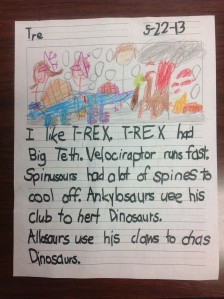
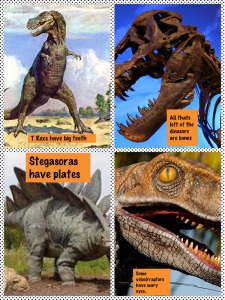
IMG_0482While a lot of my students are knowledgeable about dinosaurs, there are a lot of misconceptions.  It is hard for them to comprehend that dinosaurs pre-existed humans. We are learning from our work and we are learning from each other.  As always, we have voice and choice in our learning.  Tre chose to write about dinosaurs (above) on paper.  Another student chose to make a Pic Collage (at right).  Others chose to make an Explain Everything.  (see bottom of page).

Dinosaurs are always a topic of great interest.  Using  surveys at the beginning of the school year is a good way to find out about your students’ areas of interest.  This makes them part of the curriculum planning process and part of the decision-making process in their learning.  In the learning community of this classroom, the students learn from me, I learn from them, and they learn from each other.  We all have expertise in something and by giving Tre the opportunity to shine this week, he is buoyed by the confidence of his classmates.  My students all know who to go to as the “Expert” of various things in our class.  This gives my students responsibility, buy-in, leadership and best of all…it forces them to work on solving their own problems rather than coming to me all the time.

I’ve said before that the Explain Everything app is awesome.  (Created by a fellow Apple Distinguished Educator). It really gives you a sense of what a child is thinking when they have to explain their thinking.  Here is Hope, explaining everything about dinosaurs. She is definitely one of my class experts on this app.

In what area(s) are you an expert?  Do your students know who the experts are in your classroom? Do student interests help drive your curriculum choices?  All of these are good questions to reflect on as many of us are ending the school year.

Today we will do exciting new things. Let’s get to it!
Reaching Different Learning Styles With The iPad

We learn to do something by doing it.-John Holt

I’ve been teaching myself Spanish.  I’ve used a variety of methods, including Rosetta Stone.  All have taught me some good basic Spanish; however, nothing has helped me more than having actual conversation in Spanish.  Well, conversation may be a bit overstated…I’m ok as long as the other person speaks very slowly and we only use the present tense.  It’s definitely a process.

How do you learn best?  For me, it depends on what I am learning.  Sometimes I need to take notes, other times I need to think out loud.  Some things are easier to learn with another person while with other things, I need to be alone.  My guess is most of us have different styles for learning depending on what it is we are working on.

Our students are no different.  They all learn different things in different ways and at different rates.  Kids today learn from a variety of sources.  They learn from television, peers, computers, video games, and social media.  Technology in our classrooms allow our students to explore different approaches to learning.

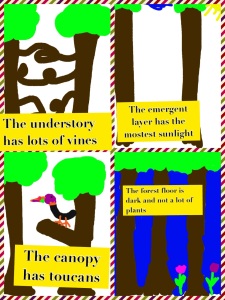
We have spent some time learning about the rainforest.  I recently blogged about how my students use planning sheets to map out their day and their learning experiences.  To share some of their knowledge gained about the rainforest, my kids chose which creation app to use and then demonstrated their knowledge through the iPad. Below are ways 2 different children chose to share with me what they have learned.

rainforest pic collage

popplet rainforest

One child chose to use Doodle Buddy and Pic Collage and the other chose to make a Popplet and import it into a Pages document. Other students in my class chose different ways.  A few chose Explain Everything, a few chose Book Creator and some chose to use drawing paper, crayons and pencils.  When students have choices they see themselves as participants and contributors to their own education.

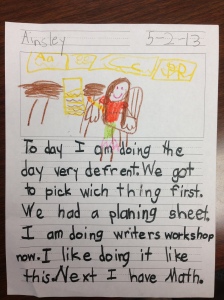
My students, even in kindergarten, like the ability and the responsibility of making these choices about their school day.  Some of the choices given to them are “must-do’s” and some are “may-do’s”.  One child wrote about planning her day in Writer’s Workshop.

PL writingMotivating students to achieve can be difficult in this hyper-paced world.  Giving students choices to work and learn in the manner that best suits them makes them stake holders in their own education.  One of the best ways to learn something is by doing it.  Let’s go for it!

Today we will do exciting new things. Let’s get to it!
What is Your Super Power?

We are what we repeatedly do. Excellence, then, is not an act, but a habit.-Aristotle

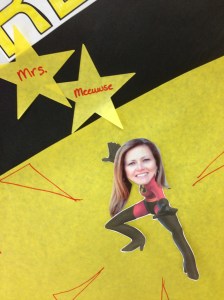
When wsuperheroas the last time you were an action figure Super Hero? I ask, because I am apparently one today. It is Teacher Appreciation Week and my room mom decorated my classroom door with pictures of my assistant and me dressed as The Incredibles. It was particularly exciting to my kids to see us on the door like that…and I must admit, I’m kind of digging the whole super- ripped, super hero body going on there.

I’m not a Super Hero in real life, nor do I play one on tv, but there are times when we must don our Super Hero apparel and create magic in a classroom full of young children. Engaging students today is no easy feat. There are many things that compete for their attention. Even with iPads, there are times when I look around my classroom and wonder what planet I just landed on because those children are NOT my students!

I find when I am using our creation apps (Explain Everything, Educreations, Pic Collage, Book Creator, iDiary, etc…) my students are far more engaged and tend to become mini-super heroes themselves. Their work is better, the content is deeper, their conversations are richer. These are not mindless apps that keep children occupied like a video game. They start with a blank canvas and end with a brand-new creation that wouldn’t have been possible without the technology. This blank slate-to-masterpiece approach, has transformed our classroom and how we learn. We are working on the habit of excellence.

Thomas2My kids love to learn and they love to create. Yes, Thomas is under the table working on his masterpiece. He likes it there because he can work undisturbed. Look at his face.  Is there any doubt he loves what he is doing?

Happy, engaged children make this Super Hero pretty happy. Creating the habit of excellence starts on day one in your classroom. Examine your classroom and see if you have created a habit of excellence.

What are your super powers?

Today we will do exciting new things. Let’s get to it!
Directions At Their Fingertips

Read the directions and directly you will be directed in the right direction. -Lewis Carroll

I know there are a million jokes about a certain gender  *ahem* not wanting to stop and ask directions.  I am one of those people who don’t like to read the directions.  I tend to jump right in and when all else fails, I read the directions….and if Dr. Phil were asking, I would have to answer that hasn’t always worked out so well for me.

Our students need directions all day and they look to us for them.  Sometimes they need those directions repeated once and sometimes multiple times.  It can be difficult to fulfill that need when there are others who also need your time and attention.  Part of personalized learning, however, is giving them what they need, when they need it.

I’ve started recording directions with my iPad for each of my literacy centers and putting them in a book in the Book Creator app. This week we have been learning about the Rainforest.  I created a video for my vocabulary center, journal center, reading center and word work center.  These are then put in Book Creator.  I named it Rainforest Centers and saved it to the Box App.  My kids go into Box and save it to their iBooks.  The directions are there for them whenever they need them.  They can put their ear buds in and listen as many times as they need.  The best part for me is twofold: 1. They don’t have to interrupt me to ask for directions and 2. Once the book is created, I can reuse it next year if I want.

Ultimately, my plan is to create 2 or 3 sets of directions for each center to benefit students working on different levels, high, medium and low.  Each group would have different directions depending on their abilities.  These direction books could also be created for math as well.

I chose Box because this required the fewest steps for my kindergarten students to complete to access the videos on their own. After all, it is meant to be done without my help.  Another ADE friend of mine in Maine uploads her videos to You Tube and creates QR Codes.  However you choose to do it, simplicity for younger students is a must.

So, while I am working on trying to be better about reading directions before doing something, my students can benefit from having directions at their fingertips whenever they need them.

Today we will do exciting new things.  Let’s get to it!
Organizing for Writing on the iPad

Why do anything unless it is going to be great? -Peter Block

We have been learning about the rainforest and my students are excited and engaged in learning all about the animals in the various layers.  Recently, the students wanted to write about the rainforest and they seemed to be having trouble narrowing their focus.  Someone said, “My brain is all busy with so many animals.”

poppletAs adults, it can often be overwhelming as we try to process large chunks of information.  I have to make lists or use sticky notes to keep it all straight.  We all have different strategies for managing the information and processing it.  Young children need to be taught how to organize themselves and their thoughts for writing.

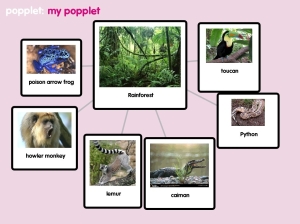
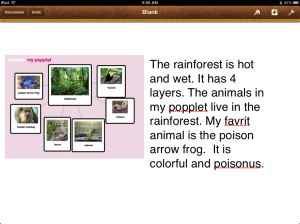
One of the apps we use as a visual organizer is Popplet LiteIt is a free mapping app that allows you to brainstorm and capture your thoughts quickly.  The full version of Popplet is $4.99 and offers many other options, including online collaboration, however, the lite version is just fine for our uses.  The popplet above, was created by a student to help her organize her thoughts on writing about the rainforest.  She saved that to her camera roll and then imported it into Pages to write.  pages and popplet

This is her first page of writing.  She wants to add a new page for each of the animals shown in her Popplet.  By adding the Popplet to her Pages document, she now has a visual reminder of what she wants to write about. She can just continue to refer back to it.

Each child had a choice in how they wanted to share their knowledge.  Some choose Book Creator, some chose Pic Collage and some chose Pages.  They all went on Safari and found the images they wanted and saved them to their camera roll.  They also had a choice to organize their pre-writing thoughts in Popplet or on paper.

Because they have choice in this activity, they are very engaged and excited to share with each other what they’ve learned.  The finished products will be reflective of their creative energies and knowledge gained.  It will be far superior work than if I had dictated how and what they would do…after all, when they have choice, they take ownership.

If we are going to ask our students to demonstrate what they know, it should be in meaningful ways so that in the very act of demonstration, they are extending their learning.  Getting organized is a great place to start!

Today, we will do exciting new things.  Let’s get to it!
Using iPads to Transform Teaching and Learning

Every great advance in science has issued from a new audacity of imagination.-John Dewey

ThomasOne of the great things I’ve noticed in the last 2 years is how my teaching has evolved with the use of the iPads.  It’s been a gradual shift, but the way I am using them now is different than the first pilot year in 2011.

In the beginning, I was focused on integrating the iPads into our day and was very much “app” oriented.  We had a lot of success that first year and my class data reflected that.

A subtle shift began last year when my students started taking charge of their own learning.  It wasn’t exactly planned, but the environment was supportive and I was open to their ideas.  Soon, they were creating content and not just interacting with apps.  They were blogging, writing, and reading on the iPad. I was thrilled with the student-centered learning environment.

This year, I’ve learned from my students, we’ve raised the bar, and kids continue to create their own content.  They are teaching other students in other classes and other grade levels, and they are articulating their learning in a variety of ways.  They are choosing how they want to demonstrate their learning and I am facilitating their choices.  I indicate what skills we are working on and they decide how they want to learn it and how they want to demonstrate their learning.  Their choices are far more involved and detailed than anything I would’ve imagined.  They are integrating multiple apps to create a finished product.  They can articulate what they are learning and how to demonstrate their learning.

Here is an example from Explain Everything.  This child was demonstrating plant parts.

I have no idea what next school year will bring (and goodness knows, I am looking forward to enjoying my summer break!), but the outlook is bright.  I am excited about learning from the other Apple Distinguished Educators this summer at the institute and bringing that knowledge back to my classroom.

Wherever you are in your classroom journey, it’s important to reflect on where you are and where you’ve been.  It’s important to celebrate your successes, no matter how small, and then be willing to move forward and try new things.  Daring to imagine the possibilities and being willing to change is not just transforming to your own teaching, it will transform your classroom in ways you never thought were possible.

Today, we will do exciting new things.  Let’s get to it!
In Their Own Words with Book Creator

Storytelling is the most powerful way to put ideas into the world today.-Robert McKee

Lessons from PeteChildren love to listen to stories.  They are also pretty adept at retelling them.  Often, the re-telling is far more interesting than the original.

One of our Common Core standards in kindergarten is that the child will retell a familiar story, including key details.  This week in our shared reading, we read Pete the Cat by Eric Litwin. There are many lessons to be learned from Pete and the children have enjoyed reading and re-reading this story.  They’ve loved singing his song along with him. We made the Lessons From Pete anchor chart yesterday.

Today, the children decided to make a book about Pete the Cat and creating pic collagehis new white shoes as a retelling.  They used a planning grid to map out their stories.  In Book Creator, they designed the cover and wrote their re-telling.  They illustrated their book by drawing in Doodle Buddy.  Once they finished their entire book, they went back and recorded themselves reading the story (and singing Pete’s song.) Here is a link to Eva’s Pete the Cat retelling.  I love her use of expression as she reads.

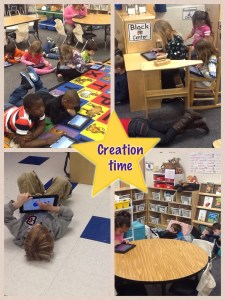
This activity was initiated by the kids and planned out by them.  They spent most of the day, off and on working on this project.  They were delighted with the fact that they came up with “the lesson” and were in charge of carrying it out.  The Pic Collage above shows them in their creative process.  They were spread out and deep in thought. From the collaborative work and rich conversations during their time working on the planning sheets, to the creation of their book and recording their own voice to retell the story, it was an amazing activity and not a bad way to end our week with Pete.

I could have had the children sit and retell me a story easily enough.  But it was so much more meaningful by having them do this in their own way.  Voice and Choice…the school work of champions…and as Pete says, “It’s all good.”

Today, we will do exciting new things.  Let’s get to it!

Dear Diary

For any writer who wants to keep a journal, be alive to everything, not just to what you’re feeling, but also to your pets, to flowers, to what you’re reading-May Sarton

I always liked the idea of a journal.  I say the idea of a journal because, despite my best intentions, I can’t seem to keep at it.  I always start with great enthusiasm but then it fades and I put it aside. I think it’s because my hand gets tired of writing and my writing is pretty messy.  I love paper and pens and beautiful blank books with endless lines just waiting for my life stories to be recorded.  A friend of mine gave me a beautiful leather bound journal that I love to hold and look at and imagine all of the things I will probably never write in there.   This blog is the closest I will come to a real journal, I’m afraid.

My students journal daily as part of their center time.  They have a choice of writing on paper or writing on their iPads.  We use an app called iDiary for Kids.  iDiary is a journaling platform where students can write personal journal entries, draw pictures or upload images from the camera roll.  Stickers are also available to enhance the page.  The kids can personalize their journal by choosing cover color and an animal icon for the front.  They can even choose font and font size. They like that there is a password (which I set the same for all.)

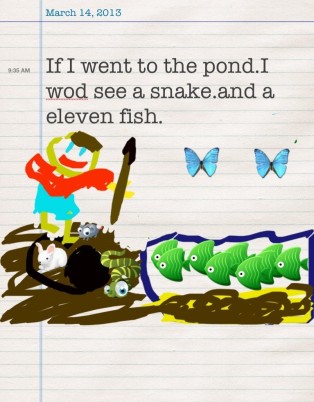
Journal writing is a great way for students to record the events of their day and use sequencing skills to do so.  Students who are reluctant writers are motivated to write in the app.  Students have voice and choice in their writing by choosing paper or iPad.  They also have choices in topics, pictures, look and style. Some of my students enjoy writing about whatever theme we are discussing in class, others write about family events, favorite activities or what they’ve done during the school day.  wells idiaryJournal writing is a chance for a child to explore his/her mind.  It develops communication skills and strengthens the reading-writing connection.  By having kids write every day in their journal, we are building stamina for writing longer pieces. In November, my students were writing 1-2 sentences over 15 minutes and they thought that was looong.  Now, they sit for 20 minutes to an hour writing and writing and writing.  Because their keyboarding skills are so emergent, they type far less than they will write on paper.  It isn’t unusual at all for my kids to get up and get a second or third sheet of paper when writing.

Developing strong writers and readers is critical to life long learning.  iPads give my children choices in their learning.  When children can take charge of their own learning, they are automatically engaged.

Today, we will do exciting new things.  Let’s get to it!