You Can’t Handle the Awesomeness!

Nothing is so contagious as enthusiasm.- Samuel Taylor Coleridge

I love my job.  Most days.  I work in a great school and have great kids and great parents.  Don’t get me wrong, there are days I could put a knot on every head.  (The kids that is, not the parents.  Maybe. ) The best part about teaching kindergarten is the never-ending enthusiasm of my students, as witnessed by this recent exclamation:  “Whoa! There’s a new app in the ABC folder! I can’t wait to play it! Oh man! This is so awesome!  I could do this every day it’s so awesome!  I  can’t handle all the awesomeness!” I’m not sure, but I think he liked it.  One of my students missed a day of school recently and during his absence, I added a new app.  I forgot to tell him about it but as soon as he opened his iPad and opened the ABC folder (I categorize my apps into folders), he immediately saw the new app.  What’s amazing to me is that there are 20 apps in that folder and he knew instantly there was a change.  Observant and enthusiastic!

When was the last time you were so excited at school that you couldn’t handle the awesomeness? As I’m typing this, I’m trying to think of the last time I was so excited about anything that I couldn’t handle the awesomeness…and I’m still thinking…anyway, the app that created the excitement is Starfall Learn to Read.  At last, all the content from Starfall.com’s Learn to Read index in an app!

I’m still pondering the unabashed love of learning.  Children innately love learning. They are curious and want to find out the what, where, how, and why of everything around them. Where does that curiosity and enthusiasm go?  Are we drilling and testing it out of them? Are we using best practices and showing our own enthusiasm as an adult learner?  I mean, if a $2.99 app generates more awesomeness than a child can handle and he enthusiastically exclaims he could play the app every day, it’s a worthy question.  Obviously, we can’t play apps all day long, just as we can’t sit at a desk and do worksheets all day either. iPads are definitely a game changer.  My kids think they are, well… awesome and I think they are pretty awesome my very own self.  I want them to be excited about learning and I don’t want them to lose that enthusiasm.   By examining ourselves as educators and taking a long hard look at what we are teaching, hopefully we can take a cue from my young student and channel our own inner awesome!

I’d love for you to leave a comment, subscribe to my blog, and/or share this post with a friend.
Giving Students Choices in Reading

Readers without power to make their own choice are unmotivated. -Donalyn Miller-The Book Whisperer

I’ve stated before that I’m a voracious reader.  I have always loved books and the ability to be transformed by a story.  I particularly love Southern writers.  I’ve never quite understood how others aren’t “readers”. They read only when required and almost never for pleasure.  In order to create readers, we have to identify ourselves as a reader first.  We must “brand” ourselves as readers.  When I read to my class, I share what I like about that particular author. I tell about other books like that book.  I make connections with myself to the text, to others, and to the world.  My students know how much I love to read.

But what about those who struggle? Or those who don’t like it?  Getting to the root helps determine which way to help the child grow.  What don’t they like?  Are there books available that interest them?  How many informational texts are available on their reading level?  I can tell you that as much as I love reading, I would not be as enthusiastic if I were forced to sit and read instructional manuals all day, or books on mechanical things. Those are not my interest.  Taking an interest inventory helps know how to fill your book center or your iBooks shelf on your iPad.  Building an early foundation of excitement about books, whether paperback, hardback, or electronic, helps build an appreciation and love for books.

My students have a variety of genres available throughout the day.  We work to build enthusiasm for our classroom library and for our eBooks on our iPads.  By demonstrating authentic reading behaviors, doing away with worksheets, engaging kids in building stamina when they read, and giving kids choices about what they read, we can develop life-long readers.

Reading is so much more than phonics, sight words, and mechanics.  It is about building discovery, wonder, and awe around the written word.  It is power.  It is peace.

So what should students learn from us about reading?  That drill and practice worksheets aren’t making them better readers.  Reading makes them better readers.  iPads give me the opportunity to practice the mechanics of reading with individual students on their own level, but they also give them a choice of what they are reading.  There are leveled books in their iBooks libraries.  There are high interest books as part of their apps, plus all of the traditional books in our classroom.  The best part of all is that the choice is theirs!

I’d love for you to leave a comment, subscribe to my blog, and/or share this post with a friend.
Montessori Crosswords

Thinking is the hardest work there is, which is probably the reason why so few engage in it.-Henry Ford

Learning to read begins with learning to talk.  Children listen to their parents and mimic sounds.  They eventually begin to associate these sounds with words that represent things and actions. From there, vocabulary increases as parents read stories, sing songs and rhymes. As children learn the alphabet and letter sounds, they soon learn that words are made of combinations of several letter sounds merged together.

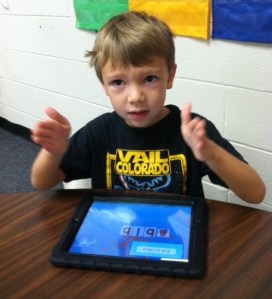
While easy to write about, it’s not so easy to accomplish.  It is also a complex task to meet each child where he/she is and personalize their learning.  We immerse our students in a language-rich environment all throughout the day.  Part of that immersion involves using iPads.  One of the apps we like to use for associating letters and sounds is Montessori Crosswords.  Montessori Crosswords helps kids develop their reading, writing, and spelling skills by building words from a set of 320 word-image-audio-phonics combinations using a phonics-enabled movable alphabet.  Montessori Crosswords allows you to select words according to their difficulty or sound categories:
➜ Level 1 displays a three-letter word with no difficulty for beginning readers (CVC words)
➜ Levels 2 and 3 offer more complex words that contains more complex phonics (as long vowels sounds or blends), and also offer the option to automatically create multi-word crosswords in tens of thousands of different combinations
➜ Alternately, you can choose from 44 sound categories (i.e. choose words that contain a specific sound.  This app costs $2.99 and is worth it!

As my students work on their emerging literacy skills through a variety of ways, I love that I have a tool that gives my students the ability to personalize their learning.  We have to be willing to look at our students as individuals and give them what they need as they need it.  Learning is not one size fits all.  Just because our lesson plans say we are teaching a certain skill this week doesn’t mean all of our students will master it in that time frame.  iPads give students the ability to practice just what they need.

I’d love for you to leave a comment, subscribe to my blog, and/or share this post with a friend.
Action Words Anchor Chart

Action expresses priorities. -Mahatma Gandhi

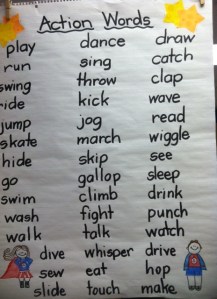
Action is something that is never lacking in a kindergarten classroom.  Something or someone is always in motion. In other action news, my students are very interested in action figures.  There was a fairly intense discussion going on at one point about who was more powerful-Spiderman or the Dark Knight. Of course, everyone had an opinion and several offered other action figures that were more awesome than the original 2 being discussed.  How does this impromptu conversation fit into the Common Core Standards?

By taking action, we can turn a random classroom discussion into a learning opportunity.  One of the kindergarten Common Core Standards is that students will participate in collaborative conversations about kindergarten topics with peers and adults. We turned their interest in that topic into an anchor chart.  Afterwards, they used their Whiteboard App to illustrate an action they could perform.  This activity involved using our sight words to construct a basic sentence and an illustration.

The following day I was reading an Eric Carle book, “Rooster’s Off to See the World” as a part of our Eric Carle author study.  As I was reading, without prompting, the children began calling out action words they heard in the story. Our discussion from the day before had carried over into a new activity.  Higher order thinking skills?  You bet.

By being alert to everyday situations, we can take action and turn them into meaningful learning activities.

I’d love for you to leave a comment, subscribe to my blog, and/or share this post with a friend.

Exploring Science

Men love to wonder, and that is the seed of science. -Ralph Waldo Emerson

Young children are curious about the world around them and eager to explore it. This curiosity is reflected in the numerous questions that children pose in everyday conversations at home and in school. However, at the beginning of school, young children are afforded few opportunities to engage systematically and thoughtfully in learning science. On average, less than 10% of instructional time is spent on teaching science in the early grades.  Time is a precious commodity in the classroom…so how do we fit it all in?

One of the ways we incorporate science is through our thematic units.  We also explore science themes through informational texts.  One of my reading groups was reading a leveled book on weather.  The informational text was written on this group’s reading level.  After reading the book and discussing different kinds of weather, we used our iPads as both a reading response/science journal.  Using our Whiteboard App, the children wrote about weather.  Kaylee wrote about a sunny day.  This was their first experience using the iPad keyboard.  They were excited about creating this assignment on their iPads.  There was a lot of good discussion among the children about which type of weather they would choose and how they would represent that on the iPad. One of the best ways to incorporate scientific skills in young children is to help them verbalize what they have observed.  Doing this activity in the small guided reading group made it very manageable.  The children already knew how to use Whiteboard in its basic form, how to change their colors, draw, erase, and save…but had not used the keyboard function before.  We had to discuss a few keyboard basics-space bar, backspace to erase, and how to hide the keyboard when finished.

Carl Sagan, the famous astronomer and writer, said that all children start out as scientists, full of curiosity and questions about the world around them.  We can tap into that natural potential by engaging students in hands-on activities, and in class discussions that help students discover simple but amazing facts about the world around them. The iPads serve as a tool to facilitate and extend the learning.

I’d love for you to leave a comment, subscribe to my blog, and/or share this post with a friend.

Engaging Students in Learning with iPads

Coming together is a beginning; keeping together is progress; working together is success. -Henry Ford

One of the best parts of teaching young children is their ability to be excited about just about anything.  They still love to learn and try new things.  Their eyes light up when I say we are going to do something new.  They are not at the eye-rolling and teeth sucking stage (yet.) The other day, I said, “Ok…it’s time to get ready for Writer’s Workshop.  I have something I want you to see.”  I got fist pumps and “YESSS!” Excitement.  Enthusiasm.  Their reactions energize me and never cease to amaze me.

A key component to student achievement is without a doubt student engagement.  Using outdated techniques, while perhaps “tried and true”, can also be seen as uninteresting or even boring to our students.  Outdated tools are ineffective and inefficient.  I mean, when was the last time you used an abacus to solve a math problem?  If we want our students engaged, we have to use currency they understand.  Just switching from hand-held flashcards to an app that teaches the same skill on the iPad instantly increases engagement.  It’s fresh.  It’s interactive.  It’s engaging.  When I have 2 students working together on a skill, they learn through interaction, shared experience, trial and error, and joint success.

Over these beginning weeks of the school year, we are getting to know each other. My students are learning classmates’ names (still!) and they are learning more about themselves and what they are capable of.  In our 21st century classroom, we learn through a mixture of traditional and digital means.  Whether we are using crayons, pencils and paper or iPads, Smart Boards and laptops, we know that our success lies in working together.  iPads allow me to up the engagement factor and meet the various needs of my students.  That is definitely worth a “high five”!

I’d love for you to leave a comment, subscribe to my blog, and/or share this post with a friend.
As Easy as ABC…Magnetic ABC App

To succeed, you will soon learn, as I did, the importance of a solid foundation in the basics of education – literacy, both verbal and numerical, and communication skills -Alan Greenspan

One of the most challenging aspects of teaching is trying to meet all of your students’ needs.  In a room of 25 children, I have students who are reading and those who have just started learning letters of the alphabet, plus all other levels in between.  The iPads facilitate my ability to differentiate learning for all of my students.

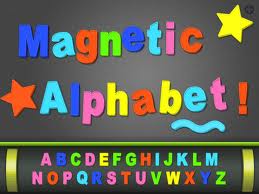
With my children that are still struggling with naming letters and sounds, we have been working with our Magnetic ABC appThis $1.99 app has upper and lower case letters and numbers.  It also has themes and objects available for use.  As an ABC practice activity, I call out an upper case letter and they choose it and put it on their board.  We scroll to the lower case letters and have them find the matching partner letter.  Sometimes I call out a letter sound and they have to find the letter that makes that sound.  Students who know their letter sounds practice with this app also. They can choose one of the objects and then match it’s beginning sound.   I can give them a CVC word and we stretch it out.  As they hear those sounds, they choose the corresponding letter. We can create word family words also.  The ability to use letters more than one time is a bonus.   More advanced students can make sentences dictated to them by either me or a partner.

The app also has numbers and objects.  Students can practice their numeracy skills, 1:1 correspondence, addition and subtraction, making sets less than, greater than or equal to, and patterning.  My students seem to enjoy the iPad version of this so much more than the real magnet letters on the cookie sheet that I put out in centers.  It’s also a lot easier to clean up!

Having a multipurpose app that meets a variety of student needs help me build a strong foundation in all students.  We can’t assume that students know these most basic of skills or short change their practice.  Apps that grow with students are efficient and effective.  Students are engaged and learning is underway. While these activities seem so…well, so basic, they are.   It just goes to show you that it doesn’t have to be fancy to be functional and fun!

I’d love for you to leave a comment, subscribe to my blog, and/or share this post with a friend.

Press the Reset Button

Definition of Reset: 1:to set again or anew  2: to change the reading of, often to zero- Miriam-Webster Dictionary

Starting a new school year with young children requires starting anew with our kindergarten curriculum.  It means ending the previous year with children reading and writing and taking charge of their own learning then starting completely over again with children who not only don’t know classmates’ names but some still don’t know MY name.

After 23 days of school, it is easy to think we are in a groove.  Most know routines and procedures and most are figuring this whole school-thing out.  But the key word here is most. It is key because by definition, most is not all.  Yes, I still have some who are still trying to make sense of our day.  I still have some who don’t know where some things go or where to find other things.  As an adult, it is easy to think that after 23 days of school, these children should have it all together.  They should know how to turn the volume down on their iPads, how to find the math folder on the iPad, how to put it to sleep and put it away quickly.  Right?

Ah…time to hit the Reset Button.  They really don’t know how to do those things yet.  It can take up to 70 repetitions for young children to fully make a concept permanent.  It is difficult, at times, for me to reset.  Ending the previous year on such an instructional “roll” and then starting back over from zero is part of the kindergarten teacher territory, but that doesn’t mean it’s easy. It helps that those children in the class who do know how to do many things are more than willing to help their friends who can’t.

As we start a new week, it is important to remember it is only our 5th full week of school.  We are 5 years old and while we learn most things very quickly, most is not all. By slowing down and making sure all are ready with these basic skills in all areas, we can then speed up with minimal disruption.  Am I preaching to myself?  Most definitely.  But I’m pretty sure there are others out there who, like me, need to push the reset button and start today, Monday, with a fresh set of expectations.

I’d love for you to leave a comment, subscribe to my blog, and/or share this post with a friend.

Let’s Play!

“Play is the highest form of research.” ~ Albert Einstein

When you ask my students what they did at school on any given day, they will answer, “I played.”  For those unfamiliar with how young children learn, that answer can be unsettling.  Play gives children a chance to practice what they are learning. Play, by its very nature, is educational. It saddens me to see kindergarten classrooms doing away with centers. Fortunately, my principal sees the value of play in young learners.

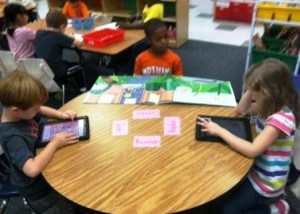
My students have a variety of centers to “play” in each day.  These centers are carefully planned to enhance learning.  We have a reading center, a poetry center, a writing center, a math center, a science center, and an ABC center.  We have centers for blocks, legos, housekeeping, and art.  We use a rotation system in the morning while I teach guided reading groups and in the afternoon while small group guided writing occurs.  While students are at the ABC or at the math center, they may also choose iPads.  I have 2 iPad cards (or passes) in each of those centers.  2 students may work on iPads while at ABC and 2 at Math.  My apps are in folders and students at ABC may only work in the ABC folder while those at math may only work on apps in the math folder.  They must have the “pass” in order to use the iPads during that time.

I don’t start the “pass system” until a few weeks into school. I print them on card stock and laminate them. (See photo at left and click here to print your own.)

I need to make sure the children know where the folders are on the iPad and that they know how to properly use the iPads on their own.  They also know that if they are not in the appropriate folder, they will lose their iPads for the afternoon.  While I do monitor the students, my monitoring is nothing compared to the eagerness of my students to monitor (tattle on) each other.  By giving them these “controlled” opportunities to use iPads on their own, I am building up to having them use iPads in the reading center and other times as they deem they are needed in their learning.

Children need the freedom and the time to play.  When the fun goes out of play, most often so does the learning.  My students are engaged in a variety of structured play activities throughout the day. We include iPads as a part of those activities.  In play, children learn how to learn.  iPads give us the opportunity to extend and differentiate learning.

I’d love for you to leave a comment, subscribe to my blog, and/or share this post with a friend.
More on Anchor Charts

Tell me and I forget. Teach me and I remember. Involve me and I learn. -Benjamin Franklin

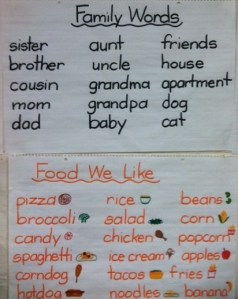
One of the first things we do in kindergarten (besides learning where the bathroom is) is to create an anchor chart together.  Anchor charts are charts that are created with the students to help them “anchor” their learning.  We make one for every letter of the alphabet, we make one with our classmates names, we make one for how to listen, we make one for colors, one for numbers, and any other skill I would like them to use on a regular basis.  We use them daily in our Reading and Writing Workshop activities.

My students love them and refer to them all throughout the day. They are engaged in the process of creating them so they take ownership in them.  After a while, they know more of what is on the charts than I do.  Space is a concern…and do I really need to leave a chart on Halloween words up all school year? Those questions are answered with the iPads.  I find that I leave the alphabet charts up all year; however, seasonal charts, or special charts made for a specific activity do not have to stay up and take up valuable wall space.  By photographing all of the anchor charts and syncing them out to the children’s iPads, they have the charts with them all year long regardless of whether they are on the wall or not.

A recent writing activity included writing about our families.  After making the Family Words chart, they were able to refer to it all week as we discussed our families.  We also wrote about foods we liked.  By having the anchor chart, students were able to write about these foods.  In a week or so, I can add these to their iPads and they will have access to these words even if I take these charts down.

Another advantage of having these charts on the iPads is that students don’t have to walk across the room to see them if they are writing something and need a word.  The charts are also available if students are reading on their iPads and would like to read the charts.  It is like Read the Room, only it is done in their seats.

If you aren’t using anchor charts, I highly recommend them.  They are quick and easy but they pack a powerful punch.  Parents can even make them at home and post on the refrigerator or in the child’s room.

By involving the child in the learning, they create connections that are critical for mastery of skills.

I’d love for you to leave a comment, subscribe to my blog, and/or share this post with a friend.