Using iPads to Supplement Reading

We shouldn’t teach great books; we should teach a love of reading. -B.F. Skinner
“Seriously!  Do I have to do ALL the work around here?” This is a quote from a child in my housekeeping center recently that made me laugh.  She was definitely channeling another adult in her life…but it is a sentiment I’m sure we have all thought, expressed, or hollered at some point in both our personal and professional lives.  Wouldn’t it be great if the great Work Fairy came down and waved her magic wand?  Wait…wouldn’t it be great if there WAS a great Work Fairy???
C0010258 StudyingAs educators, our  “In-Basket” tends to overflow with things we want to do, have to do, and need to do.  It is hard to find time to do it all.  With reading and literacy as a huge focus in early childhood classrooms, it can be difficult to meet the needs of each child.  We use the Fountas and Pinnell guided reading approach but I supplement with extension activities on our iPads.  This helps me reach all of the needs of my students.
My students are homogeneously grouped for reading.  These groups are small (4-6 students) and are flexible.  They change with the particular skill we are working on.  With my struggling children, we use games, manipulatives, flash cards and apps to immerse them in phonics skills.  Some of the apps I’ve been using that have been helpful are Starfall ABC’s, Starfall Learn to Read, Word Wizard and Montessori Crosswords.  These apps provide strong emphasis on phonics skills.
My middle group and top groups are working on sight words, blending sounds to read words, and integrating strategies to read unfamiliar words.  They are reading on Level A at this time.  I have several level A readers in my room, but I’ve created some to go on their iPads in Book Creator so they have them at their fingertips when they have a few minutes to read or when they go to the Reading Center.  Here is one using sight words
This is a PDF version since not all of my readers have Book Creator.  Some of the books I’ve made include me reading the text.  Students can touch the speaker icon on the page and hear me read the story to them.  The I Can See Book does not have that feature.
By using the iPads to supplement skills in reading, I’m able to work with students on various levels and let them move on when they are ready.  This actually reduces my work load considerably and frees me up to have conferences with individual students and work with individual students in a more meaningful way.  Work Fairy or not, less teacher work and more time with students is a beautiful thing!
Today we will do exciting new things.  Let’s get to it!
photo credit: Creative Commons
Show Me With Showbie

We are not cisterns made for hoarding, we are channels made for sharing. -Billy Graham

Sorry, but I just can’t get enough of Showbie.  It is our new app used school-wide for creating digital portfolios.  I recently wrote about Showbie and our using it to create digital portfolios.  Since then, I have discovered some other pretty awesome features.

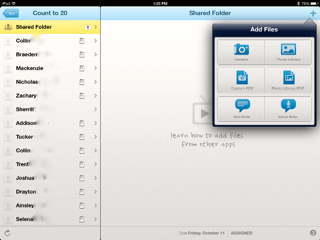
First, let me say, we are not completely paperless.  We have, however, significantly reduced our paper usage and Showbie has facilitated that.  In kindergarten, there is still the need for paper/pencil skills.  School-wide, we saved over $21,000 in paper usage, copies, ink, and toner last year.  Showbie has several features that are helpful.  Here is a screen shot showing some features:

photo

I have blurred out my students’ last names, but my class list is to the left.  The small paper icon to the right of each name shows which students have submitted an assignment.  You can also add student pictures beside their names if you want.  The shared folder allows me to upload resources, videos, voice instructions, PDF files, and ePubs to be used in that particular assignment.  Once the resources are loaded in the shared folder, it is available to all students.  It is in the shared folder that I added an ABC book that I created in Book Creator.  My students just went into the shared folder, downloaded the book in their iBooks and all students have the book on their bookshelf.

The area to the right has a drop-down box with choices for adding files. The camera option allows photographs or videos.  You can upload images from the photo library as well.  Using the Capture PDF option, you can scan in a document.  If you have a PDF file in your photo library, you can upload this also. In addition, you can add text notes to student work or voice notes.  These are all of the teacher options.  Students have the same options in their drop-down menu for putting work in the assignment folder.

Last week, I uploaded a PDF of primary lined paper for my students to demonstrate writing their numbers to 20.  They opened the assignment in Showbie and then used Good Notes (a PDF annotator) to write their numbers.  I was able to quickly email their parents this assignment.  Later in the week, I used the camera option to video tape students counting to 20.  This was a quick assessment that was also emailed to parents.

photoThe best part is that Showbie is so easy to use.  At this early point in the school year, my kindergarten students already know how to open the app and upload work on their own.  Parents also enjoy feeling like they are a part of the classroom through the email feature.

One last way we are using Showbie is to share student work with our principal.  Each grade level decided on student assignments for each nine weeks that would be used to demonstrate growth and demonstrate CCSS. My principal created a class for each grade level in Showbie.  These student provisos are uploaded for him to monitor.  We send a high, medium, and low work sample each nine weeks.  This allows him to check in on student work on a regular basis.  It also encourages meaningful use of the iPad in the learning environment.

We are very excited about the incorporation of this robust program into our classrooms.  There is a free version of Showbie if you would like to check it out. We liked it so much we purchased the school license.

Today we will do exciting new things.  Let’s get to it!


Making Your Mark With iPads

Do not go where the path may lead; go instead where there is no path and leave a trail. -Ralph Waldo Emerson

medium_4176075327Well, we missed it.  International Dot Day was September 15th.  Better to be late than not go at all, we celebrated making our creative mark this past week.  It came at a good time.  I’ve been hearing a lot of “I can’ts”  lately.  If you are unfamiliar with the story of The Dot by Peter Reynolds and International Dot Day, you can check it out here.  In the story, Vashti is an uninspired student who feels as if she can’t draw.  Her teacher encourages her to be brave enough to “make her mark”.

Leaving our mark is a lot easier than we think.  We make it hard.  We resist and tell ourselves we aren’t smart enough, creative enough, talented enough, rich enough…but what if we took a page from Vashti’s playbook and just tried?  As educators, we make lasting marks with every child we teach.

As we started using iPads in our classroom in 2011, there was no real path to follow.  We trail blazed our own.  There were a few bumps along the way, but we believed in what we were doing.  We started with our own “dot” and it has transformed the way we do everything. It has transformed the way we think about everything.

So back to our dot project…after reading the book, we used our iPads to create our own dots in our Drawing Pad app.  (We usually use Doodle Buddy, but they have not updated the app lately and it doesn’t work very well with the new iOS 7 update.) The kids uploaded their dots to Showbie and I then downloaded them all on my iPad and put them into Book Creator.  As you may know, my love  for Book Creator is epic.

Our finished product is here:

The Dot

The great thing about Showbie is there are “shared folders” with each assignment.  After I created the class book in Book Creator, I uploaded it back to the shared folder in Showbie.  This made the book available to each student and all they had to do was download it into their iBooks.  Now each student has a copy of our class book in their iBooks shelf.  They have loved looking at each other’s work and are definitely proud of their own.

You know, a lot has changed for me since I said, “yes” to iPads 2 1/2 years ago.  I never dreamed I would be doing the things I am.   I chose to try and make my mark by creating a student centered classroom infused with technology.

How are you making your mark?

Today we will do exciting new things.  Let’s get to it!

Dot photo credit 

Parents and iPads

Let’s give them something to talk about. -Bonnie Raitt

medium_3610488258Have you ever been consumed with something?  You know, a project or idea that dominates your thoughts, dreams, conversations, lesson plans…When we are so immersed in something, we know every facet, every detail, every scintilla of it.  We assume that because we know all about it, that others should as well and we are a little nonplussed when they don’t.

I’m referring to our school wide use of iPads.  We have had iPads in a 1:1 setting since January 2011 in 3 classrooms and school wide since the 2011-12 school year.  We incorporate them into our daily activities.  We use them all throughout the day.  Our kids are engaged and excited.  We’ve had a technology night to showcase for parents what some of our classes are doing.  Surely, there is no question of HOW we use these amazing devices.  Except, there are.

An independent consulting firm issued parent surveys to gauge the level of support.  This survey asked what parents liked best about the use of iPads in the classroom and if there is anything that could be improved on.  Several surveys, more than should have, came back with parents saying they aren’t really sure how the iPads are being used.  They didn’t know enough about it to comment.

Well, ouch.  That hurt.  Our first reaction was, “Of course they know! How can they not??” Then with a little time and objectivity, we decided that we needed to do a better job of letting our little light shine.  We needed to be more intentional about including parents in the conversation.  We needed to give them something to talk about!  It was decided that we will have a monthly newsletter highlighting what’s happening with iPads at each grade level.  Here is our first:

ipads at dhes September 2013_1

This will go home in each class newsletter, be featured on our school website, and printed out and made into posters for each of our main hallways.  Teachers will also be more focused on communicating not just the “what”  by the “why” so parents can see value and be more closely involved in the process.  Yes, this is all common sense but it is easy to assume we are all engaged in the same conversation when we really aren’t.

Involving all stakeholders in a large project like this is critical.  I realize that I could stand on my head and eat a bug but that doesn’t mean everyone will get the information.  We will always have people say, “I never knew…” but by being more intentional in the curating and sharing of the good news, we are partnering in the best possible way with our students’ very first teacher…their parents.

Today we will do exciting new things.  Let’s get to it.  

PS:  Big shout out to Lisa Bevans for creating this awesome first parent newsletter!

Flickr photo credit

Collaborative Work Spaces

Unity is strength… when there is teamwork and collaboration, wonderful things can be achieved. -Mattie Stepanek

medium_4264216476So I’ve been thinking a lot lately about collaborative spaces and their importance and relevance in learning.  Early childhood classrooms are collaborative by nature and the furniture provided in these classrooms allow for students to be in small groups.  But what about other grades?  Why is this important?

Think about your recent professional development experiences.  Were they in a classroom somewhere with desks in rows or were you at tables where you could easily see your table mates?  By their very nature, desks in rows inhibit conversation, eye contact, and community.  Plus, they are not very comfortable.  I start squirming after a short time in these seats.  The times I’ve been in PD at tables, it is immediately possible to engage in conversation, share, and build relationships.  It just feels better and more personal.

Our students are no different.  They need the ability to learn from their peers, to question, to share, to feel safe in a group and not feel isolated.  When we use collaborative groupings with tables, we are saying we are a community.  We learn from each other and I, as the teacher, am not the sole disseminator of knowledge.  The room arrangement instantly, and silently, shares your values as an educator.

As we use iPads, students are immediately collaborative.  They want to share what they’ve done, and in doing so, their peers are able to participate in the collective wisdom of the group.  Collective wisdom…so important for students and adults.  The saying, “It takes a village to raise a child” applies to many aspects of growing children.  No where in that saying does it say “the village” has to all be adults.

As an adult, when I have to learn in isolation, I find myself sometimes feeling anxious.  Especially if the concept is complicated.  I may even feel like I just don’t get it…what’s wrong with me?  Everyone else seems to get it.  In collaborative learning, I might find that others don’t understand either.  This immediately relieves anxiety knowing I’m not alone.  As a team, we figure it out together.   All students, from the smallest to the tallest, need to feel safe and supported in learning new content.  By having the ability to work collaboratively, in a space that supports collaboration, students are more likely to take risks.

IMG_2156My classroom has many collaborative spaces.  There are tables that seat 4 and 6.  I’ve pushed 2 rectangular tables together for a larger collaborative space.  There are rugs and pillows on the floor that allow students to spread out and be comfortable.  As I stated earlier, early childhood classrooms are equipped for collaboration.  I recently saw this video on Edutopia showing how a middle school teacher used what was already in his classroom to make the space more collaborative for his 35 students.

Take a good look at your classroom design and see what it says about what you value as an educator.  Student input is also valuable.  What changes can you make to increase collaboration and student engagement?IMG_2176

Today we will do exciting new things.  Let’s get to it!

student desks photo credit: Creative Commons

A World of Wonder

Wisdom begins in wonder. -Socrates

I_WonderWe are doing an author study on Eric Litwin this week.  He is the author of the Pete the Cat books.  My students love Pete the Cat…and with this study, we’ve started a “wonder” chart.  “Why is Pete the Cat blue?” “Who taught him to play the guitar” “Does he have other shoes since he got his new white shoes wet?”  These are all questions my students wondered this week.

If you Google image search “wonder”, you will find an alarming number of strange people dressed like Wonder Woman… but wonder is an innate part of the human experience, and somewhere along the way, we lose it.  We have to deliberately foster it, nurture it and encourage it in young children.  When children wonder, they grow bolder in their questioning.  They think beyond the surface.

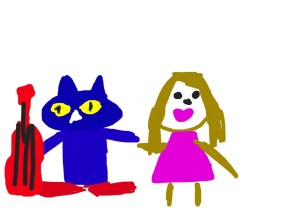
photo-14I encouraged my students to draw about their “wonderings” today in Doodle Buddy on their iPad.  There was good conversation among the groups of students and even though it is early in the school year, they are starting to understand and enjoy the opportunities to work in small groups and talk about their work.  Wondering encourages original thinking, thinking outside the box, and creativity.  When many adults look at a new piece of technology, such as an iPad, they think, “How do I use this?”  Kids look at the same piece of technology and think, “What can I do with this?”  They are curious and creative by nature.  As an aside, you will be interested to know that the above drawing was done by one of my students.  She said, “Mrs. Meeuwse, that is you with Pete the Cat.  Pete is rocking his school shoes and your lip gloss is poppin’ and I’m wondering where your shoes are.”  Hmm…I’m wondering where my shoes are as well.  And about that lip gloss….”poppin”?

There is no doubt there was some creative thinking going on there.  I love how the iPad allows us to explore many ideas and “wonderings”.  Yes…they could have just as easily drawn their picture on a piece of paper.  But then we wouldn’t be able to import their drawings into another app and “Explain Everything” in the near future.  One step builds on another.  We will start App Smashing very soon.

Look for ways to bring wonder in to your classroom.  Pete the Cat is a good place to start!

As Pete the Cat says:
“No matter what you step in,
keep walking along and
singing your song. Because it’s all good.”

Today we will do exciting new things.  Let’s get to it!

Creating Digital Portfolios

All I really need to know… I learned in kindergarten. -Robert Fulghum

We started our digital portfolios today.  We knew by the end of last year that we really needed a systematic way of curating student work.  It was important that we be able to share it with parents but it was of utmost importance that it be simple enough for everyone…especially our kindergarten students.  I mean, let’s get real…if I have to touch every iPad to save student work, it just isn’t happening.

Showbie-238x300We went with Showbie.  Showbie allows you to set up your classroom and create assignments for students. When students submit their work, it is organized by assignment.  You can see which child has submitted work and which one hasn’t.  You can even add annotations, voice notes or written notes on the assignment and send it back.  It is very easy to use and individual student work can be emailed to share with parents.

Today, I added our first assignment.  It sends a brief alert to the individual iPad so students can see there is a new assignment.  This is great for older students. My students used Pic Collage and they were asked to choose a number between 2-9.  They added a text box and typed in their number.  Then they added the number of stickers that corresponded with their number.  After the stickers, they added another text box so they could type their names.  Lastly, they learned how to save their work to their photo roll on the iPad.

Library PhotoThey did very well with this activity.  The next step involved going into their Showbie app.  We did this together.  I used Reflector to demonstrate step-by-step on the Smart Board.  When the students opened Showbie, they simply clicked the “+” symbol, then chose their camera roll and then their Pic Collage work sample.  As easy as that, it was uploaded.  The entire activity from start to finish took 25 minutes.  I was then able to email the work samples to parents to share with the their first work sample in the digital portfolio.

The digital portfolios will certainly help us keep things organized and use a lot less paper.  Just as an aside, my school saved over $21,000 in paper, copies, and ink cartridges last school year.  By using digital portfolios, student work is preserved over longer periods of time.

I’m excited about the creation of these digital portfolios.  It will be a great way to organize, view and share student progress.  As we progress through the year, it will also be a great way for students to use their own voice and choice to showcase their work.  I will provide the stimulus.  They will choose the means in which they demonstrate their learning.

Today we will do exciting new things.  Let’s get to it!

Getting Started

Who dares to teach must never cease to learn.  ~John Cotton Dana

photo-12Today was the day…iPad Day.  It was the 5th day with students.  I had been questioned about the iPads every day since day one. I knew they were excited and ready to use them but we had some procedures and routines to get under our belts first.  Front-loading procedures is a “must do” when it comes to introducing iPads to students.  Yesterday, I took their pictures with their iPad and set it as the home screen and wallpaper.  That way, we all know which iPad belongs to whom.

My assistant and I pulled over small groups of 5 and we showed them how to turn on the device, put it to sleep, navigate screens, and how to adjust the volume.  I keep all of my apps in subject related folders.  We opened the ABC folder and we worked with a couple of apps and then we put them to sleep and put them back in the iPad cart.  Wait..what? That’s it? Yes…that was it for today.  Tomorrow, we do a little more.  Each day will build on the day before. I’ve learned after 3 years of 1:1 iPads, that not only do the children need procedures, I need them as well.  It’s very tempting to embrace the idea of “Go big, or go home”.  Taking small steps early on not only keeps me sane, it allows the children to learn in manageable chunks.  I had a few students tell me today they already know how to use the iPad because they have one at home. We talked about how we need to learn how to use them at school also.  Going slow now, means we can speed up in September.

Before long, they will be masters of this device.  But since it is a powerful learning tool and not a toy, it is important we take our time in learning proper care and handling as well as digital citizenship.  It also takes time to integrate the device into the curriculum in a way that is meaningful and not just have “app time”. I want them to be creators of content and not just consumers.  This is why teachers won’t be replaced by technology.

So, we will forge on in the coming days. I’m excited about all of the possibilities. We will learn the names of our classmates and how to work, learn and play together as a community of learners. We will also begin the exciting world of a student-centered classroom that incorporates iPads in kindergarten.

Today we will do exciting new things.  Let’s get to it!

What’s Your Story?

There is no greater agony than bearing an untold story inside you.-Maya Angelou

medium_4828439402Stories…we all have them, but have you ever thought about the power of story? As educators, we want to relate to our students and connect with them. Stories bring people along on your journey.  Stories move people to action.

We are built to remember stories much more than figures and data.  When we advocate for our ideas, we often use data and figures; however, our brains are wired to resonate with story.

A story is a connected set of events with a beginning, middle and an end. Stories persuade and they move people to action. Stories shape how others see you.  Stories are tools of power.  People slow down and listen when a story is being told. Listening matters.  Stories are the one way to invite people in, to have them not only know you but to get in touch with their own story as well.  Good stories ignite emotion.

So much of what we teach students evokes the “Who cares, so what?” response.  You know…the math problem that posits someone bought 60 cantaloupes and divided them into thirds.  How many did each person receive? Who cares?  More likely the question is, “What is wrong with this person that they have 60 cantaloupes?” Our students need to get to the “why” of what they are learning.  They need to resonate with the material and care about it.

When we take our students on an engaging journey, we can persuade them. Stories need to have goals. What do you want your audience to think, feel or do at the end of the story? My kindergarten students love stories.  They lean in and tune in when a story is being told.  They not only listen more attentively to me as I tell a story, but they also listen to classmates who are telling stories.

My students love telling stories on their iPads with Book Creator and Explain Everything.  These apps provide them with a platform to share and create.  Even students who may not seem overly creative, find a voice when they are sharing stories about themselves.

My story is documented here. I encourage you all to find your own story, but more importantly, think on the importance of story in your school environment and how it may be used to connect deeply with your students. How can you get your own students to tell stories?  We live life in narrative.  Story isn’t just a good idea….it’s necessary.

So, what’s your story?

Today we will do exciting new things.  Let’s get to it!

images from Creative Commons

Reflection on the Apple Distinguished Educator Institute

Words are a pretext. It is the inner bond that draws one person to another, not words-Rumi

Words.  So plentiful and easy to use in most situations…but what about those events in life for which there are no adequate words?  Those events that color your world and leave you transformed in such a way that defy explanation…

IMG_1925As I sit on the plane returning home from Austin, Texas, I am reflecting on just such an event.  6 days ago, I arrived in Austin to attend the Apple Distinguished Educator Institute.  Over 400 select educators from the United States, Canada and Mexico came together for a week of professional development, deep conversations, reflective practice and authoring.  I know when I get home, I am going to have several people ask me about the experience and that’s where things get difficult.  The adjectives I use will be inadequate to describe the week.  Words like awesome, amazing, transformative, affirming, celebratory, and inspiring are the best I can do.

For educators, our world is filled with a lot of “Yes, but….”.  This week showed me the possibility and power of “Yes, and…”.  The simple substitution of one small word in that phrase changes everything.  We also learned to celebrate failure and not to fear it.  With failure, comes learning.

We were encouraged to take deep dives in thinking about pedagogy and not be afraid to be leaders in change.  Leaders do not spend time curating the status quo.  They dig down deep and become the change they seek.

While our individual levels of technological knowledge varied, everyone accepted and celebrated each other’s work and success.  There was no competition or jealousy.  We were all made to feel like Rock Stars and were supported no matter where we are in our journey.  Meal times revealed tables and tables of people intently listening and passionately sharing.

Staff development offerings gave us opportunities to learn new programs, apps and techniques as well as get advanced learning in programs we already use. We had brilliant speakers and we learned about the importance of story…how the story isn’t about us and we aren’t the hero.  We are more like Yoda…a mentor (only with better hair!)

We learned about the power of iTunes U for educators and we learned how to create our own courses.  We were given projects and formed PLN’s (professional learning networks) with like-minded people.

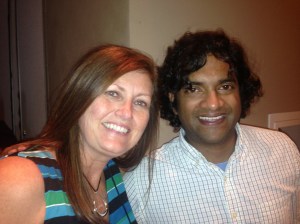
We met the developers of many of the great apps my students use daily.  It was so much fun meeting Reshan Richards (Explain Everything and a member of the ADE class of 2013) and Dan Amos (Book Creator).  Both are pure genius.

Reshan Richards

Reshan Richards

Dan Amos

Dan Amos

For 17 hours each day, I was drinking from a fire hose.  I soaked up every minute and made connections that will for sure be my life-long friends.  I was given a legacy to do more, dream more, learn more and become more than I ever thought possible.

I am forever changed…and eternally grateful!

Today we will do exciting new things.  Let’s get to it!