Kids Teaching Kids with Book Creator

collageKnowledge exists to be imparted.-Ralph Waldo Emerson

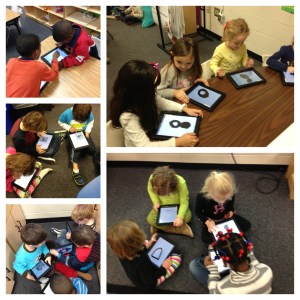
For a short time, I considered that it was highly possible I had lost my mind.  I was going to teach my kids how to use Book Creator on a Friday. Not only that, they were going to teach another kindergarten class how to use it later in the day.  Simmer down…my sanity is still intact.  I worried needlessly.  My iPad proficient five year olds created a 4 page book on Penguins in less than an hour.  They illustrated their pictures in Doodle Buddy, saved them to the camera roll, imported them into Book Creator, typed their text and exported the book to their iBooks app in the morning.  I demonstrated how to do this on the SmartBoard prior to their starting on their own.

In the afternoon, we hosted another kindergarten class to come learn from us.  At one penguin bookspoint, there were 50 kids in my classroom.  They were in groups of 2 or 4, working together.  By the end of our session, the other class had at least the book cover completed and some had their first page finished.  My children loved, loved, loved teaching them.  The engagement was instant.  Their conversations were instructive, relevant, and meaningful.  There were conversations about word choice and details in illustrations.  We even discussed getting back together and sharing our finished books with each other.

My students, in the end, wanted to know if they could show another class how to create their own books.  What a great way for all of my students to have an opportunity to be a leader.  Even the quiet and reserved students, who may otherwise be reluctant to share in front of the group, took a leadership role in the small groups.  While the finished products are going to look great, the process in getting there was priceless.  Not to be forgotten, the science facts they acquired as they wrote about penguins, their life cycle, and their habitats.  Combine that with the literacy aspect and the cooperative learning on the iPads, and I’d say today was a complete success.

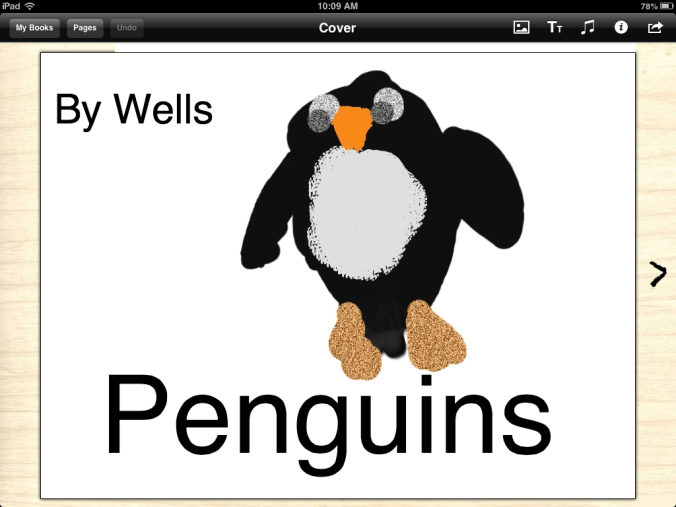
Here is a screen shot of one of the book covers:
book cover

I’d love for you to leave a comment, subscribe to my blog, and/or share this post with a friend.
iPads and the Common Core Standards

You cannot teach a man anything, you can only help him find it within himself.
― Galileo

One of the big questions I am repeatedly asked is about using iPads and implementing Common Core State Standards (CCSS).  When you study the standards and the purpose behind them, and you understand personalized learning, you can see how the two fit nicely together.

Personalized Learning is the tailoring of pedagogy, curriculum and learning support to meet the needs of the individual student.  Typically technology is used to facilitate personalized learning environments.  The CCSS are designed to be robust and relevant to the real world, reflecting the knowledge and skills that our students need for success in college and careers. In Language Arts, the CCSS focus on students learning to read and write complex texts independently at high levels of proficiency and at a rapid rate to be effective.  The focus is on proficiency and complexity, yes, but also on independence.  We want our students to be able to do quick, on-the-run research when needed, to express their thinking verbally and in writing, and to summarize, analyze, and design without needing teachers to insert the key questions along the way or to walk them through step by step.  iPads are an ideal learning tool for these goals.  Having constant access to information, students are able to research when needed.  They are able to to write, compose, and create with various applications…all without having to wait their turn on a classroom computer.  The CCSS emphasize that every student needs to be given access to the thinking curriculum that is at the heart of the standards.

The Common Core standards is, above all, a call for accelerating students’ literacy development.  We must lift the level of student achievement.  This is not achieved by simply transferring a worksheet from paper to the iPad.  The CCSS call for true reform.  Reform needs to revolve around creating systems of continuous improvement that result in teaching toward higher expectations, personalizing learning for students-which in turn, increases rigor as well as student engagement. One way we can use iPads to implement the standards is iBooks Author.  iBooks Author allows us to create our own texts to move students up levels of complexity by providing them with many just-right, high-interest texts.

As educators, we have to enable our students to become strong and proficient readers and writers.  Using iPads, we are able to fortify our own teaching, our students’ learning and meet the high standards of the Common Core.

I’d love for you to leave a comment, subscribe to my blog, and/or share this post with a friend.

Personalized Learning: Spelling

“Don’t they teach you how to spell these days?” “No, they teach us how to use spell check.” -Jodi Picoult

I have to confess…I am one of those people who never had trouble with spelling.  It came easily for me and my nickname in middle school was “dictionary”.  I hated that then, but having the ability to spell has always served me well.  In this “spell check” world, it seems as if spelling may not matter.

Fortunately, my 5 year olds have some of the same desire for spelling correctly as I.  They don’t like to get things wrong and they get concerned when they are typing in Pages and they get the red, squiggly underline indicating they have spelled incorrectly.

Since we are focusing on personalized learning, I have different spelling lists for different groups in the class.  We are working on word family words mostly at this point.  Spell Test is a free (for now) app that is very basic and simple but provides me a helping hand in managing different spelling lists and tests.

How does Spelling Test work
1. Create a Spelling Test
2. Choose a Name for Your Test.
3. Start by adding Words to your test.
4. Record your own Pronunciations in an easy to use format.
5. Now Take a Test.
6. Listen to the Pronunciation and Spell the Word in the Box correctly.
7. Instant Feedback on how you did, Did you get that right or wrong
8. Complete the Test to see a Summary of Words.
9. Each time you take a test, you will know which words you got right and which you got wrong
10. Track improvements as you take the test multiple times.

The kids like using their own voice to record the words.  I can also record words if pronunciation is an issue.  The app doesn’t show them the words during the test.

This is an easy way to personalize spelling for each child.  I’m not ready to give up to spell check completely.  I still see value in teaching words, word roots, and phonics.  Practicing with an app makes it fun for the kids, but it also allows me to individualize each list if necessary. Because it is an app that is available for iPhone and iPad, parents can also have students use it at home to practice.

I’d love for you to leave a comment, subscribe to my blog, and/or share this post with a friend.

Creating Writers

In creating, the only hard thing is to begin; a grass-blade’s no easier to make than an oak. -James Russell Lowell

As a writer, sitting in front of a blank screen with a blinking cursor mocking the emptiness of the page, Lowell’s quote hits home.  I often have no idea where my writing is going until I begin.  Often, it goes in directions surprising even to me.  That “aha” moment…the one when you have clarity, direction, and purpose is utterly inspiring.

My students are working on making a book using the Scribble Press App.  This is our first attempt at book making with this app.  They love all of the choices of tools this app provides.  Even though it is January, my students need me to model the process.  I model the think-aloud process of deciding what to write about and I even model being stuck.  I sit in front of the blank iPad screen and think….and think some more.  I model starting out with writing about one topic and then deciding to discard that idea and go in a different direction.  I model not finishing in one sitting.  They need to see this process and learn how to work through the “not knowing”.  We are all about instant gratification…we have to learn to process, think, and wait.

Their books are a work in progress.  I am hoping they will finish by the end of this week.  The end product, however, is not the important part.  It is what is learned in the getting there.  They are fussing over fonts, color and illustrations.  They are grappling with word choice, sounding out those words, and very emergent keyboarding skills on their iPads.  The Common Core standards emphasize three anchor standards for writing:  argument, informational, and narrative.  Human beings grow up on narratives, on stories.  We live our lives hearing stories and telling them.  We plan and daydream and work and worry in narrative.  How important then, is it to spend valuable time in this genre?

As tempting as it is at times, to rush through to get something done, allowing our students to sit and stew, think, plan, erase and start again is critical to growth in writing.  We have to set the stage, model and allow time-protected time-for genius to develop.

I’d love for you to leave a comment, subscribe to my blog, and/or share this post with a friend.

Choosing Brilliance

Don’t ask yourself what the world needs. Ask yourself what makes you come alive and then go do that. Because what the world needs is people who have come alive. – Howard Thurman

January is a good time for simplicity.  After all of the necessary messiness and decorations of the holidays, I like the simplicity of January.  January is a good time for reflection and renewal.  Beyond the usual “Get Healthy” resolutions, I find myself wanting to get to what matters.   Where does my professional passion lie? What makes me come alive in the classroom?

I will admit, getting up early this morning after 2 weeks off, I had trouble finding motivation.  Purpose.  Coffee.  But after arriving at school and having my students hug me and bubble over with excitement about being back in school, I realized they have no trouble connecting with their passion.  They said they missed their friends, they missed me, they missed their iPads.  They said they missed learning. I said it was time for Writing Workshop.  They cheered.  Their unabashed love for school, engagement, learning, possibilities, new things, and opportunities seem endless.  They show up everyday with wonder and brilliance.  When was the last time you showed up somewhere, anywhere,  with wonder and excitement at the possibilities?

As educators, our passion, our brilliance,  is easily lost amidst meetings, paperwork, lesson plans, less than supportive parents, criticism, behavioral problems, etc…I can choose to get bogged down in that or I can rise above.  I can choose to show up everyday with wonder… Wonder at what my brilliant 5 year old students can teach me about themselves and about myself.  I can choose to simplify my approach to teaching…to discard things that no longer work or bring my students alive.  I can come to work each day and be thankful for having a fully stocked classroom with supplies, an amazingly supportive administrator, and a district that believes in personalized learning and iPads.  I can connect with my own passion for literacy and learning and magnify what I am doing through this blog.  In the bleak mid-winter, I can choose to shine brightly. Let’s be brilliant together!

Where do you find yourself in this first chapter of 2013?

I’d love for you to leave a comment, subscribe to my blog, and/or share this post with a friend.

We’ve Only Just Begun

“The way to get started is to quit talking and begin doing.” -Walt Disney

One of the best gifts I received this holiday season was the notification from Apple that my school, Drayton Hall Elementary,  met all of the criteria for Apple Distinguished School.  The application was rigorous as was the competition.  We were thrilled to be awarded the distinction.  While many see awards like this as the culmination of hard work, I see it as just the beginning.

I’m pretty good at pushing boundaries.  When I was given the iPads back in January, 2011 as one of 3 pilot teachers for the entire school district, I really had no rules or expectations.  My only limitations were those created by my very own self.  Since I was given a class set of iPads, (thank goodness the district’s Ed Tech staff believed in kindergarten having 30 iPads!) I took full advantage of the opportunity and  looked beyond the “broadcast nature” of the iPad.  More than a presentation tool, my students fully interacted with the iPads.  In small groups, we found individual support opportunities that bolstered those students who were in the bottom tier.  As student engagement was instant, I looked for ways to incorporate the iPad into every aspect of our instructional day.  As the pilot moved beyond the 3 original classes, the staff at my school embraced the technology and zeroed in on the potential these devices hold.

While I know many schools are just getting iPads and perhaps aren’t able to fund them 1:1 at this time, I hope the teachers will continue to voice their desire for them.  The iPad is designed to be a one-user device.  The true power comes when each student holds his/her own iPad and is able to interact with it, work with materials on the child’s own level, and create and save on it.  Sharing, while perhaps necessary for a time, isn’t  ideal.  You can’t expect to see the results we are seeing at my school without a 1:1 implementation.  If you are unable to fund a whole school, find your early adopters on staff and let them have at it.  These people make things happen!

While my holidays are coming to a close next week, I’m excited about what the remaining 5 months of school hold.  With a new year beginning, let’s follow Walt Disney’s advice:  Quit talking and begin doing!  I’m proud of my school for earning the Apple Distinguished School honor.  This isn’t the end,  we’ve only just begun!

I’d love for you to leave a comment, subscribe to my blog, and/or share this post with a friend.

Does Santa have a GPS?

“To the top of the porch, to the top of the wall, now dash away! Dash away! Dash away, all!”  – Santa Claus in Clement C. Moore’s Twas the Night Before Christmas.

Today, our class went to see The Polar Express with approximately 4,683 other children.  (I exaggerate, but not by much.)  My kids were very excited and after the movie, I overheard these conversational tidbits:

Child 1: Did Santa’s sleigh have GPS?  I didn’t see one in the movie.

Child 2: Maybe Santa uses his iPad.

Child 1: Mrs. Meeuwse, does Santa have an iPad?

Me: Um, hmmm….Well, I guess he does.  I don’t really know for sure.

Child 2:  Can’t you Google it? (I did Google it and they were pleased to see the photo inserted above as it has a place for his iPod in the sleigh.  Even Santa can’t be without his iTunes.)

Child 1: If he does have one, he can just use the map app to find my house, right? That’s probably where he keeps his Christmas list.

Christmas 2.0 is very different from my experiences growing up.  Technology has infiltrated even our most magical of life’s experiences.  While I love my technology, my iPhone, my iPad, my MacBook, I find myself torn at what appears to be the loss of some holiday magic.  I remember tiptoeing into my living room as a 5 year old child and seeing that Santa had come.  The tinsel on the tree sparkling with the lights…I just accepted that Santa had come and didn’t question his ability to fly around the world and deliver presents.  I loved hearing my dad read Twas the Night Before Christmas and being allowed to open one present on Christmas Eve. (Which was usually pajamas.)  My southern upbringing left me thinking that Santa said, “Dash away! Dash away! Dash away, y’all.”

While I am grateful for all of the wonderful advantages of technology in our classroom, I would like to keep Christmas old school…unless Santa would like to bring me one of those robot vacuum cleaners…I mean, I have been very good this year. Ho, Ho, Ho!

I’d love for you to leave a comment, subscribe to my blog, and/or share this post with a friend.

Personalized Learning with iPads

Today you are You, that is truer than true. There is no one alive who is Youer than You.-Dr. Seuss

How better to say it than this? One size that fits all doesn’t work for learners today. Personalized learning is the tailoring of  curriculum and learning environments to meet the needs and aspirations of individual learners, often with extensive use of technology in the process. Personalization may differ from differentiation in that it affords the learner a degree of choice about what is learned, when it is learned and how it is learned. This may not indicate unlimited choice, since learners will still have targets to be met. However, it may provide learners the opportunity to learn in ways that suit their individual learning styles and multiple intelligences.

Personalizing learning for each learner means they take ownership of their learning. Let’s take advantage of the iPad’s ability to challenge, engage and motivate different learners.  Students can often work on different levels within the same app.  As I look at what each student needs, based on assessments and observation, I am able to direct them to certain apps or certain activities within apps.  Teachers should be able to implement multiple paths to knowledge- having a variety of ways to help a diverse group of students learn rigorous standards.

Working in flexible, small groups for guided reading, I take notes as I see areas where students need practice.  One student may need help with word families and rhyming words, where another may need help with medial vowel sounds.  My top reading group may be ready to incorporate reading response journals using Pages as they read.  This would never be possible in a whole group instructional setting.  Having the technology of the iPads at our fingertips,  it is easier to differentiate instruction, find all opportunities for remediation to help struggling learners, and  provide enrichment to challenge the advanced student.

With iPads, we can create a Pandora Radio-like effect in education.  Each student can get a variety of educational experiences, engage in topics and activities of interest, and learners have the responsibility and ownership to choose how they learn, when they learn and where they learn.

I’d love for you to leave a comment, subscribe to my blog, and/or share this post with a friend.

iPads in the Classroom: Start Small, End Big

The man who removes a mountain begins by carrying away small stones.-Chinese Proverb

As with all things new, starting small often helps lead to bigger things.  Many classes with iPads aren’t fortunate enough to have 1:1.  Looking at maximizing learning and use of the iPads is key.  In our early days of the pilot program, I originally was scheduled to have only 12 iPads for use in small groups/centers.  Within the first hour of using them, I knew we needed (and could do amazing things) with a class set.  By the end of that week, we had a class set.  But what of those first few days with 12 iPads?

My first priority was to get them in the children’s hands during guided reading.  That is where we established expectations, learned how to use them, and began the important work of setting up personal learning plans.  Since I had only 12 for such a short time, I didn’t have the issue of storing work on only 12 iPads. However, if we had remained at that number, I would have assigned children to specific iPads and would have had them upload their work to their individual folder in PaperPort.  Beyond guided reading groups, I wanted them to use the iPads for some writing activities and self-selected reading activities.  Kindergarten is never  “all or nothing” learning.  We do some writing with pencil and paper, and some on the iPad.  We read some books on the iPad and some regular books.  We do word work, math, and phonics at times on the iPad and at times with manipulatives.  By starting small, the children (and the teacher) gain confidence in guided use.  Starting small also gives teachers a good idea of which children need close monitoring and which ones can handle a little more freedom.

Even though I have a class set now, I still like small group work best.  I like being a close observer of what the children are experiencing. Where are their successes or their areas of struggle? Are they guessing at answers or do they know them?  With the new iOS6, there is a new feature called Guided Access.  It allows a parent, teacher, or administrator to limit an iOS device to one app by disabling the Home button, as well as restrict touch input on certain areas of the screen. It lets you control what features are available during use.  Just go to Settings, then General, then Accessibility, and turn guided access on.

So, whether you have a class set or just a few iPads, keep it simple, start small.  As you find your children progressing, you will find limitless uses for the iPads.

I’d love for you to leave a comment, subscribe to my blog, and/or share this post with a friend.

FAQ’s about iPads in the Classroom

An investment in knowledge pays the best interest. -Benjamin Franklin

We have had several visi
tors from other school districts over the past few months, interested in seeing iPads at work in the classroom.  From those visits and other questions posed on this blog, I am posting today some frequently asked questions. Hopefully it will help many of you as you navigate the early waters of incorporating iPads into your classroom.

  • How did you get the money to pay for the iPads?

My school district re-purposed funds that were originally designated for replacing computers in our classrooms.  These funds were for technology modernization and rather than purchase 2 computers per class, we piloted iPads.

  • iPads vs other hand-held tablets

Clearly, iPads is my answer.  They are game-changers. They are versatile, easy to use, backed by Apple and there are tons of educational apps available for use.  Having access to the internet is critical…these are more than just e-readers.

  • How often do you use the iPads each day?

All throughout the day for a variety of activities, small group, whole group, and individual. My main focus of use is to increase achievement in literacy.

  • What if the kids get tired of them or bored with them?

OK, seriously?  They are not toys.  They are learning tools that are essential to 21st century learning skills.  If teachers teach using best practices, kids will never be bored with them.

  • How do you get the work off of the iPads?

Legit question here…it’s not always been easy.  We are still unable to email from the iPads.  The best work around at this point for me is Simple Transfer app.  Anything that can be saved to the camera roll can be transferred off of the iPad.  My other option is PaperPort Anywhere.  My kids can save work to their folders on the PaperPort app.  I can access it, print, save or email work.  I’m excited that Pages now uploads to PaperPort!

  • How often do you have breakage or damage?

In 14 months of iPad usage with 3 different kindergarten classes: ZERO. They are very careful with them and I make sure we model and teach iPad procedures regularly.

  • What are your must-have apps?

Ah….these change as I come into new apps.  Currently, I love Montessori Crosswords (ELA), Park Math (Math), Pages, Book Creator, Simple Transfer, and Whiteboard. Oh…and Starfall.  Ok, making myself stop right there.

  • How often do you sync?

In the first few months of using them, A LOT.  I was constantly finding new apps and was a syncing mad woman.  Currently, not so much.  I will sync books or photos if I want them all to have them.  I use my class wiki to get work to student iPads and they then upload to PaperPort to get them back to me.

  • What do you like most about iPads in the classroom?

What’s not to love? I can’t imagine ever teaching without them.  They take learning to a whole new level with personalized instruction.  Being able to meet each student where they are instructionally is priceless.  With 25-30 students each year, I need all of the instructional support I can get.  iPads make it possible to differentiate instruction every day.

  • Are there any drawbacks?

As to the use of the iPads: absolutely none.  The only thing that could be a drawback is the cost of apps when you multiply it out over an entire class or school.  Get your PTA involved.  Hold fundraisers, donate blood (kidding, sort of) whatever it takes to bring in some extra money for those apps.

So there you are…hopefully this provided some insight into using iPads in a 1:1 classroom.  It can seem overwhelming, but it really is manageable.  My students, even at age 5, are quite capable with these devices.  The investment is worth the cost to reach every learner every day.

I’d love for you to leave a comment, subscribe to my blog, and/or share this post with a friend.