Help Wanted

We can’t help everyone, but everyone can help someone.-Ronald Reagan
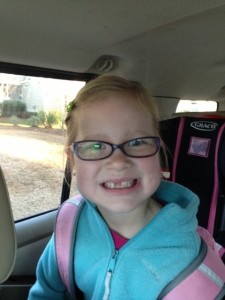
Ella

Ella

I recently found myself in a situation where I didn’t know how to do something with one of our new apps.  I could have probably figured it out if I devoted all of my attention and time to it but knew there was someone who already knew just how to do it.  So rather than spend precious time trying to figure it out, I just went to Ella. Ella is an expert at figuring things out on the iPad.  She never lets me down and if she doesn’t know the answer right away, she persists and comes back to me, usually 10.4 seconds later with the answer.  We all need an Ella…she is like a real-life Siri, only way cuter.

Working together as a community of learners benefits everyone.  Today, my class partnered with a second grade class to demonstrate how to use an app.  The second grade class had just gotten Explain K and 2 largeEverything which is an app my kids are already familiar with. It was a great activity watching 5 year olds teaching 7 and 8 year olds.  My kids were very nonchalant about the whole thing…like it is no big deal to teach older kids, because to them it’s not.  Even better, was the second graders didn’t seem to mind being taught by the younger children.  Once again, there were 50 kids in my classroom and all were engaged and on task.
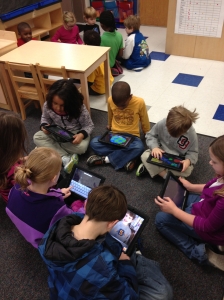
How do we create an environment where teachers learn from students and students learn from each other, regardless of their age?  We allow the experts to share what they know.  The students in my class know which child in my class can help them with a variety of needs.  Everyone has their own area of expertise.  Students are engaged in a way that provokes conversation.  Students are invested in their learning because they are able to make choices about how they learn.  The adults don’t have to always be in charge and they recognize that students have a lot to offer, even if they are 5 years old.  The learner knows it is ok to make mistakes and the teacher gives the children the opportunity to create…surprise me!

My kindergarten students have many years before they enter college and then the job market.  They have much to learn in the coming years.  They also need to learn how to work with people both younger and older than themselves.  Working cooperatively with peers, and eventually co-workers is a critical life skill.  Today’s teacher doesn’t have to have all the answers.  We just need to be able to ask an expert…even if that expert still needs a booster seat 🙂
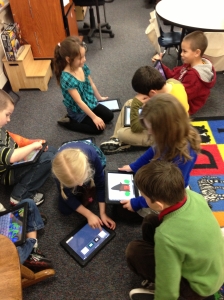
Hope helps 2nd grade

Today, we will do exciting new things.  Let’s get to it!

It’s a New Day…I’m Still Me

Every new day is a once in a lifetime event. How much more exciting would our lives be if we embraced this truth and lived accordingly?-Steve Maraboli

Tuesday, February 19th was an ordinary day.  School, cook dinner, answer emails and play my new game obsession Candy Crush.  (I can NOT get beyond level 30!) I had checked my email obsessively the last 3 weeks waiting to hear some news, and another day looked as if it would pass without hearing anything.

The email notification on my phone reluctantly pulled me away from attempting to crush those candies.  The subject line was: ADE Class of 2013-United States.  Holy cow…here it was.  The long awaited email.  I was home alone when I opened it and saw the first line: Congratulations and welcome to the Apple Distinguished Educator (ADE) Program.  I stopped reading and started yelling.  My poor dog was certain I had lost my mind.  This application had been turned in since November and the waiting was excruciating.

So what does all this mean? ” Apple Distinguished Educators (ADEs) are part of a global community of education leaders recognized for doing amazing things with Apple technology in and out of the classroom. They explore new ideas, seek new paths, and embrace new opportunities. That includes working with each other — and with Apple — to bring the freshest, most innovative ideas to students everywhere.”-Apple

I’m thrilled beyond words to be a part of this community and can’t wait to learn from the best of the best.  The honor is incredible, but more importantly, the ability to work with some of the most amazing educators in the world is priceless. ADE

Wednesday, February 20 was back to reality.  Still wearing my huge smile and excitement from the night before, it was apparent my children didn’t know the awesomeness of this distinction. They had no idea anything was different from the day before.  Because it wasn’t.  I’m still me.  I’m excited at the new role I will be wearing as an ADE and the possibilities of what new things I can bring into my classroom, but we are back to business.

My kids ask me each day “What will we learn today?”  My answer is always “Today, we will do exciting new things.  Let’s get to it!”

Thanks to all of you for all of the blog and Twitter love!  We have exciting new things to do…let’s get to it!

I’d love for you to leave a comment, subscribe to my blog, and/or share this post with a friend.

Cooperative Learning and iPads

The things that make me different are the things that make me.- A. A. Milne

collaboration 3When it comes to tattling, I have the “blood, fire, vomit” rule.  You know, don’t come tell me unless there is blood, fire or vomit.  This generally works very well.  They’ve learned what is important to tell me and what is small stuff.  Cooperative learning isn’t always smooth sailing.  5 year olds have a casual relationship with sharing and taking turns.  There are many times group activities have the potential to turn into a major disruption unless the activity is set up just right.

With iPads, cooperative learning is a breeze.  My kids look forward to working with others.  They love sharing, watching what their friends are doing and they love being “an expert” and showing others how to do things.  Each child has something unique to bring to the group. Because they feel confident, they all participate.  Today, we paired with another kindergarten class and my students worked with those students to teach them how to make books.  This is the second time in 2 weeks 50 kids have come together in one classroom to learn from each other.  There was plenty of conversation but there was no whining, tattling, or complaining.  One hour of no tattling in a class of 50 kindergarten students is nothing short of a miracle.  collaboration 2

As we begin to personalize learning and students are excited about what they are learning, it seems natural that many negative behaviors will go by the wayside.  As learners actively participate in the design of their learning and have a voice in what they learn, they take ownership.  They build a network of peers, teachers, and others to guide and support their learning.  Think back to the last professional development training you had that really engaged you and spoke to you…you were focused and energized, and hopefully excited about the possibilities of what you learned.  In contrast, think back to the last training you had that was not so engaging.  Did you stay focused or were you more inclined to check Facebook on your phone or talk to those around you?  Our students are no different.

As we here in the US move through our winter doldrums, let’s find ways to connect with the passions of our students.  It all starts with them.  The more we give them a choice and voice in their own learning, the less we have to use the “blood, fire and vomit” rule.  I, for one, am ALL for that!

group collaborationI’d love for you to leave a comment, subscribe to my blog, and/or share this post with a friend.

Personalized Learning: Spelling

“Don’t they teach you how to spell these days?” “No, they teach us how to use spell check.” -Jodi Picoult

I have to confess…I am one of those people who never had trouble with spelling.  It came easily for me and my nickname in middle school was “dictionary”.  I hated that then, but having the ability to spell has always served me well.  In this “spell check” world, it seems as if spelling may not matter.

Fortunately, my 5 year olds have some of the same desire for spelling correctly as I.  They don’t like to get things wrong and they get concerned when they are typing in Pages and they get the red, squiggly underline indicating they have spelled incorrectly.

Since we are focusing on personalized learning, I have different spelling lists for different groups in the class.  We are working on word family words mostly at this point.  Spell Test is a free (for now) app that is very basic and simple but provides me a helping hand in managing different spelling lists and tests.

How does Spelling Test work
1. Create a Spelling Test
2. Choose a Name for Your Test.
3. Start by adding Words to your test.
4. Record your own Pronunciations in an easy to use format.
5. Now Take a Test.
6. Listen to the Pronunciation and Spell the Word in the Box correctly.
7. Instant Feedback on how you did, Did you get that right or wrong
8. Complete the Test to see a Summary of Words.
9. Each time you take a test, you will know which words you got right and which you got wrong
10. Track improvements as you take the test multiple times.

The kids like using their own voice to record the words.  I can also record words if pronunciation is an issue.  The app doesn’t show them the words during the test.

This is an easy way to personalize spelling for each child.  I’m not ready to give up to spell check completely.  I still see value in teaching words, word roots, and phonics.  Practicing with an app makes it fun for the kids, but it also allows me to individualize each list if necessary. Because it is an app that is available for iPhone and iPad, parents can also have students use it at home to practice.

I’d love for you to leave a comment, subscribe to my blog, and/or share this post with a friend.

Comfort Zone-Exit Stage Right

I’m continually trying to make choices that put me against my own comfort zone. As long as you’re uncomfortable, it means you’re growing. -Ashton Kutcher

I return to school in 7 days.  Recently, I was asked to mentor a new teacher hired on my grade level.  My plan was to meet her at school and go over the important things she would need to know to get started.  I went to school the day before our meeting and moved my furniture and set up my classroom.  There was no way I was going to be able to sit in the chaos of jumbled furniture and plan with her.  I guess you can say I have high organizational needs.  My brain functions better when my environment is in order.

While we have different ways we approach things, whether it’s our classrooms, our homes, a new task, we all have a comfort zone in which we operate.  Our students are no different.  As I prepare for a new class of spunky 5 year olds, I am looking forward to watching them learn and grow.  As educators, we have to stretch ourselves and step outside of our comfort zones in order to innovate. In order to make a little magic.   There is tremendous enthusiasm for iPads and other technologies in education and it’s definitely part of learning’s future.  The opportunity to share information, collaborate around the world, to consume endless amounts of content and get access to information anywhere, anytime, anyplace, is a game changer that fundamentally will have a huge role in the future of the way learning takes place.

Ironically, using iPads is not out of the comfort zone of our students.  They come in ready and excited to get started.  Part of good teaching is staying a little ahead of the game.  Having a plan for implementation, and yet, allowing students to have the freedom to stretch and create is necessary for true success.  Teachers are good at planning….but not all are comfortable letting go and giving kids time to figure things out themselves.  For some, it’s threatening when students know more than they do.  The new Common Core State Standards stress the importance of student engagement in the whole brain activity of creative problem solving.

As we prepare for a brand new year, I’m thinking about how I can stretch myself and step out of my comfort zone a little. I’m looking to make a little magic.  With the iPads, the possibilities are endless.  Are you willing to stretch with me?

I’d love for you to leave a comment, subscribe to my blog, and/or share this post with a friend.

eBooks in the Classroom

Teaching reading IS rocket science.- Louisa Moats

Have you seen the size of textbooks lately?  Measurements go from about an inch to 3 inches.  Forget portability.  Carrying a load of them will surely result in a trip to the chiropractor.  Enter eBooks.  They are rapidly growing into a popular option with all of the electronic reading devices available.

Don’t get me wrong…I still love reading to my students with a physical book. We get cozy and listen.  We drift off to fun and faraway lands.  We laugh at the antics of our favorite characters and we learn to love reading.  Many students don’t have someone cuddle up with them, to read favorite stories and drift off to sleep to the cadence of familiar words from an oft-read story.  eBooks simply offer options for my readers.  Many ebooks have interactive features and vocabulary support that physical books don’t have.  eBooks are easily updated as information changes.  Our iPads hold many eBooks and enhance the “learning on the go” concept. You can take a virtual library with you.  No trees were cut down to make an eBook.  Another consideration is that many eBooks have accessibility features for English Language Learners.  Some students may find reading on an iPad more engaging than an actual book.  While many arguments may be held over traditional books versus eBooks, I simply want my children to READ and to love reading.  eBooks give us the ability to differentiate.

The Common Core State Standards stress readying students for college and career.  Growing good readers requires a large variety of reading resources. I have spent some time recently with Sylvan-Dell publishers.  They have 70 titles in English and Spanish available in eBook format.  The picture books that they publish are usually, fictional stories that relate to animals, nature, the environment, science, and math. Each book has a “For Creative Minds” section to reinforce the educational component of the book itself. This section will have a craft and/or game as well as “fun facts” to be shared by the parent, teacher, or other adult.  The illustrations are realistic and engaging. The books are great for school purchase or for parents to have at home on their iPads for their children. The books are leveled in a variety of ways to meet the needs of different reading programs.  There is a 30 day free trial with no obligation available.

I am all about engaging minds and growing life-long readers.  Having an arsenal of resources both physical and electronic only strengthens my teaching.  In this day and time, teachers need all the help we can get!

I’d love for you to leave a comment, subscribe to my blog, and/or share this post with a friend.

A Balancing Act

Getting information off the Internet is like taking a drink from a fire hydrant.- Mitchell Kapor

I’ve just returned from 2 weeks of vacation.  While away, I experienced 2 extremes of technology.  Part of my vacation was on beautiful Lake Champlain in Vermont.  Verdant pastures, mountains and cooler temperatures certainly made it a welcome change from the 100 plus degrees and oppressive humidity of Charleston.  With the beauty of this place, came absolutely no Verizon coverage.  No phone and very spotty wireless internet made it sometimes frustrating for my embarrassing need to connect.  After the first day of trying, I just turned my iPhone off and put it away.  The Vermonters like it that way I’m told…

In contrast, we spent a long layover in New York’s La Guardia airport.  Delta has recently installed 2,500 Ipads in the very small D terminal. Booths and bars were set up all over the terminal replacing the regular seats at the airline gates.  Ipads were everywhere.  Free to use.  Well, free limited use that is.  Certain apps were available for free. A convenient credit card swipe device was attached to each iPad if you wanted to go beyond the free apps.  I sat and watched as kids ran immediately to the devices and navigated their way easily to the games apps.  The adults were a little more apprehensive. A few even admonishing their children to “be careful” as they touched the iPads.  Many of the kids had never used one before based on the conversations going on around me.  The kids were engaged and busy and quiet. That was a welcome change from most airport experiences I’ve had lately.

So what’s the take away here?  I think it’s a good reminder of balance.  Being “off the grid” in Vermont was a little unsettling for me for the first 24 hours but it forced me to do other things.  In some ways, it was very freeing.  I couldn’t check email or voicemail or Facebook or text messages so I didn’t think about it.  The airport was as far removed from the quiet, pastoral lake setting as east is from west.  Everyone was connecting in some way with electronic devices, adults and kids alike.  Debate continues in my city about the need and value of iPads in the classroom.  Most are concerned about the financial commitment but many are concerned that students won’t experience hands on learning and interactivity with others if iPads are used.  Balance is the answer.  I’ve stated before that my kindergarten students still play in centers with blocks, paint, puzzles, games and even dress up.  We also use iPads as a tool for enhancing our learning in all subjects.  Any technology has the potential to be used inappropriately by teachers and by students.  It requires careful planning and teacher facilitation to be successful.

As I am wallowing in summer vacation and seldom know what day it is, my recent trip was a good reminder that we all need to unplug, go off the grid, and do other things from time to time.  School starts back for me in 5 weeks.  I think I will be like Scarlett O’Hara and “think about that tomorrow.”

How do you create balance in your fast-paced life?

I’d love for you to leave a comment, subscribe to my blog, and/or share this post with a friend.

Living the iLife: iPhoto, iMovie and Garage Band

Creativity is a natural extension of our enthusiasm.-Earl Nightingale

One of the great things about teaching young children is their ability to entertain themselves with just about anything.  Given a stick, it becomes a bat, a spear, a magic wand…their imagination has no limits.  My students role play, create, draw, paint, and pretend.  When is the last time you did any of those things?  Grown-ups don’t do those things right?  That’s for kids.  When did we lose our ability to create?

School systems are inherently driven by standardization.  Students are jumping through pre-designed hoops and creativity seems to be a side dish in the entree-heavy school system.  It seems to be overlooked that creativity can be a great intrinsic motivator. Creativity, if not nurtured, will take a nose-dive before a student leaves elementary school.

A great tool for the iPads is a suite of apps that help incorporate creativity into any content.  The iLife suite includes iPhoto, iMovie, and GarageBand.  iPhoto allows you to browse, edit, and share your favorite pictures.  iPhoto can also create slide shows and books.  iMovie allows you to turn video into movie trailers, tv news segments, and more.  With travel maps in your video travelogues, everyone who watches comes along on the adventure.  The drag and drop feature makes it easy to use.  Garage Band allows you to “get your groove on”.  You can use and edit existing music loops, or create your own using a variety of instruments.  Even if you have never played any of these instruments before, you are able to create a masterpiece.  Voice recordings are also available which you can then add to iMovie.

The iLife Suite gives students the power to create. Teachers often identify their main goals as helping children build cognitive and social skills. But the great engine that drives innovation and invention in society comes from people whose flame of creativity was kept alive in childhood.

Giving students freedom within a structure gives them a clear goal but also alternatives on how to get there.  By incorporating creative tools into the curriculum, students can explore the depths of their inner artist.

Check out the iLife Suite and see the possibilities.  Let freedom ring!

I’d love for you to leave a comment, subscribe to my blog, and/or share this post with a friend.

iPads and Field Trips

The World is a book, and those who do not travel read only a page. -St. Augustine

Summer is a great time for travel.  Last summer, I was able to travel to Europe for the first time.  We visited the Netherlands, Luxembourg and Belgium.  It was truly the trip of a lifetime and I would love to go back!  Travel opens our minds to different cultures, experiences and people…and amazing food!  This trip allowed me to see things and experience things I would never be able to experience in my little corner of the world.  In fact, it made me wish I had paid more attention in my World History class in college.  Walking through the poppy fields of Flanders takes you straight to 1918 and World War 1.  Standing on the battle site of Waterloo puts you in the bloody final campaign of Napoleon in 1815.  I soaked up the history and beauty of these historic gems.

Our students need to experience the larger world beyond their own little corners as well. Class field trips enable educators to broaden students and enhance their educational experiences.  With iPads in the classroom we can re-think how field trips are done.

Taking iPads on a field trip would allow students to capture what they are seeing, reflect on what they are learning, and create meaningful artifacts of the experience.  The information collected on the trip could be put into an iMovie or Keynote to share with others and for assessment.  Using the information gained on the trip and transforming it into an iMovie uses the higher order thinking skills we desire for our students.  To protect the iPads, students could place them in their school book bags.  That would allow the students to be hands-free if needed, but have the iPads handy at the same time.  Having a class set of back packs just for field trips would be the ideal.  I saw one on Amazon.com for $19.99. It is made for tablets and is lightweight enough for younger children. Now I just need a wealthy benefactor to get them for me!

What about the trips that are too far away or are too expensive?  Because of bus costs, increased gas prices and the cost of some venues increasing, we have had to cut the number of trips we take during the year.  What if you want to visit a place that is in another country?  The iPad can take you there via virtual field trips.  On a virtual field trip, you and your students can go just about anywhere on Earth — or even into the solar system.  There are many websites that have virtual field trips already set up, such as this one to the Great Wall of China, or you can create your own.

Field trips can be great educational additions to any curriculum.  By incorporating iPads, our students have endless possibilities to explore their world and beyond!

I’d love for you to leave a comment, subscribe to my blog, and/or share this post with a friend.

Mirror, Mirror, Reflecting on the School Year

I had chosen to use my work as a reflection of my values.
-Sidney Poitier

School is finally out! I have a 10 week summer stretching long before me.  Since this isn’t my first go-round with summer vacation, I know how quickly it vanishes.  I used to make a long list of things I wanted to accomplish both at home and for school.  I would find myself frustrated at the end of summer having accomplished less than half of that list.  Instead, I’ve learned to enjoy the time of no deadlines, no paperwork, no alarm clock and no schedule.  I’ve learned…to reflect.

Teaching, for me, is a calling.  It is rewarding and draining all at the same time.  By the end of the school year, I need to recharge and reconnect with me. Reflection of the year happens slowly over the summer.  At first, I just need to decompress.  I also congratulate myself on the things that went well.  We all need to do that.  Later, I begin to think of things that I could have done differently or that I want to change.  Sometimes, it is just a matter of tweaking something and other times it is more drastic.  Reflection helps us to stand back, out of the fray, and look at things a bit more objectively.

Using iPads the last year and a half has been a major source of my change.  It has definitely been a “learn-as-you-go” operation.  So much of what we have done has gone well and so it is easy to rest on that.  Test scores are up, student achievement is up and parent approval is high.  Those are all things to celebrate, especially in such a short amount of time since implementation.  Still, there is always room for improvement.

I’ve been using iBooks Author to write some leveled texts for my students.  I’ve also written a few books for content areas such as Social Studies, Science and Math.  I wrote many of those toward the end of this year and was unable to utilize them much with my class.  I want to write more books this summer and have them ready to go for student iPads in the fall.  I also want to do more personalization of the books with the students to increase their interest.  My goal is to write a short “All About” book for each student in the fall.

In addition to the iBooks Author, I want to incorporate iMovie and create short videos for students and parents.  I just purchased Roxio Toast 11 so I can burn DVD’s from iMovie.  The new MacBook Pro doesn’t have iDVD. So many skills and some good content can be incorporated when students make their own iMovie.  This also puts their engagement through the roof.

Wow…I’ve been out of school 3 days and I have quite a list.  I’m sure I will work on this and tweak it over the coming weeks.  I can’t wait to see how it will all turn out!

How does reflection work for  you?

I’d love for you to leave a comment, subscribe to my blog, and/or share this post with a friend.