Using the iPad for Addition

The essence of mathematics is not to make simple things complicated, but to make complicated things simple. -S. Gudder

We have been working on adding recently in class.  We have used counters, fingers, blocks…you name it…if it’s countable, we’ve used it! Fortunately, we also have some apps that help us with addition also.  We have been using them to create addition problems and then put them in our Math Journals we have created in Book Creator.  You can see more information on these here.

First, we used dice.  We rolled the dice, took a picture in our Math Journal and then wrote our number sentences.  Here is an example:

dice

Another day, we used a number line.  I found the image online and uploaded into a shared folder in our Showbie app. The kids then downloaded the image into their Math Journal. They used the pen tool to make a starting dot, draw their “jumps” and their ending dot.  They then used the text tool to type their number sentence.  Here is an example using the number line:
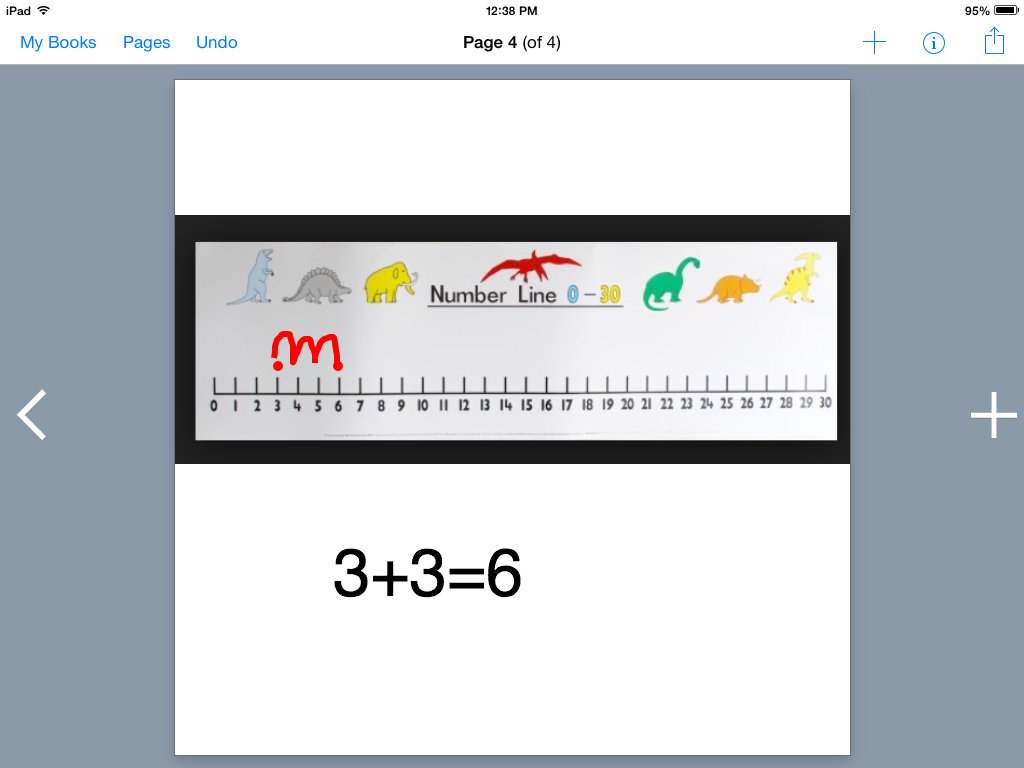
number line

Another day, we used our Number Frames app to add and make ten.  The students chose their own equations and put red dots in the frame first, then filled remainder of the frame with blue dots.  Then they wrote their number sentence. After taking a screen shot, the children put it in their math journal. Here is an example:
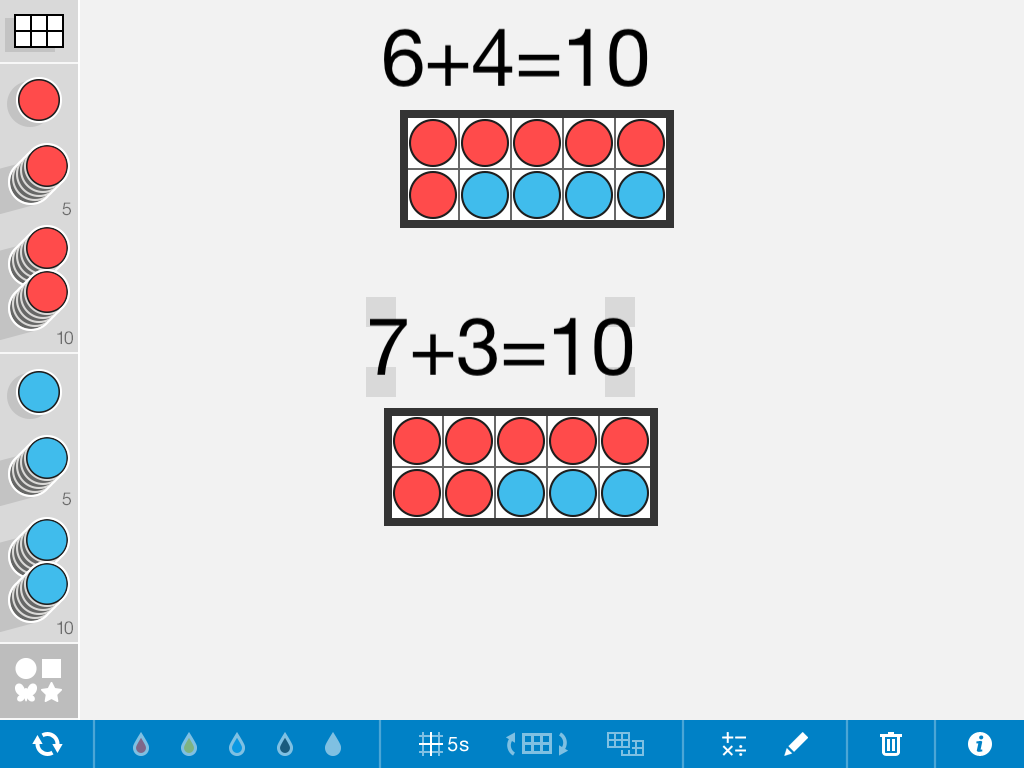
ten frames

We also used an app called Number Pieces to add and make ten.  The students pulled over a set of ten and then chose 2 different color blocks to make the ten.  Then they wrote the number sentence, took a screen shot and added it to their math journal. Here is an example:
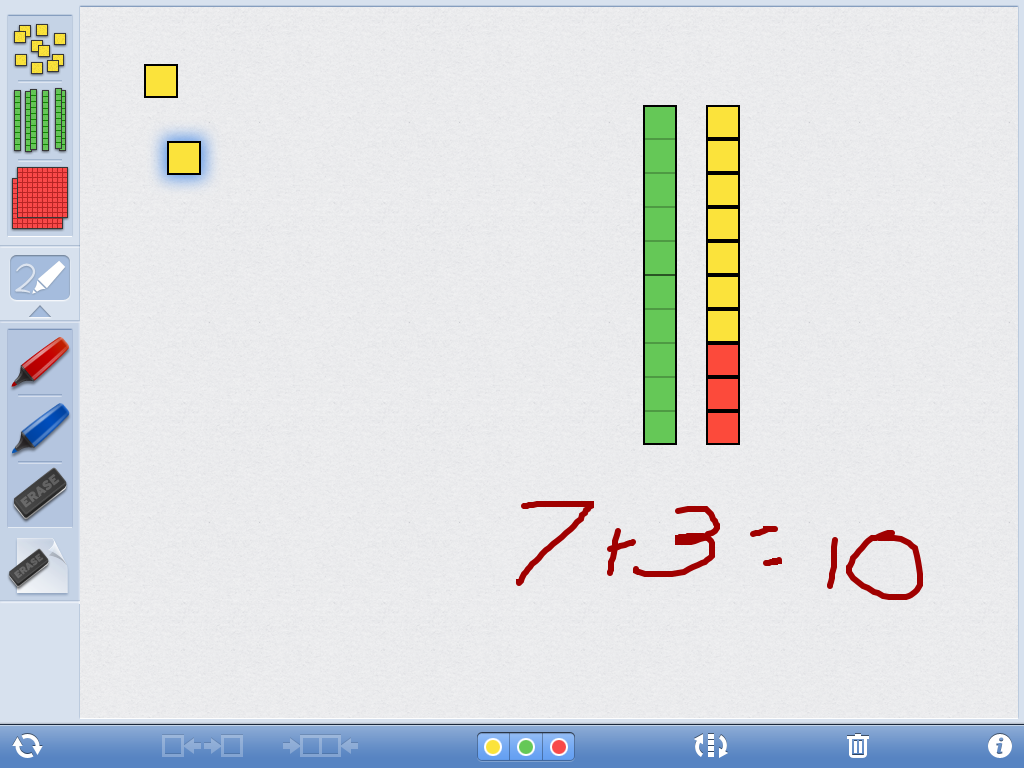
unit blocks

And lastly, we used our Felt Board app.  While we usually use this app for story telling and language, it has shapes and numbers as well.  The children chose their shapes and then used the numbers to make their number sentence. After taking a screen shot, they added it to the Math Journal.  Here is an example:

feltboardWith the exception of rolling the dice, I allow my students to choose their own number sentences.  It is a great way to give them voice and choice, it encourages them to think critically and independently.  Also, I find that some of my more advanced students will choose more difficult problems…ones where the sum is higher than ten, simply because they can.  I was also pleased to see a lot of different “impromptu” adding going on with other materials in the classroom during their choice time.

I encourage you to use a variety of apps and means to teach different skills.  You don’t have to have apps dedicated to the skill.  Get creative!  Better yet, let your students get creative and see what they come up with!

Today we will do exciting new things.  Let’s get to it!
Using iPads to Plan in Kindergarten

Productivity is never an accident. It is always the result of a commitment to excellence, intelligent planning, and focused effort. -Paul J. Meyer

Happy New Year! After 2 weeks and 3 weekends, we are back in school.  It was evident we had a little “brain drain” over the holidays.  Hopefully we can catch up and get moving by the end of the week.  After winter break is when we pick up speed and move full steam ahead.

One of the things I truly believe is that student engagement is dependent on their voice and choice in both the planning and execution of learning.  When we include even the youngest of children in the process, we get so much more concentrated effort from them.  This concept is the same for adults.  Aren’t we usually voicing concern as educators how our  voice needs to be heard in the decisions made on behalf of our students? When we are excluded from the process of decision making, we are less likely to buy into whatever it is we are being asked to do.  We are also less likely to implement changes with fidelity.

My students have quite a bit of choice in this classroom the first part of the year but after Christmas, they are included in the planning of their day.  Now, just as I would never open a closet door to a 3 year old and have them choose what to wear from an entire wardrobe of clothes, I would never just let go of the reins completely of the classroom.  I utilize a gradual release of responsibility and have some controlled choice in the beginning.  Giving students a few choices  all throughout the day, from the beginning of the year,  builds their confidence in their own abilities to make bigger choices later.

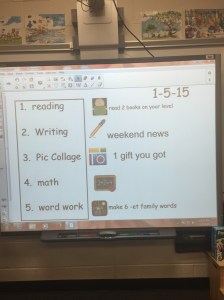
As my students walk in each morning from now on, they will have 5 must-do activities.  They may choose which order these items are completed.  They will open their notes app on their iPads and write out their plan for the day.  They then refer back to that note all throughout the day to see what they chose to do next.  The SmartBoard looks like this when they are making their plan:

IMG_0191

In the reading center, I want them to read  2 books on their reading level and then they may choose other books as well as book on their iPads to read. For writing,  they will work on their Writer’s Workshop.  A few of my students still need scaffolding and support with their writing so I have a specific conferencing time with those children. Today, I chose the app Pic Collage for them to illustrate and write a sentence but soon, they will have their own choice of creation apps in which to demonstrate understanding of unit-related vocabulary words. This work is saved and uploaded to Showbie for their work flow. Math includes small group activities and word work currently is involving word families.  Students use the ABC Magnet Board app to make 6 words of their choice in a given word family.  Today’s word work from one of my students looked like this:

Screen Shot 2015-01-05 at 1.28.31 PM

The student takes a screen shot of this work so that it is saved in the camera roll.  I can have them upload it to Showbie if I need them to or it can just stay in the camera roll as a work sample.  This particular app is great because it says the letter sounds as they manipulate them and once the word is created, it reads the word to them so they get immediate feedback.  Word Wizard is another great app for this kind of activity for the same reason.

So at the end of the 5 must-do activities, once all work is completed and checked, the student has free choice of any activity in the classroom.  This helps encourage timely work completion and on-task behavior, but in general, those things aren’t really a problem.  Their engagement is much higher as they have been a part of the planning process.

As students gain more independence and confidence in their abilities to make choices and move forward on their own initiative, this allows for other possibilities such as 20% time, Genius Hour, Makerspaces, etc…Again, this goes back to gradual release of responsibility, front-loading procedures, and giving students opportunities to develop those decision-making “muscles”.

As you start 2015, consider ways you can give your students more choice in the planning and demonstration of their learning.

What’s the plan??

Today we will do exciting new things.  Let’s get to it!

Visionary Leadership and iPads

“The most pathetic person in the world is someone who has sight, but has no vision.”-Helen Keller

Image courtesy of Creative Commons

Image courtesy of Creative Commons

I’ve spent the last 24 hours with Apple and the schools chosen for the ConnectEd initiative.  It was inspiring to watch these very deserving educators receive Apple technology and professional development at this kickoff event.  There was a great deal of discussion about vision and the importance of vision in implementing a full scale technology initiative such as this one.  So many layers of support were evident to ensure these schools are successful.

I was honored to be asked to speak at this event and share what is possible in early childhood education when students are given the ability to create their own learning.  While I was asked to share my experiences, I think I was the one who gained the most.  I saw educational leaders excited about providing their students the very best possible advantages with 1:1 iPads.  They made lists, their minds full of next steps…they started creating a common vision.

Innovation is what distinguishes a leader from a follower.  Leadership requires vision…to think ahead to what our students will need in the future, not just what they need right now.  While we don’t know the future, we do know that technology will definitely be a part of it.  True visionary leadership doesn’t say, “Yes, but…” it embraces the “Yes, and…”  Lack of financial resources will always be an issue with schools. It is here, where we have to look forward and ask ourselves what is the right thing to do for children?  Do we allow the “yes, buts…” to settle for the technology that is “good enough”? Do you really want your own child receiving an education that is “good enough”?  Of course not.  We want our own children to receive the best of what is available.

When I look at what the 1:1  iPad deployment has meant for my kindergarten students, I watch them using the power of this device to maximize their learning.  They are creating content.  They are using applications that are unique to this device to amplify their thinking…to go where they couldn’t go without the device.  They are using the accessibility features that are unique to this device to share their learning when they are unable to write independently.  As your vision for your students is created, you must ask yourself what it is you want to achieve with the technology.  If your needs are internet capability and word processing, there are plenty of devices that do that.  If you want a complete educational ecosystem, a comprehensive learning environment, then iPads are the only answer.

As a teacher, I am able to use applications unique to the iPad to personalize and target their learning.  I am able to reach each child where he/she is and create a learning environment specifically for that child.  As a parent, are you content with your child sitting in a cookie-cutter classroom where everyone receives the same assignment, regardless of ability? I would venture to say no.  Everyone has their own brand of genius.  I can tell a fish to climb a tree and it will spend the rest of its life thinking it is a failure. iPads allow each child to find his/her own genius.

The very definition of visionary is:  Thinking about or planning the future with imagination or wisdom.  When we are short-sighted it limits the potential of students not just now, but in the future.  Let’s find a way to provide our students with a complete education and not settle for “good enough”. Let’s not allow lack of funding to be the stumbling block.  Where your priorities are, your money generally follows.

I mean, after all, isn’t he worth it?

thomas2

Aren’t they ALL worth it?

Today we will do exciting new things.  Let’s get to it!

iPads and Science in Kindergarten

“Love the trees until their leaves fall off, then encourage them to try again next year.” -Chad Sugg

IMG_5602Fall is my favorite season, but living on the coast of South Carolina, we see very little evidence of the season.  We experience fall for about a week and a half in late November or early December.  The leaves are green, turn brown, then fall to the ground in that length of time.  So, I was excited to find a few  leaves on the school grounds that were living it up early! Party on…fall!

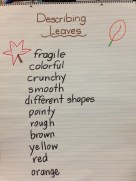
Talking about fall with my students is almost as difficult as talking about snow.  I say almost, because we do experience a bit of fall, butIMG_5601 we haven’t had significant snow fall here in 10 years.  It’s hard to even talk about the change in weather that fall brings when the high temperature today is 80 degrees. I know, I know…my friends in the north have no sympathy as they’ve already had their first snow fall.  But people, the struggle is real.  So today, in our short sleeves, we left our air conditioned class room to go look for fall leaves.  We discussed why there are so few leaves and the characteristics of the leaves we were able to find.  We made a chart of describing words and then, we grabbed our iPads.

They had a variety of leaves on their tables and they chose 2 or 3.  They opened Pic Collage and used the camera function in Pic Collage to photograph the leaves they chose.  After they added their pictures, they use the text function in Pic Collage to write about the leaves.  Here are a a couple of samples:


IMG_1047


IMG_1048


Soon, my students will have the choice of which app to use to demonstrate their work.  We use Book Creator for math journals, but it is a great app for science journals, reading response journals etc…For this particular activity, we used Pic Collage, but we can add this Pic Collage image to our science journals in Book Creator. There are so many wonderful creation apps that allow students to create their own content and demonstrate their learning.  The hands-on portion of this activity created a great deal of rich conversation and enabled us to make the anchor chart.

A big part of early childhood education is experiential learning.  Giving children a variety of experiences and enhancing those experiences with the iPads creates long-lasting connections with learning.  The technology extends the learning experience and enriches it.  We spend a lot of time as educators preparing the path for the child, when we need to be preparing the child for the path.

Today we will do exciting new things.  Let’s get to it!


App Smashing in Math

Math is like going to the gym for your brain. It sharpens your mind.-Danica McKellar

After a full day of teaching kindergarten, my mind could use a little sharpening.  It often feels like mush and I have to work hard to have adult conversation when I get home.  Surely that doesn’t mean I need to do more math…My students like math and they are enjoying working in our math journals that I’ve written about here.

We were working in our Geoboard app today making shapes. It is a free app that allows students to work with virtual geoboards without the hassle of rubber bands being snapped and popped all over the place. We made all kinds of shapes and talked about why we couldn’t make a circle.  We then learned how to do a screen shot of our work.

IMG_1036They had fun creating their shapes and making the screen shots.  My plan was to then have them upload the image into Showbie but a few students asked if we could put them in our Book Creator math journals first.  So, without delay, we immediately opened our math journals and uploaded our screen shots into the math journal created in Book Creator.  Then, I asked them what we should do with it now that the screen shot has been uploaded.  *Crickets* and blank stares.  Finally, someone said, “Aren’t you going to tell us what to do?”  I told them I wanted them to figure out what needed to be done and that they didn’t need me to tell them.  A bit more silence ensued and finally it was decided by a majority that they needed to label their picture.  Here is one that was completed today:

IMG_1037

Most didn’t finish but a few did.  The child used environmental print to write the shape words and then used the Pen tool in Book Creator to draw the arrows to each shape.  Some have decided they will use the recording function tomorrow to record themselves telling about the shapes.

By using Geoboard app and Book Creator, our math app smash was a fun and engaging way to work on this skill.  Don’t underestimate a 5 year old’s ability to handle multiple apps.  They not only understand, they come up with creative ways to do so.

Today we will do exciting new things.  Let’s get to it!

Reading Fluency with Explain Everything

There’s so much more to a book than just the reading. -Maurice Sendak

8435321969_8c5a154a0a_zWe are 35 days into this school year and several of my students are reading.  They are excited when they find words and phrases they know in books and in environmental print.  They love to share with anyone who will listen words or books they can read.  Even at age 5, my students see the treasure that is unlocked when one can read.  The fire has been lit and my fervent hope is nothing and no one comes along and puts that fire out.

We are a classroom immersed in literacy all day long.  Our iPads have certainly facilitated my ability to deliver personalized literacy instruction through the “Just Right Books” I create for my students as well as various apps that we use that adapt to students’ responses. My students also have the choice to read regular books in the book center or books on their iPads.  I want them to love reading and to be able to get lost in a story, so that when the story is over, they will wish it wasn’t.  There are books I have read and when finished, I missed the characters and I thought about them long afterward.

Part of building strong readers includes assessing students, listening to them read, working on fluency, and well…just reading, reading, reading. Having 23 students makes it difficult for me to listen to every child read every day.  The iPads definitely help. I had the students in one of the reading groups open the app Explain Everything and take pictures of each page of a leveled book they wanted to read.  They then used the laser pointer to track the print.  They saved the movie to their camera roll and then uploaded it to Showbie. I am able to then listen to the child read at any time.  I can use it as documentation for running records assessment, see where the child is having trouble and then go back work directly with that child if needed.  I can also email to parents.  This also allows the child to also re-visit the recording, listen and practice along for fluency.  By saving a few of these, you can show growth (or not) at a parent conference.  Here is one example:

Explain Everything is truly a versatile app.  It is definitely one of my go-to apps in all subjects.  Consider trying it for reading.  It engages students of all reading levels and that’s never a bad thing!

Today we will do exciting new things.  Let’s get to it!
 

Book photo credit: Creative Commons

Math Journals with Book Creator

You can be creative in anything – in math, science, engineering, philosophy – as much as you can in music or in painting or in dance.- Sir Ken Robinson

I work with some pretty amazing educators.  These folks inspire me daily to bring my A-game.  I love that sharing ideas is a welcome part of our school culture and I know that it takes a village to educate children.

One of our amazing first grade teachers shared how her students use Book Creator for their math journals.  I was immediately intrigued and of course, we tried it that very day!  It’s no secret how much I love Book Creator, so creating math journals with this versatile app was very exciting.

IMG_0033

We have been discussing more and less in math this week.  We have done a variety of hands on activities and have used the stickers in Pic Collage app to show more and less. The children uploaded this to Showbie earlier in the week.  We also used ten frames and cubes to show how many more we would need to make a “ten”.  We talked about which frames showed more and which showed less.


Screen Shot 2014-09-26 at 9.48.02 AM

IMG_5422


So, for our culminating activity we used Book Creator to demonstrate more and less in our new math journals on our iPads.  The students used the same cubes to make 2 piles.  They used the built in camera in Book Creator to take pictures of the two piles and then labeled them more and less.  You could also use dice to show this.


IMG_0035

IMG_0037


The first grade teacher used the dice to show addition.  The children took pictures of the dice and then wrote the number sentence.


IMG_0036


With the ability to write and draw in Book Creator, students can use the pen to annotate or show their thinking.  They can also use the recording functionality to tell their thinking if they aren’t able to write.  We will continue to add pages as we work on math skills and at the end of the year, this book can then be emailed to parents.  What a great way to demonstrate growth! It is also a good artifact to be used in parent-teacher conferences throughout the year.

We are excited about our new math journals and look forward to adding to them all  year!

Today we will do exciting new things.  Let’s get to it!


Finding Your Inner Teaching Ninja

Expose yourself to your deepest fear; after that, fear has no power, and the fear of freedom shrinks and vanishes. You are free. -Jim Morrison

The number one rule in our kindergarten classroom is to Be Brave.  This covers so many areas of life that it is an appropriate rule, and truly the only one we need.  It is hard to be brave sometimes.  It’s hard to speak up, step out, or stand alone.

A reader of this blog messaged me not long ago asking if it gets easier letting go and letting young students make choices in their learning.  As a long time educator (like me), she shared concerns about letting children have that voice and choice in demonstrating their learning.  I get it.  Before iPads, I was afraid to let go.  I mean…where is the control in that?   I thought I needed to be in charge.  Of Everything.  After all, that was how I was taught and how I was taught to teach.  iPads changed that.  How can a technological device make such a dramatic change in philosophy?  Perhaps I would be more accurate to say my students using iPads  changed my thinking.  Watching them use the iPad for creation, on their own, awakened me to new possibilities in learning.  Yes, it was scary but what a difference it made.

5258698926_9059e7bfe6_zSomeone once said, “If you are the smartest person in the room, it’s time to find a new room.”  How has your teaching changed in the last 4 years?  If  it hasn’t, why?  Is it because it’s easier to do what you’ve always done?  Is it because, “if it ain’t broke, don’t fix it?”  Is it because you just don’t have time/support/resources to make any changes?  Teach Like a Pirate by Dave Burgess is a popular approach to changing professional development to be engaging and interactive.  It helps you kickstart your own creativity and make your classroom experience rich and engaging.  He has a book on Amazon…worth the read!  Another organization dedicated to ongoing learning for educators is Teach Like a Feral Pig.  Their mission is for all educators to continually grow their “edutusks”.  I still want one of their t-shirts!  I often compare teaching to being a ninja.  This site emphasizes several key traits that tie teaching and ninja behavior together (particularly the one about not ever going to the bathroom)…The ninja one is tongue in cheek (slightly) but the point is…stop making excuses and make changes!  If you are stagnant, get a new PLN.  Find a Twitter chat…if you are nervous, lurk and take in the conversation.

Start the new school year with inspiration, the willingness to make some changes, and be a pirate, a feral pig, a ninja…whatever!  Just BE BRAVE!

Today we will do exciting new things!  Let’s get to it!

Photo credit:  Creative Commons

End of Year Wrap Up


“When the story of these times gets written, we want it to say that we did all we could, and it was more than anyone could have imagined.”-Bono

Well, as always, the end of the school year brings a great deal of things that need to be wrapped up.  My classroom is barren…void of all of the student work that has adorned the walls for the year. Classroom centers, games and manipulatives have all been stored away. My iPad cart has been rolled down the hall to it’s summer resting place.  All that’s left is last bits of paperwork, passing out report cards and saying goodbyes.As I go through the end of year rituals for the 25th time, and as I prepare to say goodbye to this sweet group of children, I can’t help but flash back to some great highlights from this year.  Our focus was creating a true, student centered classroom. Students were leaders in their own learning, and exercised voice and choice.  We participated in the Hour of Code. This lead to further creativity and exploration throughout the year…well beyond the initial Hour of Code.  We explored Augmented Reality. This expanded into using Chromville app to enhanced our writing activities.  We skyped with Jen at Blokify and my students were blown away with this app.  The 3D printed samples that Jen sent us led to such enthusiasm, our school purchased a 3D printer.  Toward the end of the year, we focused heavily on reading and research.  We used our iPads to research and write about a topic of our choosing. This created a seemingly insatiable desire to read and learn more on a variety of subjects.  “Can I please look up more on ocean animals?” “Can I research more on sloths and write a book?”  Daily, I’ve been asked for permission to read and research more on a topic that is meaningful to a particular child.  Without being a requirement, these children took their findings and always turned them into a Book Creator book or a drawing with notes and information.  One of our last activities was writing about and rating our favorite apps.  This activity resulted in future conversations about how a certain movie was rated or even their own writings!

While this list is certainly not all we worked on, it is a good recap of our highlights.  Keeping my students at the center of the learning, engaging them in decision making, and providing a literacy rich environment for curiosity and exploration has paid off.  Once again, all of my students are going to first grade reading above grade level.  They are prolific readers and writers.  They think deeply, question, read and respond, experiment, fail and try again, problem solve and persist in the face of difficulty.  They are now 6 years old and ready to boldly step forth into first grade.  While this is not the ending of their story, it’s where my story with them ends.  I will watch them as they grow and succeed.  I will celebrate their future accomplishments and know, that in some small measure, I was there in the beginning.

Happy Summer!

Today we will do exciting new things!  Let’s get to it!

Listen to Your Brain!

I thought about it in my brain, my brain gave me the answer and I liked the answer my brain gave me.-Isabelle, Age 6

If you ever need good quotes, just step into a kindergarten class.  I’m repeatedly told I need to write a book of their sayings.  It’s never a dull moment around here!

My students have choices about demonstrating their learning.  We recently finished a pond life unit and the work they had done during the unit was pretty extensive.  I felt pretty confident in what they knew and what they had learned.  As we were wrapping it up, a student asked why they hadn’t done any projects to show me what they had learned.  I explained that they had done several projects over the last 2 weeks and they had done a really good job on those.  Their puzzled faces indicated that they didn’t realize they had demonstrated their learning.  I pulled out some of their work samples they had uploaded to Showbie.  I put them on the Smart Board and we talked about several of them.

PicCollage

We talked about this example and what animals were chosen and how they were chosen.  I asked what else they learned and was told, “We learned how to find pictures on the web in Pic Collage without going into Safari and we learned how to cut around them.”  popplet

We looked at this work sample created in Popplet Lite and we talked about how they didn’t know about water striders and how they walked on top of the water.  (Living where we live, it is not unusual for alligators to live in ponds.)  I asked what else we learned in this work sample and someone said they learned they wanted to go to that child’s house to see the alligator!

I reminded them that both of these projects show me what they know and what they have learned.  Someone piped up that he didn’t know that he was learning AND having fun at the same time.  (Ah yes…my work here is done!)

So, how did we get to this place…this place where learning and fun co-habitate, where children don’t even realize they are “doing work”?  It started back on day 1 in August.  It starts with children having voice and choice in their activities and moving on when they are ready… not when a worksheet, a basal reader, or a workbook page, or even a teacher tells them they are.  The work samples above were taken on the same day.  One student chose Pic Collage, another chose Popplet and yet another chose Book Creator.

It also means including the students in the information gathering process.  We made this anchor chart together and refer to it often when we are working on new learning.

photo


My students know that “an expert” can be an adult or another student in our classroom.  They know to ask for help when looking on the internet for answers and they also know where to find resource books in our classroom to reference.  We work hard all year to instill confidence in our students’ abilities to think for themselves….to “listen to their brains” and think about what their brain is “telling them.”

It is an ongoing process that gets refined all year long.  I want my students to go to first grade ready…ready to learn, ready to think and reason, and ready to have fun!

Today we will learn exciting new things.  Let’s get to it!