Kids Teaching Kids with Book Creator

collageKnowledge exists to be imparted.-Ralph Waldo Emerson

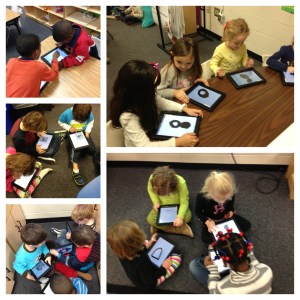
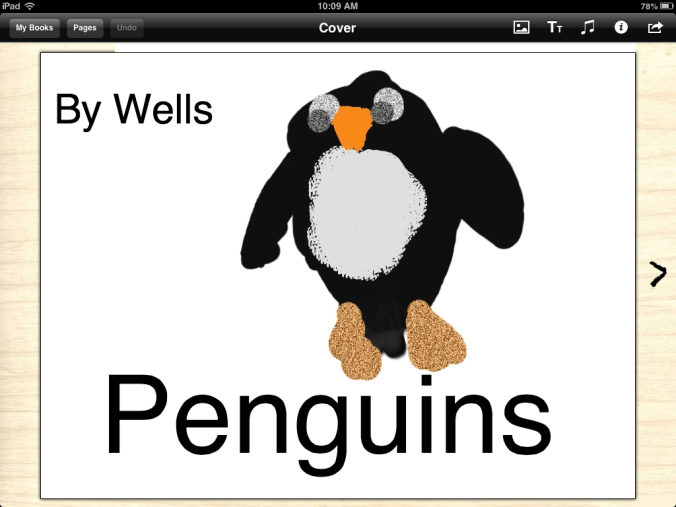
For a short time, I considered that it was highly possible I had lost my mind.  I was going to teach my kids how to use Book Creator on a Friday. Not only that, they were going to teach another kindergarten class how to use it later in the day.  Simmer down…my sanity is still intact.  I worried needlessly.  My iPad proficient five year olds created a 4 page book on Penguins in less than an hour.  They illustrated their pictures in Doodle Buddy, saved them to the camera roll, imported them into Book Creator, typed their text and exported the book to their iBooks app in the morning.  I demonstrated how to do this on the SmartBoard prior to their starting on their own.

In the afternoon, we hosted another kindergarten class to come learn from us.  At one penguin bookspoint, there were 50 kids in my classroom.  They were in groups of 2 or 4, working together.  By the end of our session, the other class had at least the book cover completed and some had their first page finished.  My children loved, loved, loved teaching them.  The engagement was instant.  Their conversations were instructive, relevant, and meaningful.  There were conversations about word choice and details in illustrations.  We even discussed getting back together and sharing our finished books with each other.

My students, in the end, wanted to know if they could show another class how to create their own books.  What a great way for all of my students to have an opportunity to be a leader.  Even the quiet and reserved students, who may otherwise be reluctant to share in front of the group, took a leadership role in the small groups.  While the finished products are going to look great, the process in getting there was priceless.  Not to be forgotten, the science facts they acquired as they wrote about penguins, their life cycle, and their habitats.  Combine that with the literacy aspect and the cooperative learning on the iPads, and I’d say today was a complete success.

Here is a screen shot of one of the book covers:
book cover

I’d love for you to leave a comment, subscribe to my blog, and/or share this post with a friend.
iPads and the Common Core Standards

You cannot teach a man anything, you can only help him find it within himself.
― Galileo

One of the big questions I am repeatedly asked is about using iPads and implementing Common Core State Standards (CCSS).  When you study the standards and the purpose behind them, and you understand personalized learning, you can see how the two fit nicely together.

Personalized Learning is the tailoring of pedagogy, curriculum and learning support to meet the needs of the individual student.  Typically technology is used to facilitate personalized learning environments.  The CCSS are designed to be robust and relevant to the real world, reflecting the knowledge and skills that our students need for success in college and careers. In Language Arts, the CCSS focus on students learning to read and write complex texts independently at high levels of proficiency and at a rapid rate to be effective.  The focus is on proficiency and complexity, yes, but also on independence.  We want our students to be able to do quick, on-the-run research when needed, to express their thinking verbally and in writing, and to summarize, analyze, and design without needing teachers to insert the key questions along the way or to walk them through step by step.  iPads are an ideal learning tool for these goals.  Having constant access to information, students are able to research when needed.  They are able to to write, compose, and create with various applications…all without having to wait their turn on a classroom computer.  The CCSS emphasize that every student needs to be given access to the thinking curriculum that is at the heart of the standards.

The Common Core standards is, above all, a call for accelerating students’ literacy development.  We must lift the level of student achievement.  This is not achieved by simply transferring a worksheet from paper to the iPad.  The CCSS call for true reform.  Reform needs to revolve around creating systems of continuous improvement that result in teaching toward higher expectations, personalizing learning for students-which in turn, increases rigor as well as student engagement. One way we can use iPads to implement the standards is iBooks Author.  iBooks Author allows us to create our own texts to move students up levels of complexity by providing them with many just-right, high-interest texts.

As educators, we have to enable our students to become strong and proficient readers and writers.  Using iPads, we are able to fortify our own teaching, our students’ learning and meet the high standards of the Common Core.

I’d love for you to leave a comment, subscribe to my blog, and/or share this post with a friend.
Personalized Learning: Spelling

“Don’t they teach you how to spell these days?” “No, they teach us how to use spell check.” -Jodi Picoult

I have to confess…I am one of those people who never had trouble with spelling.  It came easily for me and my nickname in middle school was “dictionary”.  I hated that then, but having the ability to spell has always served me well.  In this “spell check” world, it seems as if spelling may not matter.

Fortunately, my 5 year olds have some of the same desire for spelling correctly as I.  They don’t like to get things wrong and they get concerned when they are typing in Pages and they get the red, squiggly underline indicating they have spelled incorrectly.

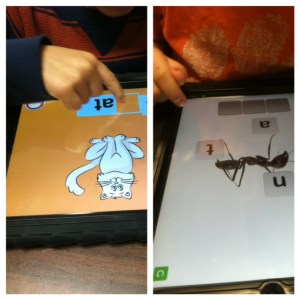
Since we are focusing on personalized learning, I have different spelling lists for different groups in the class.  We are working on word family words mostly at this point.  Spell Test is a free (for now) app that is very basic and simple but provides me a helping hand in managing different spelling lists and tests.

How does Spelling Test work
1. Create a Spelling Test
2. Choose a Name for Your Test.
3. Start by adding Words to your test.
4. Record your own Pronunciations in an easy to use format.
5. Now Take a Test.
6. Listen to the Pronunciation and Spell the Word in the Box correctly.
7. Instant Feedback on how you did, Did you get that right or wrong
8. Complete the Test to see a Summary of Words.
9. Each time you take a test, you will know which words you got right and which you got wrong
10. Track improvements as you take the test multiple times.

The kids like using their own voice to record the words.  I can also record words if pronunciation is an issue.  The app doesn’t show them the words during the test.

This is an easy way to personalize spelling for each child.  I’m not ready to give up to spell check completely.  I still see value in teaching words, word roots, and phonics.  Practicing with an app makes it fun for the kids, but it also allows me to individualize each list if necessary. Because it is an app that is available for iPhone and iPad, parents can also have students use it at home to practice.

I’d love for you to leave a comment, subscribe to my blog, and/or share this post with a friend.

What’s Your Story?

I think it’s imperative to follow your heart and choose a profession you’re passionate about.-Steve Kerr

What’s your story?  We all have one.  Mine is chronicled here on this blog and while it may seem like a love note to Apple and iPads most of the time, it is more about the changes in my classroom as a result of innovation.

Teachers are innovators.  We have to be.  We are often short on time, money, and resources, but we are not short on passion, creativity, and a desire to make a difference.  It is easy to walk down the hall everyday to your classroom, close the door, and go about the business of educating each day.  It is easy to start believing that what you do doesn’t matter and even easier to drift into autopilot.  It becomes easy to reject new ideas and technologies because that brings change and change brings uncertainty and uncertainty brings…well, it brings a degree of discomfort.  And who has time for that?

There is a bigger story here.  It’s your story. How do you innovate?   What if you tried one thing differently today?  What if you said no to “what we’ve always done” and said yes to something you’ve always wanted to do?

Ok, enough about you, let’s talk about me…I’ve said before iPads have been a game changer in my teaching career.  I’ve always believed in my calling to teach.  It is who I am, but that doesn’t mean I am impervious to ruts, routines, and rigor mortis.  Jumping into this project with a “what if” mindset opened more doors than I even imagined.  Stretching, embracing the change, and learning to live in the uncertain was my personal lesson plan.  It was not (and still isn’t) without setbacks, do overs, and what-in-the-world-was-I-thinking moments.  Innovation does not come without your personal investment.  Innovation doesn’t necessarily mean setting the world on fire…I’d settle for setting my students on fire for learning.

Make a promise to yourself that you will try one new thing.  Stir your creative juices and stretch.  Your skin may feel a little tight; but in the end, you will find your story.  You will re-discover what it is that brought you to this profession and you will be better for it-both personally and professionally.

I’d love for you to leave a comment, subscribe to my blog, and/or share this post with a friend.

Choosing Brilliance

Don’t ask yourself what the world needs. Ask yourself what makes you come alive and then go do that. Because what the world needs is people who have come alive. – Howard Thurman

January is a good time for simplicity.  After all of the necessary messiness and decorations of the holidays, I like the simplicity of January.  January is a good time for reflection and renewal.  Beyond the usual “Get Healthy” resolutions, I find myself wanting to get to what matters.   Where does my professional passion lie? What makes me come alive in the classroom?

I will admit, getting up early this morning after 2 weeks off, I had trouble finding motivation.  Purpose.  Coffee.  But after arriving at school and having my students hug me and bubble over with excitement about being back in school, I realized they have no trouble connecting with their passion.  They said they missed their friends, they missed me, they missed their iPads.  They said they missed learning. I said it was time for Writing Workshop.  They cheered.  Their unabashed love for school, engagement, learning, possibilities, new things, and opportunities seem endless.  They show up everyday with wonder and brilliance.  When was the last time you showed up somewhere, anywhere,  with wonder and excitement at the possibilities?

As educators, our passion, our brilliance,  is easily lost amidst meetings, paperwork, lesson plans, less than supportive parents, criticism, behavioral problems, etc…I can choose to get bogged down in that or I can rise above.  I can choose to show up everyday with wonder… Wonder at what my brilliant 5 year old students can teach me about themselves and about myself.  I can choose to simplify my approach to teaching…to discard things that no longer work or bring my students alive.  I can come to work each day and be thankful for having a fully stocked classroom with supplies, an amazingly supportive administrator, and a district that believes in personalized learning and iPads.  I can connect with my own passion for literacy and learning and magnify what I am doing through this blog.  In the bleak mid-winter, I can choose to shine brightly. Let’s be brilliant together!

Where do you find yourself in this first chapter of 2013?

I’d love for you to leave a comment, subscribe to my blog, and/or share this post with a friend.

A Reading Buffet with iPads

Books are no more threatened by Kindle than stairs by elevators.  -Stephen Fry

Sunday potluck dinners in the South are awesome.  There is always a huge array of church- lady food.  You know the kind I’m talking about…Miss Ruby’s secret recipe sweet potato casserole, or Miss Ethel’s homemade from scratch coconut cake.  You look down the long table filled with amazing choices and hope the blessing is said quickly and that you’ve got enough space in your stomach to hold a little bit of all of it. You walk away with a plate piled high of a little of this and a little of that.  So much better is this than going to a restaurant where you may have a menu full of choices, but you must settle on only one entree.  Invariably, I always look around once the food arrives and wish I had ordered what someone else ordered.

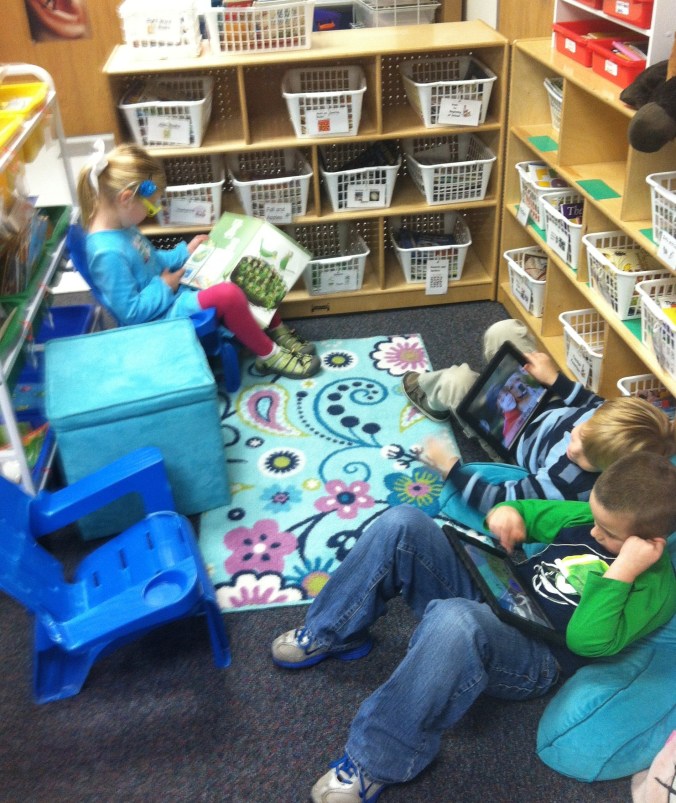
reading choicesHaving choices in reading is no different than that Sunday covered dish luncheon.  My students have the choice of reading regular books, and they can also read from their iPads.  They have many books both hard copy and electronic to choose from.  They can read from a variety of genres and from a variety of topics on a variety of reading levels.  This is a time when more is definitely…well…more.  Already my kindergarten students are referencing author styles, comparing illustrations, and making connections to other texts with their reading partners.  One student recently asked another, “Do you like Eric Carle’s illustrations better than Dr. Seuss?”

Donalyn Miller, author of The Book Whisperer states: “People who lose the ability to make choices become disempowered. This is true for adults, and it is true for young readers. When every book a child reads is chosen for them — by parents or teachers — children lose self-motivation to read and interest in reading. Children should choose their own reading material most of the time, but they need exposure to a book flood to determine what books they like and learn how to choose their own books. ”

Choices encourage engagement, engagement encourages stamina and stamina teaches the curriculum of time.  Children need to learn to read by reading.  By offering them a veritable table of “covered dish” choices, they don’t have to decide between the sweet potatoes and the mashed potatoes…they can have both.  And isn’t that the best of both worlds?  Pass the gravy y’all…

I’d love for you to leave a comment, subscribe to my blog, and/or share this post with a friend.

Digital Letters to Santa

Maybe Christmas, the Grinch thought, doesn’t come from a store.-Dr Seuss, from How The Grinch Stole Christmas

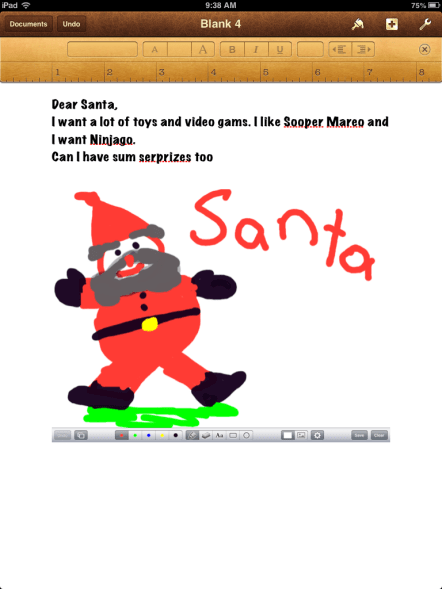
Pages SantaAh…try telling that to a class of 5 year olds.  Ever since the calendar turned to December, my students have been in Christmas mode.  In Grinch-like fashion,  I have been trying to ignore Christmas in the classroom…trying to hold out until next week which is our last week of school before winter break.  My efforts have been met with stubborn resistance.  They want to talk about, read about, sing about and write to Santa.  My steely resolve was usurped…and with apologies to Dr. Seuss, every 5 year old in my class, the tall and the small, was singing and writing without any permission at all!   Mrs. Meeuwse HADN’T stopped Christmas from coming! IT CAME!  Somehow or other, it came just the same!

So, taking advantage of the teachable moment, I turned their desire to write to Santa into a lesson using Pages.  We worked on our writing and then incorporated a drawing from our Whiteboard App.  This activity was easier in small writing groups.  I was able to work with each child on the mechanics of using Pages and how to import their artwork from their photo roll.

Sometimes we have to be willing to give into the frenzy and go with the flow.  Their general excitement was channeled into a meaningful activity that kept them engaged. They were busily writing and talking with their partners about their writing.  I have to admit, even my grinchy self enjoyed the activity. Knowing the fickleness of the 5 year old list for Santa, I imagine we will have several more opportunities to revise, refine, and edit these lists.  This will provide me a few more opportunities to incorporate the writing process.  Having the iPads, we were able to take an age-old activity of writing to Santa and move it into the digital age.

We have 7 more days until winter break.  After all of the excitement, I will definitely be ready for “a long winter’s nap” or at the very least, some Who-pudding and some Who- roast beast.

I’d love for you to leave a comment, subscribe to my blog, and/or share this post with a friend.

Increasing Rigor with iPads

It is no longer OK to provide the vast majority of America’s children with a fill-in-the-blank, answer-the-questions, read-the-paragraph curriculum that equips them to take their place on the assembly line.-Lucy Calkins, Pathways to the Common Core

I was recently asked to observe in a 4th grade classroom at my school.  She was implementing some new literacy strategies and wanted some feedback.  It was affirming to see the rigor and engagement of her students. It was also a good reminder of the vertical articulation that needs to occur between grade levels.  As a kindergarten teacher, I seldom get to see my students in action after they leave my classroom.

Our literacy activities involve small group work.  In my class, students read and write for a variety of purposes on their level.  These activities include reading on the iPad as well as word work in various apps and some writing on the iPad.  In the class I observed, students were using iPads to research information for a news article.  They were seeking credible sources and the author of the article.  They were jotting down important facts and comparing information.  Later in the school year, my kindergarten students will be using iPads to research information on various topics.  They will be finding facts to incorporate into their writing. I am building up to that now with iPad activities of increasing complexity with my students.

As we work diligently in our own classroom worlds to prepare our students to move up, it is important to keep a broader view.  We lay a foundation in each grade level that is built upon by the next.  It was good for me to step out of my kindergarten world into the world of “big kids”.  What I do each day is important and relevant.  I think we all need a reminder of that from time to time.

Our students face a different world of challenges than we did.  They will approach problem solving differently.  The implementation of the Common Core State Standards emphasize much higher-level comprehension skills than previous standards.  Readers of today are asked to integrate information from several texts, to explain the relationships between ideas and author’s craft.  Previous literacy efforts defined literacy in terms of basal reading programs with emphasis on seatwork.  The Common Core standards convey that “intellectual growth occurs through time, across years, and across disciplines.” While iPads alone can’t meet these standards, having a powerful, technological tool combined with strong teaching, we can meet and exceed these standards.

I’d love for you to leave a comment, subscribe to my blog, and/or share this post with a friend.

Personalized Learning with iPads

Today you are You, that is truer than true. There is no one alive who is Youer than You.-Dr. Seuss

How better to say it than this? One size that fits all doesn’t work for learners today. Personalized learning is the tailoring of  curriculum and learning environments to meet the needs and aspirations of individual learners, often with extensive use of technology in the process. Personalization may differ from differentiation in that it affords the learner a degree of choice about what is learned, when it is learned and how it is learned. This may not indicate unlimited choice, since learners will still have targets to be met. However, it may provide learners the opportunity to learn in ways that suit their individual learning styles and multiple intelligences.

Personalizing learning for each learner means they take ownership of their learning. Let’s take advantage of the iPad’s ability to challenge, engage and motivate different learners.  Students can often work on different levels within the same app.  As I look at what each student needs, based on assessments and observation, I am able to direct them to certain apps or certain activities within apps.  Teachers should be able to implement multiple paths to knowledge- having a variety of ways to help a diverse group of students learn rigorous standards.

Working in flexible, small groups for guided reading, I take notes as I see areas where students need practice.  One student may need help with word families and rhyming words, where another may need help with medial vowel sounds.  My top reading group may be ready to incorporate reading response journals using Pages as they read.  This would never be possible in a whole group instructional setting.  Having the technology of the iPads at our fingertips,  it is easier to differentiate instruction, find all opportunities for remediation to help struggling learners, and  provide enrichment to challenge the advanced student.

With iPads, we can create a Pandora Radio-like effect in education.  Each student can get a variety of educational experiences, engage in topics and activities of interest, and learners have the responsibility and ownership to choose how they learn, when they learn and where they learn.

I’d love for you to leave a comment, subscribe to my blog, and/or share this post with a friend.

iPads in the Classroom: Start Small, End Big

The man who removes a mountain begins by carrying away small stones.-Chinese Proverb

As with all things new, starting small often helps lead to bigger things.  Many classes with iPads aren’t fortunate enough to have 1:1.  Looking at maximizing learning and use of the iPads is key.  In our early days of the pilot program, I originally was scheduled to have only 12 iPads for use in small groups/centers.  Within the first hour of using them, I knew we needed (and could do amazing things) with a class set.  By the end of that week, we had a class set.  But what of those first few days with 12 iPads?

My first priority was to get them in the children’s hands during guided reading.  That is where we established expectations, learned how to use them, and began the important work of setting up personal learning plans.  Since I had only 12 for such a short time, I didn’t have the issue of storing work on only 12 iPads. However, if we had remained at that number, I would have assigned children to specific iPads and would have had them upload their work to their individual folder in PaperPort.  Beyond guided reading groups, I wanted them to use the iPads for some writing activities and self-selected reading activities.  Kindergarten is never  “all or nothing” learning.  We do some writing with pencil and paper, and some on the iPad.  We read some books on the iPad and some regular books.  We do word work, math, and phonics at times on the iPad and at times with manipulatives.  By starting small, the children (and the teacher) gain confidence in guided use.  Starting small also gives teachers a good idea of which children need close monitoring and which ones can handle a little more freedom.

Even though I have a class set now, I still like small group work best.  I like being a close observer of what the children are experiencing. Where are their successes or their areas of struggle? Are they guessing at answers or do they know them?  With the new iOS6, there is a new feature called Guided Access.  It allows a parent, teacher, or administrator to limit an iOS device to one app by disabling the Home button, as well as restrict touch input on certain areas of the screen. It lets you control what features are available during use.  Just go to Settings, then General, then Accessibility, and turn guided access on.

So, whether you have a class set or just a few iPads, keep it simple, start small.  As you find your children progressing, you will find limitless uses for the iPads.

I’d love for you to leave a comment, subscribe to my blog, and/or share this post with a friend.