Dear Diary

For any writer who wants to keep a journal, be alive to everything, not just to what you’re feeling, but also to your pets, to flowers, to what you’re reading-May Sarton

I always liked the idea of a journal.  I say the idea of a journal because, despite my best intentions, I can’t seem to keep at it.  I always start with great enthusiasm but then it fades and I put it aside. I think it’s because my hand gets tired of writing and my writing is pretty messy.  I love paper and pens and beautiful blank books with endless lines just waiting for my life stories to be recorded.  A friend of mine gave me a beautiful leather bound journal that I love to hold and look at and imagine all of the things I will probably never write in there.   This blog is the closest I will come to a real journal, I’m afraid.

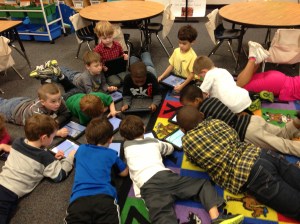
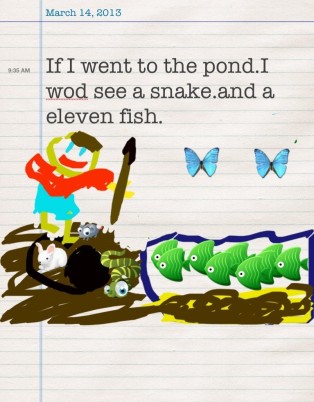
My students journal daily as part of their center time.  They have a choice of writing on paper or writing on their iPads.  We use an app called iDiary for Kids.  iDiary is a journaling platform where students can write personal journal entries, draw pictures or upload images from the camera roll.  Stickers are also available to enhance the page.  The kids can personalize their journal by choosing cover color and an animal icon for the front.  They can even choose font and font size. They like that there is a password (which I set the same for all.)

Journal writing is a great way for students to record the events of their day and use sequencing skills to do so.  Students who are reluctant writers are motivated to write in the app.  Students have voice and choice in their writing by choosing paper or iPad.  They also have choices in topics, pictures, look and style. Some of my students enjoy writing about whatever theme we are discussing in class, others write about family events, favorite activities or what they’ve done during the school day.  wells idiaryJournal writing is a chance for a child to explore his/her mind.  It develops communication skills and strengthens the reading-writing connection.  By having kids write every day in their journal, we are building stamina for writing longer pieces. In November, my students were writing 1-2 sentences over 15 minutes and they thought that was looong.  Now, they sit for 20 minutes to an hour writing and writing and writing.  Because their keyboarding skills are so emergent, they type far less than they will write on paper.  It isn’t unusual at all for my kids to get up and get a second or third sheet of paper when writing.
Developing strong writers and readers is critical to life long learning.  iPads give my children choices in their learning.  When children can take charge of their own learning, they are automatically engaged.

Today, we will do exciting new things.  Let’s get to it!
Help Wanted

We can’t help everyone, but everyone can help someone.-Ronald Reagan

Ella

Ella

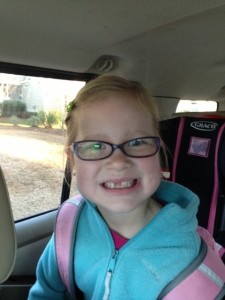
I recently found myself in a situation where I didn’t know how to do something with one of our new apps.  I could have probably figured it out if I devoted all of my attention and time to it but knew there was someone who already knew just how to do it.  So rather than spend precious time trying to figure it out, I just went to Ella. Ella is an expert at figuring things out on the iPad.  She never lets me down and if she doesn’t know the answer right away, she persists and comes back to me, usually 10.4 seconds later with the answer.  We all need an Ella…she is like a real-life Siri, only way cuter.

Working together as a community of learners benefits everyone.  Today, my class partnered with a second grade class to demonstrate how to use an app.  The second grade class had just gotten Explain K and 2 largeEverything which is an app my kids are already familiar with. It was a great activity watching 5 year olds teaching 7 and 8 year olds.  My kids were very nonchalant about the whole thing…like it is no big deal to teach older kids, because to them it’s not.  Even better, was the second graders didn’t seem to mind being taught by the younger children.  Once again, there were 50 kids in my classroom and all were engaged and on task.

How do we create an environment where teachers learn from students and students learn from each other, regardless of their age?  We allow the experts to share what they know.  The students in my class know which child in my class can help them with a variety of needs.  Everyone has their own area of expertise.  Students are engaged in a way that provokes conversation.  Students are invested in their learning because they are able to make choices about how they learn.  The adults don’t have to always be in charge and they recognize that students have a lot to offer, even if they are 5 years old.  The learner knows it is ok to make mistakes and the teacher gives the children the opportunity to create…surprise me!

My kindergarten students have many years before they enter college and then the job market.  They have much to learn in the coming years.  They also need to learn how to work with people both younger and older than themselves.  Working cooperatively with peers, and eventually co-workers is a critical life skill.  Today’s teacher doesn’t have to have all the answers.  We just need to be able to ask an expert…even if that expert still needs a booster seat 🙂

Hope helps 2nd grade

Today, we will do exciting new things.  Let’s get to it!
Technology Infused Classrooms

The love of learning, the sequestered nooks,
And all the sweet serenity of books.- Henry Wadsworth Longfellow

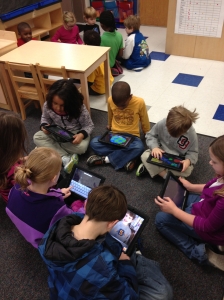
Luc landformsWhat does a technology-infused classroom look like?  If it’s done correctly, the technology becomes invisible.  It is seamless.  The teacher scaffolds and creates a curriculum-based lesson, then steps back and allows the students to make the magic.

In my classroom, I’ve  intentionally modeled procedures and through the gradual release of responsibility, my students are independent during their work time.  I’m not interrupted while teaching guided reading groups as students incorporate peer collaboration into their skill sets.  Once my students have learned how to use their apps, they are able to then demonstrate their learning in a creative way they choose.

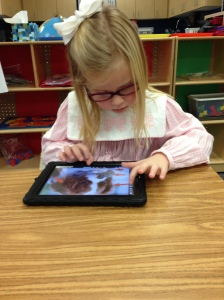
It is not uncommon to see students in the reading center reading eBooks on their iPads asElla making a book well as regular paper books.  At the writing center, there will be children making books in Book Creator as well as writing out long hand on paper.  Ella, pictured at right, chose to skip her free choice centers today to go write a book on her iPad.  On Monday, she chose to write about her weekend news during Writer’s Workshop.  She wrote 6 pages on lined paper.  Her method of delivery differs but she is demonstrating the skills

With a technology infused classroom, students can make their own decisions.  They are engaged and motivated.  In kindergarten, the infusion is slow and deliberate.  It becomes a natural part of our every day routine so that we don’t have to work at it.  We don’t have “iPad time”.  It an extension of our learning. We don’t just add technology and stir.  We use the technology for information, research, collaboration and creation of products.

By being deliberate, having a plan, and empowering your students, creating a technology infused classroom is easy.

Today, we will do exciting new things.  Let’s get to it!
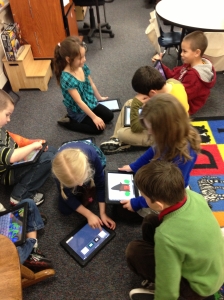
Hope Explains More

hom·o·phone : a word pronounced the same as another but differing in meaning, whether spelled the same way or not, as heir  and air.

If you want a sure-fire way to make a class of kindergarten students laugh you need only say “underwear”, “poop” or “naked”.  This will result in uncontrolled, hysterical whooping and laughing.  We recently added the sight word “but” to our list and that immediately created some wide eyes and giggling.  I had added a “bad word” to our list.  What was I thinking?

We immediately launched into a lesson on homophones. This is a complicated concept for my students because they don’t realize words can sound the same but be spelled differently and mean different things.  We came up with a few together on an anchor chart to help them visualize this.  We will add to this as we come across other words, hopefully not as scandalous as “but” and “butt”.

These class conversations combined with the anchor charts help them make concrete connections to otherwise nebulous concepts.  My students are not experts on homophones now, but they have been exposed to the concept and hopefully, with the creation of the anchor chart, it will cause them to stop and think when confronted with another word that is confusing.

In a recent post, I extolled the virtues of our Explain Everything app. One of my students, Hope, was very articulate in her explanation of her annotated illustration.  Hope was vexed by the whole “but” “butt” issue and wanted to Explain Everything about these words that was creating such consternation in our classroom.  Please allow Hope to explain more:

I’d love for you to leave a comment, subscribe to my blog, and/or share this post with a friend.

Increasing Math Literacy with iPads

Mathematics expresses values that reflect the cosmos, including orderliness, balance, harmony, logic, and abstract beauty.-Deepak Chopra

Math and I don’t get along.  While we are civil out of necessity, I make it a practice not to do math in public.  It just never turns out well. I think our disharmony can be traced back to the early beginnings of our relationship when my second grade teacher would smack our knuckles with a ruler if we used our fingers when adding.  I was terrified of her and I soon became terrified of math.  It’s been a rocky road ever since.

So how ironic that my 100th blog post (insert big fanfare here!) is about math.  I don’t want my students to be afraid of math, nor do I want them to share the same ambivalent feelings I have.

ella tens and onesOur common core math standard this week is “I can break numbers in to tens and ones.”  We’ve unpacked that standard all week.  We’ve practiced and practiced and today was the day they demonstrated their proficiency.  First, we chose four teen numbers.  They drew their tens frame in Doodle Buddy and showed the ones outside the frame.  After the drawing was saved, they imported it into Pic Collage and typed out their breakdown of the number into tens and ones.  This one to the left is Ella’s.  She has extended our valentines theme in her tens frame.

I’ve mentioned before how we are focusing on workflow fluency. As my students save their Pic Collage to their camera roll, I can transfer it to my laptop with Simple Transfer.  This allows me to keep electronic work portfolios.  You could also add this Pic Collage to Explain Everything and the children could tell all about their thinking.  Wells Tens and OnesIn Wells’ example to the right, he chose to draw some of his and use the stickers in Pic Collage for others.

Mathematical thinking supports science, technology and mathematical literacy.  Having students demonstrate and be able to explain how they came to their conclusions is not only important in math, but any problem solving activity.

As we have recently celebrated and counted up to the 100th day of school, we are exposing our students to greater numbers.  Having spent the week on tens and ones, they are already asking me about what the “1” in 100 means if their are zero tens and zero ones.  Time to move the bar up a notch and explore hundreds.

My students loved this activity and it is definitely one you can “count” on me using again!

I’d love for you to leave a comment, subscribe to my blog, and/or share this post with a friend.

For the Love of Words…

The limits of my language are the limits of my universe-Goethe

Kaylee vocabWe are at the point in the school year where my students are able to read most of their sight words and are able to decode many others.  As we flex our thinking muscles, we are working on increasing vocabulary words.

Students learn vocabulary words informally when they are immersed in a word rich environment. Anchor charts with rich words and lists of synonyms can be used to create a word rich environment. Students learn new words through rich conversations, personal reading and daily experiences with read aloud texts.

We are working to increase our Tier 2 and Tier 3 vocabulary during literacy centers.  Students are given 4 vocabulary words that go along with our thematic unit.  In the example above, the words were love, heart, friend and valentine.  The children had to write a sentence in Pic Collage to show they understood the word and then they illustrated their sentence in Doodle Buddy and imported it into the Pic Collage.  They will also be allowed to look for pictures on Safari to demonstrate words soon.  (I was a little hesitant to have them look up images for valentines words…) After they created their Pic Collage, they shared it with their team and read the sentences of the other children.  A colleague of mine uses Strip Designer with her first graders to demonstrate their vocabulary words.  Either of these apps work great.  You can save the work to the photo library or upload to PaperPort to demonstrate workflow.

To teach vocabulary, we must use rich and robust instruction through multiple exposures. Children who acquire a substantial vocabulary are often able to think more deeply, express themselves better, and learn new things more quickly. They are also very likely to be successful not only learning to read, but also in reading at or above grade level throughout their school years.

I’d love for you to leave a comment, subscribe to my blog, and/or share this post with a friend.

Hope Explains Everything on iPad

Grown-ups never understand anything for themselves, and it is tiresome for children to be always and forever explaining things to them. -Antoine de Saint-Exupery

Have you ever listened to a 5 year old tell about their work? Try listening to 25 of them.  Daily.  They have so much they want to tell and explain that I don’t have enough ears to listen to it all.  Their work is so detailed and there are like 40 bajillion things they absolutely must tell, and if you interrupt them even once, they must.  start.  over.

Hope

Hope

Thank goodness I have Explain Everything.  It is the perfect app for my kids to demonstrate their workflow, show me what they have learned and talk, talk, talk to their hearts content.  If they mess up, they just erase and start over.  My kids are learning about labeling and annotating their work.  Scientists label and good readers annotate for meaning.  When I showed them the app, someone said, “You mean I can just tell my iPad everything I want it to know?”  Yes…within 13.8 GB of reason.  So with full permission to illustrate, write, label, annotate AND talk, this lesson was a home run. There is an example from Hope, one of my students at the end of this post.

Ok…so a small caveat.  I have a slight obsession with neat and orderly and it’s hard for me to do messy.  (Yes, I realize I teach kindergarten.  Somehow it all works.)  This activity can get messy.  I had to get over my urge to tidy it up and put it all in a bento box and say that’s, that. You can’t have kids recording all over the classroom while other kids are talking and recording at the same time.  So, as kids finished their illustrations, labeling and annotations, I allowed 4 at a time to go out in the hall, spread themselves out, and tell their story.  I actually had to tell them it was ok to speak up so they could be heard by the recorder.

We will be using this approach with demonstrating mastery of math standards as well in the coming weeks.  Explain Everything is not free…There are other apps, like Show Me that does similar things that is free.

As my kids are working on many different kinds of fluencies, stretching their cognitive wings and needing to share what they’ve learned, having the iPad allows my kids to create, produce, redefine and transform all in one place.

Please allow Hope to Explain Everything:

I’d love for you to leave a comment, subscribe to my blog, and/or share this post with a friend.

Workflow and iPads

Don’t mistake activity for achievement.-John Wooden

boys workingIn a recent post, I wrote about moving beyond apps and concentrating your focus on content. What are your students learning, why are they learning it and how will they know they’ve learned it? As I unpack the common core standards with my students, I am focusing heavily on these questions…not so that I can answer them, but so that they can answer them.  With these questions in place and iPads in hand, we need to look beyond apps and instead focus on workflow fluency.

If you look up the definition of workflow, you find:

  1. The flow or progress of work done by a company, industry, department, or person.
  2. The rate at which such flow or progress takes place.

The flow of progress…how can my students demonstrate the flow of progress?  Just because they are interacting with an app does not mean they are learning.  iPad activity should be purposeful and connected.  It should also be personalized to what that particular child needs.  

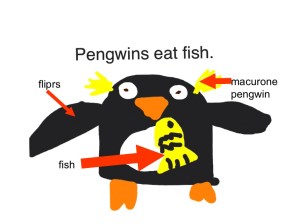
Workflow and iPads allow students to redefine their work.  The technology allows for the creation of new tasks previously inconceivable.  It is transformative.  After our recent thematic unit on penguins, my students created their own books in Book Creator. workflowThis started with their own illustrations in Doodle Buddy which were imported into their book in Book Creator.  The students wrote sentences to go with their own illustrations.  Taking this a little further, students took some of their individual illustrations and labeled them using Explain Everything. They were able to record themselves explaining their work.  While the apps I used in this are great, there are others that do similar things.  Some of them are free.  Pic Collage is another way to demonstrate workflow and it’s free. The take away here is that students are able to use the iPad to demonstrate what they’ve learned and can use apps to explain in their own words what they’ve learned.

As we are striving to make learning more personal, we should teach our students about workflow fluency. By using the iPad to demonstrate workflow, our students are engaged, thinking critically, and are using skills of a 21st century learner.  Even the youngest among us can do it.

I’d love for you to leave a comment, subscribe to my blog, and/or share this post with a friend.

Cooperative Learning and iPads

The things that make me different are the things that make me.- A. A. Milne

collaboration 3When it comes to tattling, I have the “blood, fire, vomit” rule.  You know, don’t come tell me unless there is blood, fire or vomit.  This generally works very well.  They’ve learned what is important to tell me and what is small stuff.  Cooperative learning isn’t always smooth sailing.  5 year olds have a casual relationship with sharing and taking turns.  There are many times group activities have the potential to turn into a major disruption unless the activity is set up just right.

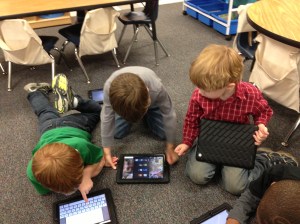
With iPads, cooperative learning is a breeze.  My kids look forward to working with others.  They love sharing, watching what their friends are doing and they love being “an expert” and showing others how to do things.  Each child has something unique to bring to the group. Because they feel confident, they all participate.  Today, we paired with another kindergarten class and my students worked with those students to teach them how to make books.  This is the second time in 2 weeks 50 kids have come together in one classroom to learn from each other.  There was plenty of conversation but there was no whining, tattling, or complaining.  One hour of no tattling in a class of 50 kindergarten students is nothing short of a miracle.  collaboration 2

As we begin to personalize learning and students are excited about what they are learning, it seems natural that many negative behaviors will go by the wayside.  As learners actively participate in the design of their learning and have a voice in what they learn, they take ownership.  They build a network of peers, teachers, and others to guide and support their learning.  Think back to the last professional development training you had that really engaged you and spoke to you…you were focused and energized, and hopefully excited about the possibilities of what you learned.  In contrast, think back to the last training you had that was not so engaging.  Did you stay focused or were you more inclined to check Facebook on your phone or talk to those around you?  Our students are no different.

As we here in the US move through our winter doldrums, let’s find ways to connect with the passions of our students.  It all starts with them.  The more we give them a choice and voice in their own learning, the less we have to use the “blood, fire and vomit” rule.  I, for one, am ALL for that!

group collaborationI’d love for you to leave a comment, subscribe to my blog, and/or share this post with a friend.

Flash Mob Writing Groups?

No matter how many plans you make or how much in control you are, life is always winging it.-Carroll Bryant

book writingMy lesson plans said something completely different.  It was unscheduled, unplanned, and… undeniably better than anything I had on today’s agenda.  You’ve heard of a Flash Mob?  A Flash Mob is a group of people who assemble suddenly in a public place, perform an unusual and seemingly pointless act for a brief time, then quickly disperse, often for the purposes of entertainment or artistic expression.  Well, That.  Just.  Happened.  No dancing or singing…this was definitely in the realm of artistic expression.  My students were working on their iPads when a group suddenly gathered in the middle of the room and started writing books.  This group (pictured above) was fully engrossed in their work.  They were discussing book topic, titles, text placement, and content. They stopped briefly, only to ask me to put on some “creative music”.   Once they started, they didn’t stop until they were finished.  Most had written a 4 page book.  Once they finished, they dispersed and went back to what they were doing before.

Flexibility is critical in a student centered classroom.  Kids need to feel comfortable making decisions about their learning…even at age 5.  Shutting down that activity because it wasn’t what I had planned for today, would have killed the creativity and spontaneity of that moment.  (Ok, that hour.)  If we are about the business of creating readers and writers, we have to give them time to read and to write.  I can’t always write on command; however, there are times when an idea strikes me and I can hardly wait to write.  It’s hard to stifle that feeling when you are inspired.

Setting up your classroom so that children can move in and out of small groups and make choices about their learning environment, helps foster a real sense of ownership. Allowing them the freedom to grab that iPad and jot down ideas, research a topic, read a book, or create their own book is what 21st century learning is all about. I will welcome a flash mob like that any day!

Here is Kaylee’s book commemorating the 100th day of school:

I Love 100! by Kaylee

I’d love for you to leave a comment, subscribe to my blog, and/or share this post with a friend.