Braving Technology in the Classroom

Do one thing every day that scares you -Eleanor Roosevelt

spiral stair caseWhat scares you? I’ve recently decided I’m afraid of open heights…you know, high places with very little barrier, or steep steps with open spaces in between where I can look waaay down…I usually make my husband go in front of me and I hold on to his shoulder, or else I get stuck right there!

This wasn’t always the case.  It has developed only recently but it’s still a strong fear.   I feel ridiculous talking about it because it seems so silly but my heart races and I feel all panicky when faced with a situation involving high open spaces.

In the classroom, we’ve spent a lot of time talking about being brave and what that means.  It could mean trying something new, speaking up when we aren’t sure of the answer, facing a bully, or doing something by yourself.  All of these can be daunting when you are 5 years old.  I’d venture to say some of these are daunting to adults as well.  My students are beginning to ride their bikes without training wheels these days and many come in reporting about their bravery in this feat.  Their pride is quite evident when it seems they’ve conquered something new.

Of all the scary things in their big, wide worlds, technology isn’t one of them.  A recent visitor went to one of my students and asked him about how he learned to do all of the things he was doing on the iPad.  He looked at her quizzically and said, “I didn’t learn it, I just do it.”  So Nike’s theme aside, “just doing it” seems to be how they all think about using this device.  It’s no big thing.  So why are the adults all standing on their heads about teaching kids how to use the device?  Possibly because we see the device in a different way than they do.  Obviously, we need to teach responsible use and digital citizenship, but I do not teach my class as a whole group how to use apps.  I work with a few students in a small group and they usually end up working with each other and helping each other.

illusionMany of you have seen this illusion  where you have to determine if it is an old woman or a young woman.  Some people have difficulty seeing the image as 2 different images.  I found that I saw the old woman first and then saw the young woman later.  I also found that once I saw the young woman, I had difficulty seeing it the other way without really concentrating on that.  As educators in connected classrooms, we have to be able to adjust our vision and see as our students do.  If we only see the “old woman” in the photo, we are missing out on the possibilities of the “young woman”.  We can’t be credible to our students if we are singularly minded.

Change is scary.  By keeping our eyes forward, not looking down or back, and letting go of the handrail, we can navigate that big open staircase.  It also doesn’t hurt if there is someone in front of you to hold on to…

Today we will do exciting new things.  Let’s get to it!

1:1 iPads and Student Centered Classrooms

And no, we don’t know where it will lead.  We just know there’s something much bigger than any of us here. -Steve Jobs

It never gets old.  Even after 3 years of 1:1 iPads, the magic and wonder of my students’ engagement and learning excites and motivates me daily.  Having a student-centered classroom makes my job so much more interesting and meaningful.

Trent's photosynthesisWe have been learning about fall and fall leaves this week. Living by the ocean in the south, we have about 2 weeks of fall.  The leaves are green, then they are a little yellow, then brown and on the ground.  We don’t get to enjoy the rich colors of our northern neighbors.

Today,  I was reading a non-fiction book about leaves and it briefly touched on photosynthesis.  Knowing this concept was a bit advanced, I kept reading, and didn’t stop to discuss photosynthesis.  However, just like our recess snail episode, the children were fascinated with this large word and had many questions.  We started a wonder chart on this concept.  How does the tree live through the winter if there aren’t leaves on it to make food?  Is the sugar that the leaf makes during photosynthesis the same as the sugar we eat?  We looked at other books and found pictures on the internet.  We talked and wondered, wondered, and talked.  During their free choice time today in centers, several drew pictures about this concept.  Some chose drawing paper, some our Drawing Pad app. (See drawing at the top of this post.) Some even put their drawing into Explain Everything and talked about it there.  Here is one of those examples:

The only planned part of this day was the reading of that initial book.  The rest was courtesy of my curious children.  By being in tune with my students, I was able to go with their flow (which, by the way, was far better and more meaningful than anything I would have had them do.) As I look back on our fall unit in previous years, before iPads, the learning wasn’t nearly as rich or in-depth.  Of course, the iPads alone didn’t do anything.  They have served as a conduit of change for ME.  Over the last 3 years, I’ve changed and in turn, my teaching has been transformed.  It’s not about the iPad, but it is about a shift in the way my classroom works.  The learning environment is completely different and it continues to evolve.

Just like Steve Jobs, I have no idea where this will all lead.  I just know there is something bigger than all of us here…and THAT is exciting!

Today we will do exciting new things.  Let’s get to it!


The Choice is Yours!

Tell me and I forget. Show me and I remember. Involve me and I understand. -Chinese Proverb

Would you want to work in a place that gave you no voice? Would you want to teach in a school that allowed you no autonomy in how you teach? What if your every day was prescribed as to what you would do, what you would say and how you would say it…

medium_2699584043As professionals, we become offended when the “higher ups” in education make decisions that affect us without including us in the decision making.  Even professional development is terribly ineffective when we just “sit and get” without any input.  Would an artist paint very often or very well if the subject of the painting was always assigned? Of course not. So why are we so reluctant to give our students choice in how they learn?

Choice.  It’s meaning is clear: an act of selecting or making a decision when faced with two or more possibilities. Choice.  It’s not just for adults.  Alfie Kohn writes a good article here about choices for children in learning.

To be clear, there is a difference between choice and free reign.  Without some control and teacher facilitation, it can be pure anarchy. Setting up the learning environment to allow for student choice is critical.  You would never open a closet to a 3 year old and ask them what they want to wear.  You would ask, “Do you want to wear this or this?”  In my room, we begin with simple choices and through a gradual release of responsibility, students eventually have multiple choices all throughout the day.

Last week we were working on the pumpkin life cycle.  By Friday, everyone was ready to show me what they had learned.  They were given 2 choices.  They could show me in Pic Collage or in Explain Everything.  Later, they will have other choices, but for now, 2 is all they need.

photo

Instructions were on the Smartboard and everyone was hard at work!

photoThis is one of the examples from Pic Collage.

This is one of the examples from Explain Everything.

When given choices, students engage and take ownership.  By learning how to make choices and make decisions at a young age, they are better equipped at these skills as they get older.  When children learn to think for themselves, they are also less likely to be easily led by others whose choices may not be as desirable.

We want our students to love the content…to love learning.  By giving choices we lessen the chance of burnout (for both students and teachers), and we increase the chances of engaged, independent thinkers.  None of us like to be told, “You have no choice in the matter.” Instead, let’s work toward, “The choice is yours!”

Today we will do exciting new things.  Let’s get to it!

One Way Sign Photo Credit:  Creative Commons


Making the Most of Small Moments

Life isn’t a matter of milestones, but of moments. -Rose Kennedy
snailI don’t do critters…creepy crawly, slimy, or slithery.  So when my students found this guy at recess yesterday, of course, they were fascinated.  I had to admit, he was pretty spectacular in a disgustingly slimy way.
Their intrigue, however, brought about some pretty awesome conversation and some creativity later.  They immediately asked questions like, “Is it a snail or a slug?”  “What does it eat?”  “Does it keep its shell or outgrow it?” “Is it helpful or a pest?”   Then came this little gem from a child…”I wish we had an iPad out here to take its picture for the science center.” Silence for a moment.  In that moment of silence, I’m thinking, “Me too…it would make a great picture.”  Suddenly, a child says, “Mrs. Meeuwse has an iPhone (awesome brand identification for a 5 year old).  She can take a picture of it and print it out!”  Huh?  Oh yeah…I DO have a phone! I quickly snapped a photograph and then many started asking if I could send it to their iPads with Showbie…And then I was asked if I could “text the picture” to their parents.  Several wanted them to see it.  In our quick 25 minutes of recess, about 20 was spent with this snail.
During all of the activity, I was preoccupied with their questions and getting a good picture, making sure the creature wasn’t injured or touched, etc…but afterward, I reflected back on that moment and was struck by my students’ thinking.  The immediate thought of including technology…using my phone to take a picture, putting it on their iPads with Showbie, texting the image to their parents…technology was at the forefront of their thoughts.  It was not an afterthought.  It was how these 5 year olds solved their questions and problem-solved in the moment.
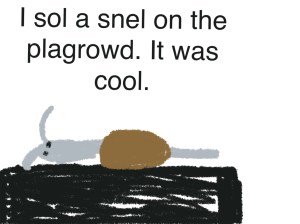
Later in the afternoon, many chose to draw the snail in art and write about him in the writing center.  Here is one example from the iPad:
snail drawing padThe child used Drawing Pad and saved it to his camera roll.  I used Simple Transfer to get it off his iPad on to my laptop.
Our thematic unit this week is Pumpkins and how they grow…but  yesterday, we took a detour and talked about snails.  The questions, vocabulary, and engagement were just too good to shut down at the end of recess.
I don’t necessarily recommend taking a detour every time the opportunity appears, but by being open to small moments in your day and allowing students to lead the way in their wonder and discovery, we begin to create students who think deeply.  I am always amazed at the complexity of a child’s mind and yesterday was no exception.  I was reminded just how naturally they incorporate technology into their lives and how curious they are about living creatures.  By being present in that very small moment, I’m certain I learned more than they did yesterday!
Today, we will do exciting new things.  Let’s get to it!

Engaging Students with Explain Everything

If you can’t explain it simply, you don’t understand it well enough. -Albert Einstein

The blank stare…You know, the one that either says, “I have no earthly idea what you are talking about.” or “Why are you telling me this? I already know it.” I suppose there is one other possibility. Anyone? Anyone? Bueller?… Utter and complete boredom. Misconceptions and lack of engagement can both derail the learning process.

IMG_2265One of the apps we use really gets to the heart of both of those concerns.  I’ve written about Explain Everything before. It really is a robust app.  The best part is that it is easy enough for my 5 year olds, yet just as relevant and engaging for older students.  I’ve even seen a few adults having a great time creating a screen cast in this app. We used this app weekly last spring.  This past week was the first time we used it this school year. We’ve been learning about Spiders in science.  My students all drew a detailed spider picture in our Drawing Pad app and saved it to the camera roll. Then they uploaded it to Explain Everything.  We’ve been working on labeling like a scientist in our Writing Workshop so they labeled their drawings and then they recorded themselves telling about their work.  As I was showing this app to a small group, their eyes widened and they were immediately interested in doing their own.  They were very excited and had great conversations amongst themselves as they discussed the length/width of the arrows used to point to their objects.  Should it point this way or that? What if they moved this over there? Noticeably absent were questions directed at ME.  Even though this was their first time using this app, they were busy figuring things out themselves and working through ideas, thoughts and questions with their peers.

This first time with Explain Everything was very successful.  After completing their assignment, they uploaded it to Showbie where I could then see and listen to each one.  As the year progresses, Explain Everything will always be one of their go-to apps to share with me what they have learned.  As we work on unpacking standards and demonstrating learning, my students have voice and choice in how they want to document what they know.

While iPads are often thought of as a consumptive device, through the use of creation apps, students are able to create their own content.  Explain Everything allows students to create both simple and complex presentations in an engaging way in any subject. Our first product this week is more simple but they will become more complex as the year goes on.  This is Caitlyn’s Explain Everything:

Want to lose the blank stares? Engage students, get to the heart of what they know and don’t know, and stimulate their minds and their conversations.   Any takers?  Anyone?  Anyone?

Today we will do exciting new things.  Let’s get to it!

Show Me With Showbie

We are not cisterns made for hoarding, we are channels made for sharing. -Billy Graham

Sorry, but I just can’t get enough of Showbie.  It is our new app used school-wide for creating digital portfolios.  I recently wrote about Showbie and our using it to create digital portfolios.  Since then, I have discovered some other pretty awesome features.

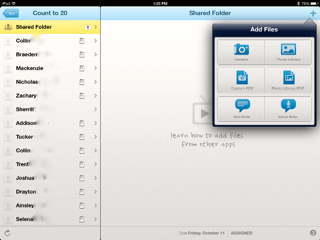
First, let me say, we are not completely paperless.  We have, however, significantly reduced our paper usage and Showbie has facilitated that.  In kindergarten, there is still the need for paper/pencil skills.  School-wide, we saved over $21,000 in paper usage, copies, ink, and toner last year.  Showbie has several features that are helpful.  Here is a screen shot showing some features:

photo

I have blurred out my students’ last names, but my class list is to the left.  The small paper icon to the right of each name shows which students have submitted an assignment.  You can also add student pictures beside their names if you want.  The shared folder allows me to upload resources, videos, voice instructions, PDF files, and ePubs to be used in that particular assignment.  Once the resources are loaded in the shared folder, it is available to all students.  It is in the shared folder that I added an ABC book that I created in Book Creator.  My students just went into the shared folder, downloaded the book in their iBooks and all students have the book on their bookshelf.

The area to the right has a drop-down box with choices for adding files. The camera option allows photographs or videos.  You can upload images from the photo library as well.  Using the Capture PDF option, you can scan in a document.  If you have a PDF file in your photo library, you can upload this also. In addition, you can add text notes to student work or voice notes.  These are all of the teacher options.  Students have the same options in their drop-down menu for putting work in the assignment folder.

Last week, I uploaded a PDF of primary lined paper for my students to demonstrate writing their numbers to 20.  They opened the assignment in Showbie and then used Good Notes (a PDF annotator) to write their numbers.  I was able to quickly email their parents this assignment.  Later in the week, I used the camera option to video tape students counting to 20.  This was a quick assessment that was also emailed to parents.

photoThe best part is that Showbie is so easy to use.  At this early point in the school year, my kindergarten students already know how to open the app and upload work on their own.  Parents also enjoy feeling like they are a part of the classroom through the email feature.

One last way we are using Showbie is to share student work with our principal.  Each grade level decided on student assignments for each nine weeks that would be used to demonstrate growth and demonstrate CCSS. My principal created a class for each grade level in Showbie.  These student provisos are uploaded for him to monitor.  We send a high, medium, and low work sample each nine weeks.  This allows him to check in on student work on a regular basis.  It also encourages meaningful use of the iPad in the learning environment.

We are very excited about the incorporation of this robust program into our classrooms.  There is a free version of Showbie if you would like to check it out. We liked it so much we purchased the school license.

Today we will do exciting new things.  Let’s get to it!
 

Making Your Mark With iPads

Do not go where the path may lead; go instead where there is no path and leave a trail. -Ralph Waldo Emerson

medium_4176075327Well, we missed it.  International Dot Day was September 15th.  Better to be late than not go at all, we celebrated making our creative mark this past week.  It came at a good time.  I’ve been hearing a lot of “I can’ts”  lately.  If you are unfamiliar with the story of The Dot by Peter Reynolds and International Dot Day, you can check it out here.  In the story, Vashti is an uninspired student who feels as if she can’t draw.  Her teacher encourages her to be brave enough to “make her mark”.

Leaving our mark is a lot easier than we think.  We make it hard.  We resist and tell ourselves we aren’t smart enough, creative enough, talented enough, rich enough…but what if we took a page from Vashti’s playbook and just tried?  As educators, we make lasting marks with every child we teach.

As we started using iPads in our classroom in 2011, there was no real path to follow.  We trail blazed our own.  There were a few bumps along the way, but we believed in what we were doing.  We started with our own “dot” and it has transformed the way we do everything. It has transformed the way we think about everything.

So back to our dot project…after reading the book, we used our iPads to create our own dots in our Drawing Pad app.  (We usually use Doodle Buddy, but they have not updated the app lately and it doesn’t work very well with the new iOS 7 update.) The kids uploaded their dots to Showbie and I then downloaded them all on my iPad and put them into Book Creator.  As you may know, my love  for Book Creator is epic.

Our finished product is here:

The Dot

The great thing about Showbie is there are “shared folders” with each assignment.  After I created the class book in Book Creator, I uploaded it back to the shared folder in Showbie.  This made the book available to each student and all they had to do was download it into their iBooks.  Now each student has a copy of our class book in their iBooks shelf.  They have loved looking at each other’s work and are definitely proud of their own.

You know, a lot has changed for me since I said, “yes” to iPads 2 1/2 years ago.  I never dreamed I would be doing the things I am.   I chose to try and make my mark by creating a student centered classroom infused with technology.

How are you making your mark?

Today we will do exciting new things.  Let’s get to it!

Dot photo credit 

Collaborative Work Spaces

Unity is strength… when there is teamwork and collaboration, wonderful things can be achieved. -Mattie Stepanek

medium_4264216476So I’ve been thinking a lot lately about collaborative spaces and their importance and relevance in learning.  Early childhood classrooms are collaborative by nature and the furniture provided in these classrooms allow for students to be in small groups.  But what about other grades?  Why is this important?

Think about your recent professional development experiences.  Were they in a classroom somewhere with desks in rows or were you at tables where you could easily see your table mates?  By their very nature, desks in rows inhibit conversation, eye contact, and community.  Plus, they are not very comfortable.  I start squirming after a short time in these seats.  The times I’ve been in PD at tables, it is immediately possible to engage in conversation, share, and build relationships.  It just feels better and more personal.

Our students are no different.  They need the ability to learn from their peers, to question, to share, to feel safe in a group and not feel isolated.  When we use collaborative groupings with tables, we are saying we are a community.  We learn from each other and I, as the teacher, am not the sole disseminator of knowledge.  The room arrangement instantly, and silently, shares your values as an educator.

As we use iPads, students are immediately collaborative.  They want to share what they’ve done, and in doing so, their peers are able to participate in the collective wisdom of the group.  Collective wisdom…so important for students and adults.  The saying, “It takes a village to raise a child” applies to many aspects of growing children.  No where in that saying does it say “the village” has to all be adults.

As an adult, when I have to learn in isolation, I find myself sometimes feeling anxious.  Especially if the concept is complicated.  I may even feel like I just don’t get it…what’s wrong with me?  Everyone else seems to get it.  In collaborative learning, I might find that others don’t understand either.  This immediately relieves anxiety knowing I’m not alone.  As a team, we figure it out together.   All students, from the smallest to the tallest, need to feel safe and supported in learning new content.  By having the ability to work collaboratively, in a space that supports collaboration, students are more likely to take risks.

IMG_2156My classroom has many collaborative spaces.  There are tables that seat 4 and 6.  I’ve pushed 2 rectangular tables together for a larger collaborative space.  There are rugs and pillows on the floor that allow students to spread out and be comfortable.  As I stated earlier, early childhood classrooms are equipped for collaboration.  I recently saw this video on Edutopia showing how a middle school teacher used what was already in his classroom to make the space more collaborative for his 35 students.

Take a good look at your classroom design and see what it says about what you value as an educator.  Student input is also valuable.  What changes can you make to increase collaboration and student engagement?IMG_2176

Today we will do exciting new things.  Let’s get to it!
student desks photo credit: Creative Commons

A World of Wonder

Wisdom begins in wonder. -Socrates

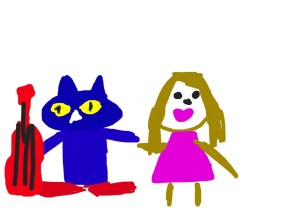
I_WonderWe are doing an author study on Eric Litwin this week.  He is the author of the Pete the Cat books.  My students love Pete the Cat…and with this study, we’ve started a “wonder” chart.  “Why is Pete the Cat blue?” “Who taught him to play the guitar” “Does he have other shoes since he got his new white shoes wet?”  These are all questions my students wondered this week.

If you Google image search “wonder”, you will find an alarming number of strange people dressed like Wonder Woman… but wonder is an innate part of the human experience, and somewhere along the way, we lose it.  We have to deliberately foster it, nurture it and encourage it in young children.  When children wonder, they grow bolder in their questioning.  They think beyond the surface.

photo-14I encouraged my students to draw about their “wonderings” today in Doodle Buddy on their iPad.  There was good conversation among the groups of students and even though it is early in the school year, they are starting to understand and enjoy the opportunities to work in small groups and talk about their work.  Wondering encourages original thinking, thinking outside the box, and creativity.  When many adults look at a new piece of technology, such as an iPad, they think, “How do I use this?”  Kids look at the same piece of technology and think, “What can I do with this?”  They are curious and creative by nature.  As an aside, you will be interested to know that the above drawing was done by one of my students.  She said, “Mrs. Meeuwse, that is you with Pete the Cat.  Pete is rocking his school shoes and your lip gloss is poppin’ and I’m wondering where your shoes are.”  Hmm…I’m wondering where my shoes are as well.  And about that lip gloss….”poppin”?

There is no doubt there was some creative thinking going on there.  I love how the iPad allows us to explore many ideas and “wonderings”.  Yes…they could have just as easily drawn their picture on a piece of paper.  But then we wouldn’t be able to import their drawings into another app and “Explain Everything” in the near future.  One step builds on another.  We will start App Smashing very soon.

Look for ways to bring wonder in to your classroom.  Pete the Cat is a good place to start!

As Pete the Cat says:
“No matter what you step in,
keep walking along and
singing your song. Because it’s all good.”

Today we will do exciting new things.  Let’s get to it!
Creating Digital Portfolios

All I really need to know… I learned in kindergarten. -Robert Fulghum

We started our digital portfolios today.  We knew by the end of last year that we really needed a systematic way of curating student work.  It was important that we be able to share it with parents but it was of utmost importance that it be simple enough for everyone…especially our kindergarten students.  I mean, let’s get real…if I have to touch every iPad to save student work, it just isn’t happening.

Showbie-238x300We went with Showbie.  Showbie allows you to set up your classroom and create assignments for students. When students submit their work, it is organized by assignment.  You can see which child has submitted work and which one hasn’t.  You can even add annotations, voice notes or written notes on the assignment and send it back.  It is very easy to use and individual student work can be emailed to share with parents.

Today, I added our first assignment.  It sends a brief alert to the individual iPad so students can see there is a new assignment.  This is great for older students. My students used Pic Collage and they were asked to choose a number between 2-9.  They added a text box and typed in their number.  Then they added the number of stickers that corresponded with their number.  After the stickers, they added another text box so they could type their names.  Lastly, they learned how to save their work to their photo roll on the iPad.

Library PhotoThey did very well with this activity.  The next step involved going into their Showbie app.  We did this together.  I used Reflector to demonstrate step-by-step on the Smart Board.  When the students opened Showbie, they simply clicked the “+” symbol, then chose their camera roll and then their Pic Collage work sample.  As easy as that, it was uploaded.  The entire activity from start to finish took 25 minutes.  I was then able to email the work samples to parents to share with the their first work sample in the digital portfolio.

The digital portfolios will certainly help us keep things organized and use a lot less paper.  Just as an aside, my school saved over $21,000 in paper, copies, and ink cartridges last school year.  By using digital portfolios, student work is preserved over longer periods of time.

I’m excited about the creation of these digital portfolios.  It will be a great way to organize, view and share student progress.  As we progress through the year, it will also be a great way for students to use their own voice and choice to showcase their work.  I will provide the stimulus.  They will choose the means in which they demonstrate their learning.

Today we will do exciting new things.  Let’s get to it!