iPads and Field Trips

The World is a book, and those who do not travel read only a page. -St. Augustine

Summer is a great time for travel.  Last summer, I was able to travel to Europe for the first time.  We visited the Netherlands, Luxembourg and Belgium.  It was truly the trip of a lifetime and I would love to go back!  Travel opens our minds to different cultures, experiences and people…and amazing food!  This trip allowed me to see things and experience things I would never be able to experience in my little corner of the world.  In fact, it made me wish I had paid more attention in my World History class in college.  Walking through the poppy fields of Flanders takes you straight to 1918 and World War 1.  Standing on the battle site of Waterloo puts you in the bloody final campaign of Napoleon in 1815.  I soaked up the history and beauty of these historic gems.

Our students need to experience the larger world beyond their own little corners as well. Class field trips enable educators to broaden students and enhance their educational experiences.  With iPads in the classroom we can re-think how field trips are done.

Taking iPads on a field trip would allow students to capture what they are seeing, reflect on what they are learning, and create meaningful artifacts of the experience.  The information collected on the trip could be put into an iMovie or Keynote to share with others and for assessment.  Using the information gained on the trip and transforming it into an iMovie uses the higher order thinking skills we desire for our students.  To protect the iPads, students could place them in their school book bags.  That would allow the students to be hands-free if needed, but have the iPads handy at the same time.  Having a class set of back packs just for field trips would be the ideal.  I saw one on Amazon.com for $19.99. It is made for tablets and is lightweight enough for younger children. Now I just need a wealthy benefactor to get them for me!

What about the trips that are too far away or are too expensive?  Because of bus costs, increased gas prices and the cost of some venues increasing, we have had to cut the number of trips we take during the year.  What if you want to visit a place that is in another country?  The iPad can take you there via virtual field trips.  On a virtual field trip, you and your students can go just about anywhere on Earth — or even into the solar system.  There are many websites that have virtual field trips already set up, such as this one to the Great Wall of China, or you can create your own.

Field trips can be great educational additions to any curriculum.  By incorporating iPads, our students have endless possibilities to explore their world and beyond!

I’d love for you to leave a comment, subscribe to my blog, and/or share this post with a friend.
iPads in the Classroom: A Parent’s Perspective

School is officially out for summer. Today’s post was written by Angie Mizzell. Her son Dillon was in my class this year.

“Mom, how many trees are in the world?” my son asked a few weeks ago, as we were driving to school down a two-lane, tree-lined road.

“That’s a really good question. I don’t know. Billions? Trillions? A lot.” And then I remembered a blog post Kristi had written. “I wonder if there’s a way to find out?”

He responded quickly, as if he’d come to the conclusion on his own. “I could type on my iPad, ‘How many trees are there.'”

When my son started school last August, he was still learning letter sounds. Today, as an official kindergarten grad, he’s reading on a first grade level and doing Google searches to find out how many trees exist in the world. (Turns out I’m a good guesser.)

Did the iPad contribute to that? That’s a question for people who collect data. I’m a mom, and I tend to operate under this philosophy: Seeing is believing. And what I’ve seen is a teacher who uses iPads to meet her students where they are and take them as far as they can go.

I visited the classroom earlier in the year, and it felt familiar to me—a mix of what I recall about kindergarten and first grade combined: Students writing on primary ruled paper, breaking up into smaller, focused reading groups and playing in centers (think blocks and housekeeping). And of course, the children were oozing with cuteness.

I watched a child at the SMART Board, building words by dragging letters from the bottom of the screen. I was intrigued by how engaged my son appeared while working on his iPad.

It’s the natural evolution of things. Today, when my child walks around with a notebook and a pencil (his journal, he says) recording thoughts, I realize the “old” and the “new” can coexist.

My son represents the future, and I’m encouraged by what I see.

Reflecting on Student Growth and Achievement

I was taught that the way of progress was neither swift nor easy.-Marie Curie

Recently, I was looking at photographs taken of my students on the first day of school. They looked so little and baby-faced.  It was amazing to see them then and to see how much they have grown this year.  They are taller and their faces have changed.  Because I am with them all day, every day, the change wasn’t as evident.

The same goes for their work.  They work hard all year and little bit, by little bit, progress is seen.  Several years ago, I started keeping a writing portfolio of student work.  I save a writing sample from each child, each month.  At the end of the year, I put them all together in a portfolio to send home to parents.  It is so wonderful to look through the pages and see the growth that occurred throughout the year.  We start on the first day of school:

Students write their names and draw a picture of themselves.  If they are able to, many will write on or label their pictures.  Each month, growth is evident.  By the end, it will look something like this:

What a difference 9 months makes!  It looks so easy, yet a lot of hard work went into this progress. Many times I ask myself, “Are we there yet?” It takes looking at the beginning to appreciate the end product.

How do iPads fit into this? The iPads were used as a companion in both the Reading and Writing Workshop.  Students used them for reference, for reading, and even some writing.  The apps provided them with practice in reading and spelling, which in turn, helped them in their writing.  Their writing on the iPad has been incorporated into their blogging experience, in their creation of books in eBook Magic and in Pages.  While they tend to write more prolifically on paper, they do enjoy writing on their iPads.  It has also given them some beginning keyboarding skills.

They have had a variety of experiences in using iPads, reading books, class discussions, writing stories, using anchor charts, partner work, and various other literacy-building activities.  The key words here are “variety of experiences”.  When you immerse students in a literacy-rich environment, incorporate a systematic approach to reading and writing, and differentiate instruction with iPad technology, students can’t help but succeed!

I’d love for you to leave a comment, subscribe to my blog, and/or share this post with a friend.

The Experts Speak

Everyone’s an expert. -Seth Godin

My very seasoned kindergartners are total iPad experts.  They know all the tricks.  They are able to put apps in folders, search for apps quickly using the search screen, save images from the internet, import images into a Pages document, save the document on PaperPort, take a screen shot, use the camera, save a document as  PDF, and if I would let them, they could probably order a pizza from Pizza Hut or a movie from Netflix.  As with all experts, they love to share what they know with others.  In their own words, they are sharing their advice for using iPads with next year’s kindergarten students and with you.

Always carry the iPad with two hands for safetyness.-Jason age 6

Never pick your nose and touch the iPad screen. That is gross. -Hagan age 6

Keep the volume on low or the teacher takes it away. -Parker Jane age 6

It is never ok to stomp on the iPad or throw it. -Kade age 6

There are lots of cool apps and you can learn very lots.-Amantay age 6

You will like the iPad so much you will want one for Christmas, but your parents will say no.  -Ella age 5

Don’t share your ear buds with anyone because your earwax is disgusting. -Jacob age 6

There were more, but these are the highlights.  They also had good things to say about how they can read a lot on the iPad, write stories, use it for learning new things, work on projects with other students, learn math and science, and blog with others.  Can you imagine being a 5 or 6 year old, and already know how to do the things these children can do? Next year in first grade, they will continue to grow in their skills and knowledge.

With all of this wonderful technology, comes responsibility.  Just as we aren’t gaining all of our adult knowledge from our smart phones, laptops and mobile devices, our students also need to learn from multiple sources.  Social skills, responsible behavior, courtesy, manners, and interpersonal relationships aren’t learned on the iPad.  Teachers and parents are role models for our children.  We still need to take our children outside and show them nature, curl up and read real books together, play board games together, ask children what they think and why they think that, model appropriate electronic device manners (put it away when you are at dinner or having a personal conversation), and model how and when it is appropriate to use technology.  While my students are very knowledgeable on the workings of the iPad and they are gaining 21st century skills in kindergarten, my role is more important than ever.

Being an expert often means someone who knows a lot about the past.  Moving into the future, means we all learn together.  Technology changes by the millisecond.  I have no doubt that my students will be on top of every advancement.  I just hope I can keep up!

I’d love for you to leave a comment, subscribe to my blog, and/or share this post with a friend.

Sweet 16: Countdown to Summer Vacation

Always desire to learn something useful.-Sophocles

16 days of school are remaining. While I am looking forward to summer vacation, part of me is wistful at seeing this class go. They are busy, talkative, and loud. (I won’t miss the loud part.) They are also inquisitive, bright, and eager to learn. They haven’t shut down for the impending summer vacation. They continue to go full steam ahead wanting to learn. This morning during her free time, Tahra was researching sharks on her iPad. After looking online, she thought of something she had seen in a book in the reading center on sharks. She went and got the book, found what she was looking for, and proceeded to blog about some shark facts.

Tahra knew how to access information she needed. More importantly, she had access to the information she needed. These are essential components to learning. It was gratifying to me to see her use both her iPad and the non-fiction text. Seamless learning. She was reading, researching, blogging…she was also highly engaged. At this point in our school year, I can smile knowing my work with these children is almost complete. They are equipped and ready to go to first grade (and beyond) with the skills necessary to be successful.

When asked how my students became so independent and engaged in their own learning, I answer with these words: intentional planning and constant modeling and monitoring. We must be intentional about our instruction both with and without iPads. Apps are carefully considered before purchasing. Student use of iPads and any other activity in which they will have some freedom is carefully modeled daily, if needed. I subscribe to “I do, we do, you do” philosophy. This is that important gradual release of responsibility.

As we count down the final days of this year, my students’ love for learning is evident. I watch my students stand on the edge of their own greatness. They aren’t looking down in fear…but looking forward with great anticipation. So am I, my little friends. So am I.

I’d love for you to leave a comment, subscribe to my blog, and/or share this post with a friend.

Problem Solving and Math Apps

Before beginning a hunt, it is wise to ask someone what you are looking for before you begin looking for it.-Winnie the Pooh

Problem solving is a critical skill and a large part of the foundation for early learning.   Opportunities for problem solving exist in everyday life.  By exploring their environment, manipulating objects, thinking critically, and building on existing learning, students can strengthen problem-solving  skills.

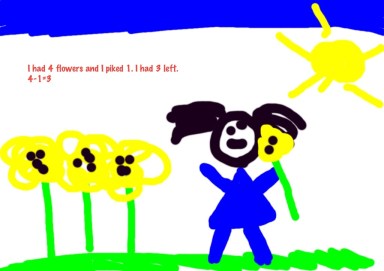
We have been using our iPads to create story problems in our Whiteboard App.  Students draw the story problem then type the number sentence to represent the picture.  We have even had a story problem exchange.  Students create the picture to represent either an addition or subtraction problem.  Then they pass their iPad to a friend who looks at the picture and figures out the appropriate number sentence.

Another activity my students have enjoyed is taking objects in our classroom such as unifix cubes or pattern blocks and creating a pattern.  They use their camera on their iPad to take a photograph and trade iPads with another student.  That student identifies the pattern and re-creates the pattern using Pop Beads app.

Using these manipulatives, students can make visual representations and I can model for students.  The iPads create another opportunity for practice and integration.  It can serve as a calculator, a notepad, an information resource, and flashcards.  It keeps score, tracks progress, and many apps monitor and adjust content.  iPads allow me to also integrate content.  The word problem in the above picture was created by a student after we studied seeds and plants.  She typed a science journal entry in Pages and then created her story problem.  The iPad allows for seamless integration of subjects that makes sense to students and increases their understanding of new concepts.

Other apps my students enjoy using in math are Math Bingo, Park Math, Monkey Math, and Flash to Pass.

By providing sustained opportunities for students to solve problems in a variety of contexts, they begin taking responsibility for their own learning.

I’d love for you to leave a comment, subscribe to my blog, and/or share this post with a friend.
The Play’s the Thing!

Without this playing with fantasy, no creative work has ever yet come to birth. The debt we owe to the play of the imagination is incalculable. -Carl Jung

Play is an essential part of Early Childhood Education.  It stimulates cognitive, motor, and social skills.  Children are playful by nature and interact with their environment through play.  It reduces stress and promotes well-being.  Even now, in this time of high expectations and educational rigor, we still play.  Our class has learning centers for literacy, math, science, art, blocks, reading, Legos, housekeeping and iPads.  The children spend time in each of the centers every day. The structure of our day lends itself to creativity and self-directed learning; yet, it is still structured and the learning environment is carefully planned.  If you ask the children what they did all day, they will say, “I played.”
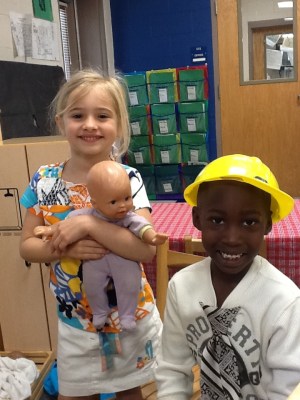
In the mornings, we have Reading Workshop, guided reading and literacy center rotations.  After lunch and recess, we have a whole group time where we have our shared reading, our read aloud and our word-work.  We also have discussion on whatever thematic unit we are on before going into Writing Workshop and more center rotations. Throughout the day, students are rotating in and out of small group instruction and center time.  The iPads serve as a tool in our classroom to facilitate  differentiation of instruction.  Even as Parker Jane and Dontay played in the housekeeping center (see picture above), they decided they needed to make a grocery list on their iPads.  They collaborated together to create a list in the Notes app.  I didn’t have to suggest that…they came up with the idea and moved to a table with an iPad to create a list of about 8 or so items, then they pretended to go shopping. One read the grocery list, while the other shopped.  As they are creating their own learning, they are problem solving, analyzing and synthesizing new information.
Play is all about exploring possibilities. In our world today,  exploring possibilities is a valuable skill.
Our classroom is a busy hub all day as students collaborate, learn, share, explore, inquire, and yes…play.

Making a grocery list for housekeeping center

I’d love for you to leave a comment, subscribe to my blog, and/or share this post with a friend.
I Get By With A Little Help From My Friends

Have you ever had a divine, glorious, light-coming- down- from -the- heavens moment? One that says, “YES!  They finally get it!”  A recent student conversation was music to my ears:

Tahra: “Mrs. Meeuwse, I think I need help spelling the word ‘children’.”

Ansley (before I could respond to Tahra): “I saw that word in a book I was reading today.  I can get it and show it to you.” Ansley goes directly to the book and brings it back. Opens it right to the page and points out the word “children”.

Tahra: “Thanks, Ansley.  That was helpful.” Such nice manners!

What!?  This conversation was awesome on many levels but  I was truly delighted they worked together and solved a problem without me!

Cooperative learning creates an environment of active, involved, exploratory learning. It also develops social skills and higher order thinking skills.  Creating an environment where cooperative learning takes place all throughout the day is important.  It builds student confidence knowing they aren’t alone.  Using iPads, students are constantly teaching each other (and me!) how to do something.  This sharing of information and exploration is seamless as we move throughout the day.

Tahra and Ansley reversed roles a little later.  Ansley thought of some ideas for her blog posts and wanted to write them down.  Tahra showed her how to make a list in the Notes app on her iPad.  The children enjoy  helping each other.  Problem solving skills are also being reinforced, not to mention my name is called a few times less each day.  They are learning to “ask the experts” in the classroom.

John Lennon was right. We all need some help from our friends. I know I do and I have 26 little friends who are there when needed!

Anchor Charts: Why We Use Them!

Sorry, this isn’t a blog post about boating in the beautiful Charleston area. The anchors I’m referring to are anchor charts. 

Anchor charts are valuable visual support tools to assist students in learning new concepts.  Teachers and students may refer to them all throughout the year.  When we are working on new content in our Reading and Writing Workshop mini lessons, anchor charts are co-created with teacher and students to help “cement” the learning.  They help to make abstract ideas more visible for students.

So where do the iPads come in? The anchor charts are only the start. Due to space restraints on the chart paper, I’m unable to add all of the connections that the students share with the class.  Students then use their iPads to jot down their own ideas.  We use the Notes app to make a list of things that go along with our anchor chart.  Students may then use that list as they are writing to activate their schema.  Students also use the Pages app to write more complete thoughts and incorporate images. By using the iPads, students are able to quickly record connections as they make them, then refer to them as they need them in their writing.

Emergent readers and writers struggle at times with ideas.  The anchor charts and the students’ abilities to extend them with the iPads are a perfect pairing for successful learning!