eBooks in the Classroom

Teaching reading IS rocket science.- Louisa Moats

Have you seen the size of textbooks lately?  Measurements go from about an inch to 3 inches.  Forget portability.  Carrying a load of them will surely result in a trip to the chiropractor.  Enter eBooks.  They are rapidly growing into a popular option with all of the electronic reading devices available.

Don’t get me wrong…I still love reading to my students with a physical book. We get cozy and listen.  We drift off to fun and faraway lands.  We laugh at the antics of our favorite characters and we learn to love reading.  Many students don’t have someone cuddle up with them, to read favorite stories and drift off to sleep to the cadence of familiar words from an oft-read story.  eBooks simply offer options for my readers.  Many ebooks have interactive features and vocabulary support that physical books don’t have.  eBooks are easily updated as information changes.  Our iPads hold many eBooks and enhance the “learning on the go” concept. You can take a virtual library with you.  No trees were cut down to make an eBook.  Another consideration is that many eBooks have accessibility features for English Language Learners.  Some students may find reading on an iPad more engaging than an actual book.  While many arguments may be held over traditional books versus eBooks, I simply want my children to READ and to love reading.  eBooks give us the ability to differentiate.

The Common Core State Standards stress readying students for college and career.  Growing good readers requires a large variety of reading resources. I have spent some time recently with Sylvan-Dell publishers.  They have 70 titles in English and Spanish available in eBook format.  The picture books that they publish are usually, fictional stories that relate to animals, nature, the environment, science, and math. Each book has a “For Creative Minds” section to reinforce the educational component of the book itself. This section will have a craft and/or game as well as “fun facts” to be shared by the parent, teacher, or other adult.  The illustrations are realistic and engaging. The books are great for school purchase or for parents to have at home on their iPads for their children. The books are leveled in a variety of ways to meet the needs of different reading programs.  There is a 30 day free trial with no obligation available.

I am all about engaging minds and growing life-long readers.  Having an arsenal of resources both physical and electronic only strengthens my teaching.  In this day and time, teachers need all the help we can get!

I’d love for you to leave a comment, subscribe to my blog, and/or share this post with a friend.

Living the iLife: iPhoto, iMovie and Garage Band

Creativity is a natural extension of our enthusiasm.-Earl Nightingale

One of the great things about teaching young children is their ability to entertain themselves with just about anything.  Given a stick, it becomes a bat, a spear, a magic wand…their imagination has no limits.  My students role play, create, draw, paint, and pretend.  When is the last time you did any of those things?  Grown-ups don’t do those things right?  That’s for kids.  When did we lose our ability to create?

School systems are inherently driven by standardization.  Students are jumping through pre-designed hoops and creativity seems to be a side dish in the entree-heavy school system.  It seems to be overlooked that creativity can be a great intrinsic motivator. Creativity, if not nurtured, will take a nose-dive before a student leaves elementary school.

A great tool for the iPads is a suite of apps that help incorporate creativity into any content.  The iLife suite includes iPhoto, iMovie, and GarageBand.  iPhoto allows you to browse, edit, and share your favorite pictures.  iPhoto can also create slide shows and books.  iMovie allows you to turn video into movie trailers, tv news segments, and more.  With travel maps in your video travelogues, everyone who watches comes along on the adventure.  The drag and drop feature makes it easy to use.  Garage Band allows you to “get your groove on”.  You can use and edit existing music loops, or create your own using a variety of instruments.  Even if you have never played any of these instruments before, you are able to create a masterpiece.  Voice recordings are also available which you can then add to iMovie.

The iLife Suite gives students the power to create. Teachers often identify their main goals as helping children build cognitive and social skills. But the great engine that drives innovation and invention in society comes from people whose flame of creativity was kept alive in childhood.

Giving students freedom within a structure gives them a clear goal but also alternatives on how to get there.  By incorporating creative tools into the curriculum, students can explore the depths of their inner artist.

Check out the iLife Suite and see the possibilities.  Let freedom ring!

I’d love for you to leave a comment, subscribe to my blog, and/or share this post with a friend.

iPads and Field Trips

The World is a book, and those who do not travel read only a page. -St. Augustine

Summer is a great time for travel.  Last summer, I was able to travel to Europe for the first time.  We visited the Netherlands, Luxembourg and Belgium.  It was truly the trip of a lifetime and I would love to go back!  Travel opens our minds to different cultures, experiences and people…and amazing food!  This trip allowed me to see things and experience things I would never be able to experience in my little corner of the world.  In fact, it made me wish I had paid more attention in my World History class in college.  Walking through the poppy fields of Flanders takes you straight to 1918 and World War 1.  Standing on the battle site of Waterloo puts you in the bloody final campaign of Napoleon in 1815.  I soaked up the history and beauty of these historic gems.

Our students need to experience the larger world beyond their own little corners as well. Class field trips enable educators to broaden students and enhance their educational experiences.  With iPads in the classroom we can re-think how field trips are done.

Taking iPads on a field trip would allow students to capture what they are seeing, reflect on what they are learning, and create meaningful artifacts of the experience.  The information collected on the trip could be put into an iMovie or Keynote to share with others and for assessment.  Using the information gained on the trip and transforming it into an iMovie uses the higher order thinking skills we desire for our students.  To protect the iPads, students could place them in their school book bags.  That would allow the students to be hands-free if needed, but have the iPads handy at the same time.  Having a class set of back packs just for field trips would be the ideal.  I saw one on Amazon.com for $19.99. It is made for tablets and is lightweight enough for younger children. Now I just need a wealthy benefactor to get them for me!

What about the trips that are too far away or are too expensive?  Because of bus costs, increased gas prices and the cost of some venues increasing, we have had to cut the number of trips we take during the year.  What if you want to visit a place that is in another country?  The iPad can take you there via virtual field trips.  On a virtual field trip, you and your students can go just about anywhere on Earth — or even into the solar system.  There are many websites that have virtual field trips already set up, such as this one to the Great Wall of China, or you can create your own.

Field trips can be great educational additions to any curriculum.  By incorporating iPads, our students have endless possibilities to explore their world and beyond!

I’d love for you to leave a comment, subscribe to my blog, and/or share this post with a friend.

Summer Fun and Draw Something

A vacation is having nothing to do and all day to do it in.  –Robert Orben

I live 10 minutes from this beach.  It serves as both an inspiration and a distraction depending on your frame of mind.  After a long school year, it is a soothing medication to frayed nerves.  The wind and waves are hypnotic.  On this day, soaking up the warm sun, I find I must confess something…

I am addicted to the Draw Something app on my iPad.

Draw Something is a free social drawing game you play with others.  You can find friends through email or Facebook.  Once you create a game with someone, you are given 3 words of varying difficulty to choose from.  You choose the word and draw.  When finished, it goes to the other person who watches your drawing being created on their screen.  They are given a tray of letters at the bottom they must choose from and re-arrange to guess the word.  Once they guess, it is their turn to draw and you must guess.  Coins are earned for the varying difficulty of the pictures drawn and they may be exchanged for additional colors. It is similar to the game Pictionary.  I find that using a stylus is much easier for drawing than using my finger.  It is fun and I think I mentioned…addictive. 

While this app isn’t appropriate for my students, the concept is appropriate. Initially, I could introduce the game on my iPad with the Whiteboard app.  I could draw something they would be familiar with and have a few letters at the bottom for them to unscramble to guess the word.  Showing this on my Smart Board would allow all to see and participate.  Once they have the concept of the game, they could then partner play on their own.  This would build spelling skills, vocabulary and fine motor skills.

Of course, I will spend this summer in *ahem* Research and Development to perfect any “kinks” to make it easier for my students…after all, it is about them right? Um, gotta run…it’s my turn and I need to figure out how to draw Lady Gaga.

I’d love for you to leave a comment, subscribe to my blog, and/or share this post with a friend.

PaperPort Anywhere

Organizing is what you do before you do something, so that when you do it, it is not all mixed up. -A. A. Milne

One of the few challenges we have faced in implementing iPads has been the inability to get work off of the iPad.   Our district network is not set up to allow student email at this time, although I hear it is in the works.  Teachers are able to send email but students are not.  Dropbox is also not available as an option through our network. There are times when I have photographed student work with my iPad camera so that it is on my iPad.  We have also set up class wikis so that we can upload items to the wiki for a variety of uses.

On PaperPort, I have created a variety of folders.  Each child has a folder and I have a folder for images as well as iBooks that I have created on iBooks Author. The original account is created online at the PaperPort website. The PaperPort App is free and is downloaded on each student iPad.  As students create work or books to be saved, they choose to open the document in PaperPort and upload it to their folder.  It’s very simple and my kindergarten students can all do it themselves.  They are also able to go into the PaperPort app and download books that I’ve uploaded into their own iBooks libraries.

From Paperport, I am able share documents with parents or administrators as needed.  The iBooks I have created, I have shared with my grade-level team through PaperPort.  They simply go to the folder and download it to their student iPads.  This app makes it easy to scan, organize and share documents.

With a classroom full of busy children, we all need a little easy!

I’d love for you to leave a comment, subscribe to my blog, and/or share this post with a friend.
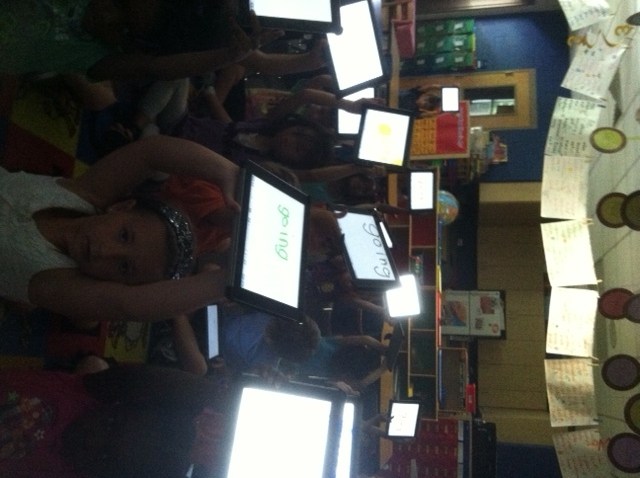
Using Confer App in Reading Workshop

The biggest mistake regarding record-keeping is not writing things down or not remembering where you wrote it down.-David Mellem

Do you have an organized method for your record-keeping?  I have an old-school grade book and I have one on the iPad.  I have a stack for this and a pile for that.  One of the things that drive me crazy is having some things here and some things there. I have Language Arts and sight word assessments, math assessments, and running records for reading.  In my attempt to consolidate my “stuff” I discovered an app called Confer.

Confer is an app that lets you record and track your students both individually and in small groups.  I teach Reading and Writing Workshop and this app  works very well with that method.  I can take notes on individuals and small groups. I can view students by “tag”, “strength”, “teaching point”, or “next step”.  Creating small flexible groups allows me to see at a glance what those students are working on, what reading level they are on, or what I need to do next with them.  Confer also allows you to upload your data to a Gmail account as a spreadsheet or to upload to any iOS device or to Dropbox.

The downside is the cost.  It is $14.99.  There is a lite version, but it’s a little too lite.  The plus side is that it is easy to use and is very portable in the iPad.  While I use it exclusively for running records and guided reading groups, it can be used in any subject that you wish. When I meet with my grade level team, principal or a parent, I have the data right at hand.

With 30 kindergarten students, having the ability to look at student data in both small group, individual and whole class views quickly is not only convenient, it is necessary.

I’d love for you to leave a comment, subscribe to my blog, and/or share this post with a friend.

In the Dark: What Happens When You Lose Electricity?

Things work out best for those who make the best of how things work out. -John Wooden

And then there was darkness…a recent school-wide power outage left us without the use of my laptop, the Smart Board, overhead lights, air-conditioning…all of the things we take for granted every day and that are absolute necessities in my book.   An announcement was made that it was uncertain how long we would actually be without power.  Hmmm…what do we do, now that we can’t see to move around our classroom, and can’t use our Smart Board? Our technology-dependent classroom came to a screeching halt. 
As I am using my iPhone flashlight app to move around without stepping on someone, it occurs to me that all is not lost.  We may not be able to see to read or write in the traditional ways,  but we do have iPads.  Our wonderful back-lit devices allows us to carry on even in darkness.  We can read, write, spell, add, subtract, complete patterns, count, draw, sing, do yoga, learn a foreign language,  ok…you get the idea.  We all sat on the rug and played a favorite spelling game.  Using our White Board app, I called out words and they wrote the words on their iPads.  They held them up to reveal their answers. The glow of the back-lit screens even contributed to the ambiance in the room.  Everyone lowered their voices and it was almost like we were in a really nice restaurant.  Almost.

We played our spelling game and before we knew it, the power was back on.  That 20 minute outage could’ve seemed like an eternity but we “powered” through with iPads.  The kids were disappointed when the lights came back on.

The Multi-touch White Board app by Shifting Mind is a very versatile one.  We use it for multiple purposes and in all subject areas. You have the ability to have up to 9 white boards in use at once.  It is also possible to type in text rather than write or draw.  It uploads nicely into the Pages app and eBook Magic.

We made the best of things on that day. The kids thought it was an adventure and even ask if we can turn off the lights in the classroom whenever we do whole group iPad activities on the carpet.  It seems to keep them quiet so I’m all for it!

I’d love for you to leave a comment, subscribe to my blog, and/or share this post with a friend.

Knowledge is Power: Students Taking Charge of Their Own Learning

Research is creating new knowledge.-Neil Armstrong

We have been studying the rainforest.  Kids love animals and the plethora of exotic animals in the rainforest creates instant interest and curiosity.  One day the wonderment and inquiry had reached fever pitch.  “Does the poison arrow frog have any predators?” ” How big is a giant anteater anyway?” “Are howler monkeys nocturnal or diurnal?” And my personal favorite question that was asked, “How does chocolate come from the rainforest?” I started writing down all of our questions so that we could figure out how we would solve them.  Before I finished, someone said, “I think we should look on Safari on our iPads.” Someone else immediately asked if they could “research” rainforest to find some answers.  Do you see the rich vocabulary here?  These questions and statements are not being paraphrased.  This is what happens when children feel empowered to take charge of their own learning. I barely had nodded yes to the research question when my room looked like the start line at the Boston Marathon.  Someone found a website on Safari that had several rainforest animals.  Peer sharing began immediately.  The students started finding images and information about animals that interested them.  They helped each other and they were engaged, focused and excited.  Without me giving any directions…on their own they started saving images and importing them into Pages.  They debated font size, picture size and word choice.  I facilitated, checked-in with groups, answered a few questions and mostly just let them have at it.  Their conversation was rich with the language of inquiry. They worked on this for over an hour before we had to stop. After lunch they came back to it and worked until they finished.  Here is one student’s work that is finished. Keep in mind these children are 5 years old and have no keyboarding skills other than “hunt and peck”.

This lesson was completely student-driven.  It all started with me reading a non-fiction book on the rainforest.  My plan was to go in a different direction but once the questions started, I knew my plan was out the window and we were headed down a different path.  But…isn’t that how it’s supposed to be?  Inquiry-based learning teaches problem solving and critical thinking skills. It develops student ownership of their learning and builds student interest in the subject matter.  Inquiry allows students to create their own knowledge. The iPads give the accessibility needed for each student to do the research.  With only 4 computers in our class just 2 years ago, this would have never been possible.

I’ve been asked what happens when the children become bored with the iPads.  They say, “Oh, it’s a source of fascination now, but what happens when it no longer is?”  My answer to that is two fold.  First, if it is being used as a toy and not a learning tool, then it will gather dust on a shelf somewhere.  However, if it is integrated into the curriculum properly, it will be as valuable to students as our own laptops, smartphones, and computers are to us as adults.   When was the last time you used a phone book to look up a phone number or address?

My friends, knowledge is power.  Our students are overflowing with wonder and an urgency to learn.  We need to equip them with all the tools necessary to be successful.

I’d love for you to leave a comment, subscribe to my blog, and/or share this post with a friend.

Who Are You? Are You a Reader?

I call everyone ‘Darling’ because I can’t remember their names. -Zsa Zsa Gabor

This post would be more suitable for the beginning of a school year.  However, it is never a bad idea to plan ahead!  My students always have difficulty learning the names of their classmates.  They will say “that boy over there” or “some girl”.  This year, I took a picture of each student with my iPad and imported them into a class book.  I used eBook Magic but you could also use iBooks Author.  It is a simple book.  Each page consists of only the child’s picture and a sentence that says, “I am ___”  The simplicity of this book was so helpful at the beginning of the year.  Students learned names much more quickly, but more importantly, they were “reading”.  For many, this was their first book to read on their own.  I underestimated how much they would love this book.  It excited them to see their own picture in a real book as they called it.  Even more surprising, they continue to read that simple book even today, with only 25 school days remaining.

Thinking about next year, I will definitely make the book again with my new students.  However, I want to add some other books as well-  books about the children themselves.  We do a lot with thinking maps.  At the beginning of each year I feature one child each day and make a circle map.  On that map, we write various items that describe the child’s likes, favorite things, and descriptors of that child. We display the circle maps in the hall.  I will take that circle map and make a short book in eBook Magic about the child and upload it to each child’s iBooks.  By the end of the first nine weeks, each child will have a book about themselves as well as books about their classmates.

Providing students with opportunities to experience both narrative and informational text will improve both their motivation and achievement. 46% of students in the United States start kindergarten unprepared for school. The achievement gap tends to widen through the years and often students who enter school behind their peers, stay behind.  By providing high interest books in the reading center and on their iPads, we develop print motivation which is a child’s interest in books. Children with print motivation will work harder to learn to read. They will identify themselves as a reader.

By taking incremental steps in our classrooms, providing high interest reading materials, and engaging students at an early age, we can work toward decreasing that achievement gap one classroom at a time.  The iPads give me the opportunity to create my own reading material through eBook Magic, iBooks Author and even Pages.  After all, who wouldn’t want to jump into a book written just for them?

Wouldn’t it be great for a child to say, “Who am I?  I am a reader!”

I’d love for you to leave a comment, subscribe to my blog, and/or share this post with a friend.
Symbaloo to You

I find it helps to organize chores into categories: Things I won’t do now; Things I won’t do later; Things I’ll never do.”- Cartoon Character Maxine

I’m a fairly organized person.  My teaching friends would say I’m obsessive. That sounds so… so….accurate.  *sigh* I just like things where they go and I don’t like to waste time.  I like things alphabetized, organized, folderized, containerized, and color coded.  (I even debated on using the words color-coded since it didn’t fit my -ized theme.)

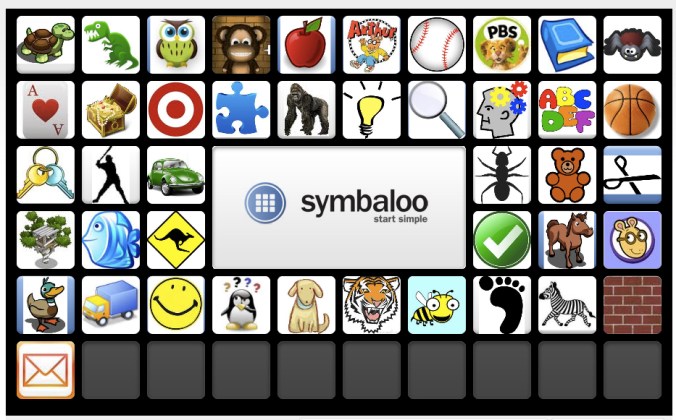
My online life is no exception.  I have a need for things to be organized and easily found.  I recently decided my bookmarks were out of control.  The “website weeds” needed to be pulled and I needed some rhyme to my reason.  I found Symbaloo.  Symbaloo is a FREE, customizable start page tool that lets users add all their most important links in a format that is easy to use. The user’s webmix appears as sleek buttons with icons or logos. The user can drag and drop items to organize them in a way that is convenient and practical. The items, or tiles, can be searched so users can find those that are most relevant to the items they are adding. Users can view their home webmix or browse webmix collections. News highlights and major news are also accessible through tabs on the Symbaloo homepage. The user can access an online resource simply by clicking one of the tiles on the webmix they are currently viewing.

Initially, I thought this is a great way to put all of my websites in one visual Scrabble board of sorts.  Then it occurred to me I could use this on the iPad.

Having the ability to create several different webmixes, you could make one just for iPad apps.  This can be shared with others, including parents of students in the class.

You could also create a webmix of various websites that you want the students to access for a particular subject your are studying.  Students would have all of those websites contained in the one webmix…no web surfing needed.  You would just make a shortcut to the webmix on the iPad screen.  Students would have instant access.  The visual aspect of the tiles is particularly beneficial to younger students.

If you are short of time or not feeling creative, you can search other webmixes created on a theme and add them to your own collection.  My Symbaloo is a combination of my own webmixes as well as some educational webmixes created by others.  I am able to access them on my iPad or on a computer.  The webmixes I’ve posted here are ones I added from the Symbaloo gallery.Symbaloo is great for those who prefer a visual format over text.  It helps me keep my ducks in a row and my obsessive side in sync.  Give it a try!

I’d love for you to leave a comment, subscribe to my blog, and/or share this post with a friend.