Spelling on the iPad

“My spelling is Wobbly. It’s good spelling but it Wobbles, and the letters get in the wrong places.” A. A. Milne

How many times in a day do I hear “How do you spell…”  They know better than to ask.  They know I do not spell for them.  I guess hope springs eternal and they think if they ask often enough, I will cave.  We use inventive spelling strategies in the classroom along with environmental print and word walls.  There is no shortage of words in our room.

On the iPads, we like to use a few apps to work on spelling.  The favorite of my students is Montessori Crosswords.  This app is a little pricey at $2.99 but it is very good. Students build words in crossword puzzle form using sounds and picture clues.  We also use Word Wizard. There are 189 word lists to choose from and 1000 frequently used words.  Students use a talking, moving alphabet that enables them to create words and read.  This app is also $2.99.  For individualization, I use the Spelling 1-2 app.  This app is very pricey at $9.99.  It has skyrocketed in price.  I bought it for much less last year.  The best feature of this app is the ability to create individualized spelling lists for students.  The newest app we have is FREE.  It is called NG Word Builder.  It is created by National Geographic.  Word Builder is an interactive resource that lets students build words and sentences using letters, blends and digraphs, vowel patterns, endings and affixes, word families, and high frequency words. It is perfect for reinforcing phonics and spelling.  Did I mention it is free??

In addition to using these apps, we do word work daily in the classroom.  We use the iPads to write the room, make lists, work on word families and even take spelling tests.

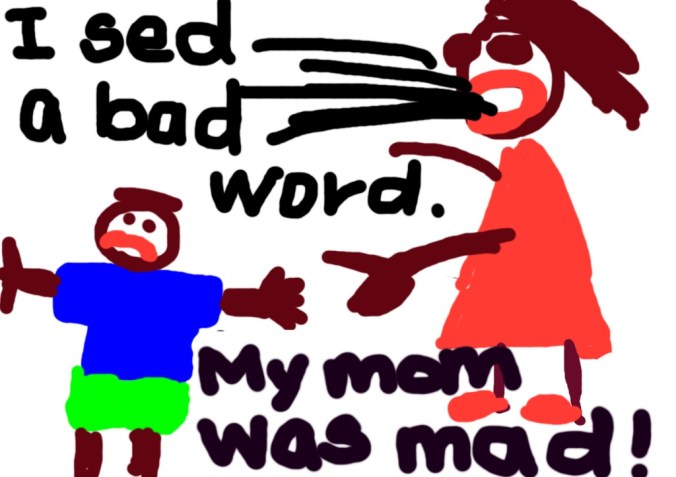
I recently read “I Ain’t Gonna Paint No More” by Karen Beaumont. If you haven’t read it, it’s hysterical.  The illustrations alone make me laugh.  In the story, the young man gets in trouble for painting all over the house and making a terrible mess.  After the story, we talked about things the students have done that have gotten them in trouble.  We went to the iPads and illustrated.  Some wrote directly on the illustration, others imported it into the Pages app and typed their story.  Boy, talk about true confession time! Here is my favorite.  It is a good way to end a Friday blog post.
I’d love for you to leave a comment, subscribe to my blog, and/or share this post with a friend.

iBooks Author

“There are many little ways to enlarge your child’s world. Love of books is the best of all.”-Jackie Kennedy

How can I help my students be better readers?  What do good readers do? These are questions all teachers face daily.  For the past 3 years, we have been using the Fountas and Pinnell Leveled Literacy approach to teach reading and writing.  This has been very successful for us.  One of our biggest obstacles in implementing this program is obtaining resources for teaching guided reading.  Our leveled book collection initially was non-existent.  Over the last 2 years, our school has prioritized literacy and added books to create a leveled book room.  While we are in a much better position with resources now, adding books is expensive…and no one has any money.

Enter iBooks Author.   This free program for the Mac allows you to create your own multi-touch book.  It allows for creation of galleries, video, 3D objects, and interactive diagrams.  There are templates ready to use or you can create your own. I’ve been creating books for my students in this app and uploading them to their iBooks app on the iPads.  My first book was a non-fiction book about our city, Charleston, SC.  It was written with easier vocabulary, repetitive text patterns, and utilizing mostly sight words.  I created a second version using the same pictures with slightly more difficult vocabulary and increased sentence structure.  The third version has the same pictures, but was written for my above-grade level readers.  Knowing my students’ interests has also helped me decide on book topics.  I wrote a non-fiction book on Dirt Bikes and another on Soccer.  Looking at my state science standards, I wrote a non-fiction book on Baby Animals.  Some of my boys who are more reluctant readers, love the Dirt Bikes book and read it daily.

The Common Core State Standards indicate students need to be reading more informational texts. By 4th grade, students should be reading 50% literary texts and 50% informational texts.  Today’s workplace requires many different kinds of literacy.  Good readers read many different kinds of books. They think about what they read and they make connections as they read.  Good readers ask questions and make predictions.  With the iBooks Author app, I am able to create student centered texts that are literally at their fingertips.

I’d love for you to leave a comment, subscribe to my blog, and/or share this post with a friend.
Problem Solving and Math Apps

Before beginning a hunt, it is wise to ask someone what you are looking for before you begin looking for it.-Winnie the Pooh

Problem solving is a critical skill and a large part of the foundation for early learning.   Opportunities for problem solving exist in everyday life.  By exploring their environment, manipulating objects, thinking critically, and building on existing learning, students can strengthen problem-solving  skills.

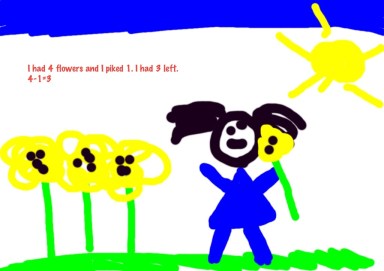
We have been using our iPads to create story problems in our Whiteboard App.  Students draw the story problem then type the number sentence to represent the picture.  We have even had a story problem exchange.  Students create the picture to represent either an addition or subtraction problem.  Then they pass their iPad to a friend who looks at the picture and figures out the appropriate number sentence.

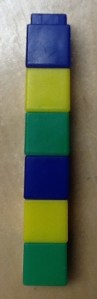
Another activity my students have enjoyed is taking objects in our classroom such as unifix cubes or pattern blocks and creating a pattern.  They use their camera on their iPad to take a photograph and trade iPads with another student.  That student identifies the pattern and re-creates the pattern using Pop Beads app.

Using these manipulatives, students can make visual representations and I can model for students.  The iPads create another opportunity for practice and integration.  It can serve as a calculator, a notepad, an information resource, and flashcards.  It keeps score, tracks progress, and many apps monitor and adjust content.  iPads allow me to also integrate content.  The word problem in the above picture was created by a student after we studied seeds and plants.  She typed a science journal entry in Pages and then created her story problem.  The iPad allows for seamless integration of subjects that makes sense to students and increases their understanding of new concepts.

Other apps my students enjoy using in math are Math Bingo, Park Math, Monkey Math, and Flash to Pass.

By providing sustained opportunities for students to solve problems in a variety of contexts, they begin taking responsibility for their own learning.

I’d love for you to leave a comment, subscribe to my blog, and/or share this post with a friend.
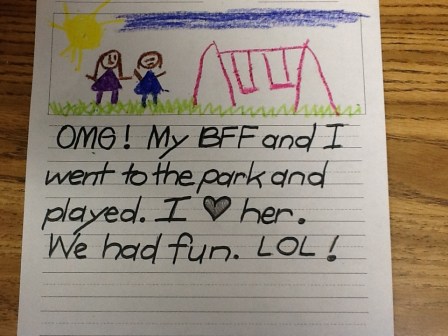
Y-E-L-L Everybody Spell!

“It’s a poor mind that can only think of one way to spell a word.-Andrew Jackson

Um, did I mention these children are 5 years old?  Clearly our little ones are heavily influenced by our text-rich world.

In kindergarten, we place emphasis on invented spelling. Invented spelling is the practice of young children using their best judgement when writing words.  This opens the children to using more of a variety of words than if they only write the words they know how to spell correctly.  Students write what they hear.  When students use invented spelling, they seem to develop word recognition and phonics skills sooner.  The more they write, the more confidence they have in their writing.  The process of getting it out of their head and onto the paper is the key rather than have them get bogged down in spelling words correctly.  My students are easily able to write several sentences on a given topic on their own.  We have environmental print in the room on the anchor charts, plus they use invented spelling.

Using the iPads, I am able to give the students opportunities to practice spelling high frequency words and word family words.  We use the app Spelling 1-2.  This allows students to work on their own list of words.  In the beginning of the year, I put their words in the app, but later they can put their own words in themselves.  They practice all week on their given list of words on the app and they are assessed weekly.  This ability to differentiate instruction allows my higher students to move on to more difficult words and my struggling students to practice what they need.  At one point this year, I had 4 different lists going on the iPads.  Now I’m down to 2.  With a class of 26 students, I am able to meet the needs of each of my students where they are. We  use a few other spelling apps for fun.  Two of the apps we like are Montessori Crosswords and Word Wizard.

As we allow students to express themselves in a safe, encouragement environment, we see the possibilities and their creativity flourish.

I’d love for you to leave a comment, subscribe to my blog, and/or share this post with a friend.

Gettin’ Buggy With It…Using iPads for Literacy and Science

“Do not limit children to your own learning, for they were born in another time.”  Chinese Proverb

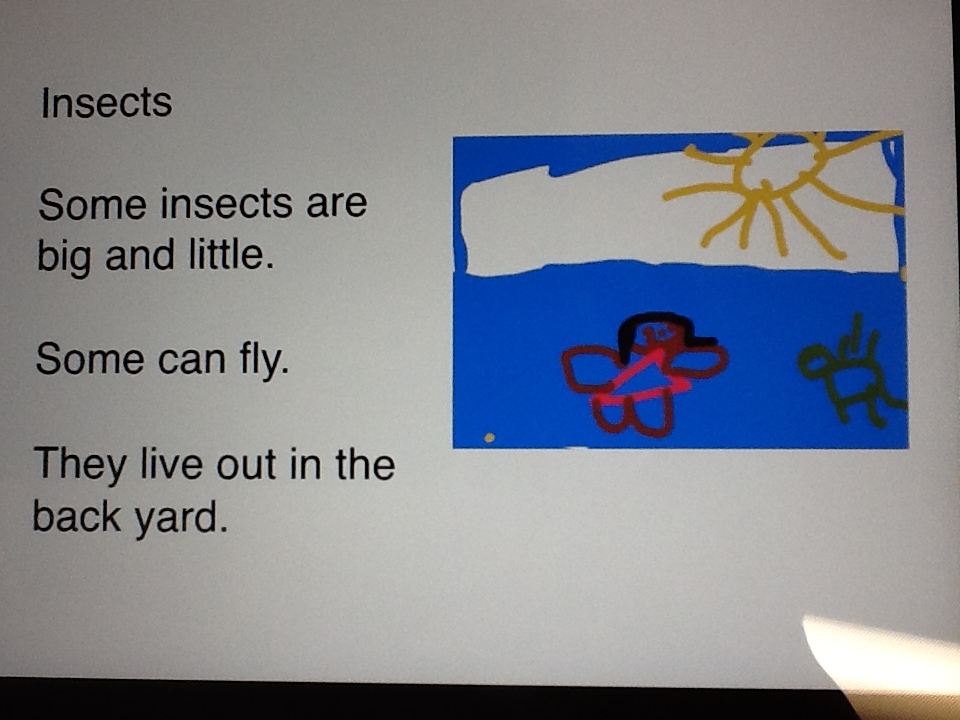
One of the most exciting aspects of using the iPad is integrating it with the content I am covering in class.  We’ve been discussing insects, and what 5 year old isn’t fascinated by bugs?  Today, my students used the Pages app as a science journal to write about insects and then created illustrations in their Whiteboard app.  Afterward, they imported their picture into the Pages document and re-sized it to fit on the page.  Throughout the process, they were buzzing (no pun intended) with each other about their insect facts, helping one another with importing their illustrations, and proudly sharing their masterpieces.  In addition, as children shared their work, they were reading and developing fluency.

Many years ago, when I was in kindergarten, I was given a fat, black, eraser-less pencil and primary-lined paper to write on. I am left handed and as I wrote, my hand smeared my words.  Unable to erase, I would get frustrated and not want to write.  Even in the early 80’s when I was in college, I had no computers available or even typewriters to type my papers.  As our students move into the digital future, they will learn by doing.  I am preparing them for jobs that don’t even exist yet!  It is crucial that content be engaging and relevant and that the rigor in our classrooms promote those higher order thinking skills.  If you break down this iPad exercise into steps, this is what they had to do:

1.  Open the Pages app and change the font size.

2. Type the title and their content. (which is no small feat since they don’t have keyboarding skills, plus they are sounding out their words at the same time)

3.  Open Whiteboard app, create illustration and save it

4.  Go back to Pages and import illustration and re-size.

5.  Read and share

On the revised Blooms Taxonomy, these students were creating, evaluating, analyzing and applying.

This isn’t old school kindergarten.  We are cutting-edge, 21st century learners!

Listen to Gracie read her insect story from her iPad…


I’d love for you to leave a comment, subscribe to my blog, and/or share this post with a friend.